@guardian/react-crossword
用于渲染填字符的独立反应组件 .
特征
- 横字网和线索
- 在网格中显示连字符和多字词答案的分隔符
- 版式是响应的(可以定制)
- 尝试的线索在线索列表中被灰色化
- 点击线索突出显示关联行或列
- 跨多行或多行的组合线索
- 进度保存到本地存储
- 答案可以检查和披露
- 在检查通过错误信件击中的答案时智能清除
- 图表助手
- 可访问性:填字符中的元素被明确标注为交流上下文和状态以辅助技术
- 键盘可导航: 您可以在网格、 线索和控件之间标签, 这些可以使用箭头键导航
- 包括打印样式
- 包括对主题和自定义颜色方案的支持
API 密码
道具
| Prop | 细节 |
|---|---|
data | (单位:千美元)需求提供填字的数据,包括线索、答案和元数据(见 交叉字数据格式(中文(简体) ) |
progress | (单位:千美元)可选)电网现状(见 进度格式(中文(简体) ) |
onProgressChange | (单位:千美元)可选每次读者改变网格时都会打电话 { progress, filledCells, totalCells, isComplete }。 。 。 . isComplete 实值 true 当每个细胞都持有它的解决方案,并且总是 false 当找不到解决方案时。 在装入时恢复保存进度时不调用 . |
Layout | (单位:千美元)可选)允许自定义默认布局(见 版式(中文(简体) ) |
默认主题的任何密钥也可以作为道具被传递来自定义填字的外观. 详细情况见 他们 节.
交叉字数据格式
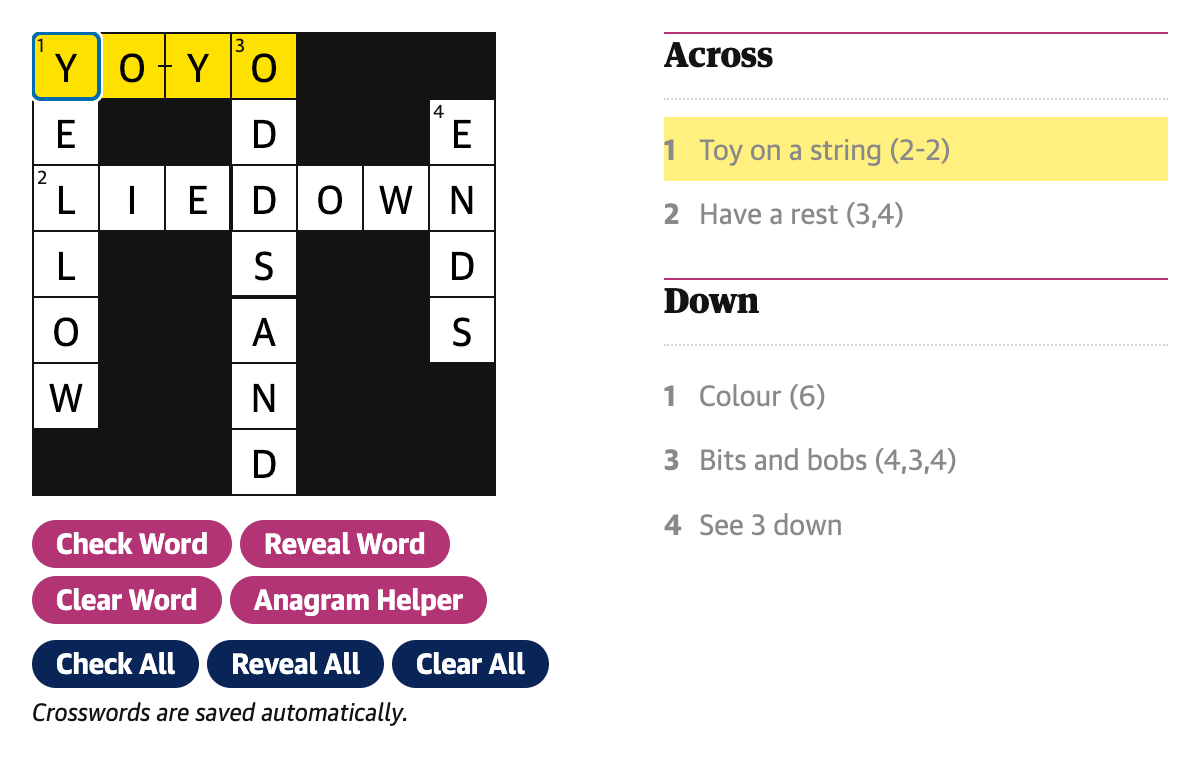
这是用于创建以上所显示的填字符的一组示例数据:
{
    id: 'crosswords/example/1',
    number: 1,
    name: 'Example crossword No 1',
    creator: {
        name: 'James',
        webUrl: 'https://www.theguardian.com/profile/maskarade',
    },
    date: 1740149419743,
    webPublicationDate: 1740149419743,
  entries: [
    {
      id: '1-across',
      number: 1,
      humanNumber: '1',
      clue: 'Toy on a string (2-2)',
      direction: 'across',
      length: 4,
      group: ['1-across'],
      position: { x: 0, y: 0 },
      separatorLocations: {
        '-': [2],
      },
      solution: 'YOYO',
    },
    {
      id: '2-across',
      number: 2,
      humanNumber: '2',
      clue: 'Have a rest (3,4)',
      direction: 'across',
      length: 7,
      group: ['2-across'],
      position: { x: 0, y: 2 },
      separatorLocations: {
        ',': [3],
      },
      solution: 'LIEDOWN',
    },
    {
      id: '1-down',
      number: 1,
      humanNumber: '1',
      clue: 'Colour (6)',
      direction: 'down',
      length: 6,
      group: ['1-down'],
      position: { x: 0, y: 0 },
      separatorLocations: {},
      solution: 'YELLOW',
    },
    {
      id: '3-down',
      number: 3,
      humanNumber: '3',
      clue: 'Bits and bobs (4,3,4)',
      direction: 'down',
      length: 7,
      group: ['3-down', '4-down'],
      position: { x: 3, y: 0 },
      separatorLocations: {
        ',': [4],
      },
      solution: 'ODDSAND',
    },
    {
      id: '4-down',
      number: 4,
      humanNumber: '4',
      clue: 'See 3 down',
      direction: 'down',
      length: 4,
      group: ['3-down', '4-down'],
      position: {
        x: 6,
        y: 1,
      },
      separatorLocations: {},
      solution: 'ENDS',
    },
  ],
  solutionAvailable: true,
  dateSolutionAvailable: 1542326400000,
  dimensions: {
    cols: 13,
    rows: 13,
  },
  crosswordType: 'quick',
    pdf: 'https://crosswords-static.guim.co.uk/gdn.quick.20250221.pdf',
}
进度格式
网格进取被作为简单的二维阵列存储,并被坚持于本地存储. 阵列中的每个元素都包含相应的网格单元格的值. 空或非部分答案的单元格以空字符串表示.
上面的字面例子有:
[
    ['Y', 'E', 'L', 'L', 'O', 'W', ''],
    ['O', '', 'I', '', '', '', ''],
    ['Y', '', 'E', '', '', '', ''],
    ['O', 'D', 'D', 'S', 'A', 'N', 'D'],
    ['', '', 'O', '', '', '', ''],
    ['', '', 'W', '', '', '', ''],
    ['', 'E', 'N', 'D', 'S', '', ''],
];
数据按栏(x)和行(y)进行索引,因此与网格的视觉布局相比较,打印时将数组中的数据被移植.
例如,最后一个字母: 2个纵队 位于网格的第7行和第3行,因此可按 progress[6][2] 给我们"N".
他们
填字题中的以下密钥可以传递到 Crossword 用于自定义其外观的组件 :
| 密钥 | 说明 |
|---|---|
gridBackgroundColor | 网格上“ 黑色” 平方/ 潜水器等的背景颜色 |
gridForegroundColor | 网格上“ 白色” 平方的背景颜色 |
gridTextColor | 网格中文字的颜色(符号和输入字母) |
gridPrintBackgroundColor | 打印时“ 黑色” 方格的背景颜色 |
gridGutterSize | 网格单元格间差距的大小 |
gridCellSize | 网格上单元格的一面长度 |
gridCellStrikeThrough | 错误单元格中的击出颜色 |
textColor | 主文本颜色(网格文本,线索等) |
focusColor | 当前选中单元格边框的颜色 |
selectedTextColor | 当前选中线索的颜色 |
selectedBackgroundColor | 目前选中的单元格/ 线索的颜色 |
connectedBackgroundColor | 连接到当前选中线索的单元格/ 线索的颜色 |
buttonBackgroundColor | 线索帮助按钮的背景颜色 |
buttonBackgroundHoverColor | 线索帮助按钮的徘徊颜色 |
borderColor | 用于视窗分隔UI部分的边框颜色 |
clueListBorderColor | 线索列表上方应用的边框颜色 |
clueMinWidth | 线索最小宽度 |
clueMaxWidth | 线索的最大宽度 |
anagramHelperBackgroundColor | 动画助手的背景颜色 |
anagramHelperCandidateTextColor | 尚未在网格上被洗发的信件的文本颜色 |
focusedClueBackgroundColor | 焦点线索的背景颜色 |
建筑
版式
自定义布局组件可以传递到 Crossword 组件通过 Layout 道具 (英语). 由填字所构成的单个组件被传递到布局上作为道具,以便可以根据需要应用额外的元素或样式. (这在DCR中用于自定义版式并允许插入广告槽
这是布局的简化例子 :
const Layout: CrosswordProps['Layout'] = ({
    Grid,
    Clues,
    Controls,
    SavedMessage,
    AnagramHelper,
    FocusedClue,
}) => {
    return (
        <div>
            <AnagramHelper />
            <div>
                <FocusedClue />
                <Grid />
                <FocusedClue />
                <Controls />
                <SavedMessage />
            </div>

            <div>
                <Clues direction="across" />
                <Clues direction="down" />
            </div>
        </div>
    );
};
安装
$ pnpm add @guardian/react-crossword
或者说
$ npm i @guardian/react-crossword