98.css
A design system for building faithful recreations of old UIs.
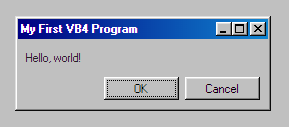

98.css is a CSS file that takes semantic HTML and makes it look pretty. It does not ship with any JavaScript, so it is compatible with your frontend framework of choice.
Be sure to check out XP.css and 7.css as well.
Installation / Usage
The easiest way to use 98.css is to import it from unpkg.
<!DOCTYPE html>
<html>
<head>
  <title>98.css example</title>
  <meta charset="UTF-8" />
  <link rel="stylesheet" href="https://unpkg.com/98.css" />
</head>

<body>
  <div class="window" style="margin: 32px; width: 250px">
    <div class="title-bar">
      <div class="title-bar-text">
        My First VB4 Program
      </div>
    </div>
    <div class="window-body">
      <p>Hello, world!</p>
    </div>
  </div>
</body>
</html>
Alternatively, you can grab 98.css for the releases page or npm.
npm install 98.css
Here is an example of 98.css being used with React, and an example with vanilla JavaScript.
Refer to the documentation page for specific instructions on this library's components.
Developing
First, run npm install.
style.css is where everything happens.
You can use npm start to start a development environment that will watch for file changes and rebuild 98.css, reloading your browser in the process.
You can run a build manually with npm run build. This will write to the dist/ directory.
Issues, Contributing, etc.
Refer to the GitHub issues page to see bugs in my CSS or report new ones. I'd really like to see your pull requests (especially those new to open-source!) and will happily provide code review. 98.css is a fun, silly project and I'd like to make it a fun place to build your open-source muscle.
Thank you for checking my little project out, I hope it brought you some joy today. Consider starring/following along on GitHub and maybe subscribing to more fun things on my twitter. 👋
Publishing
Building the docs site: npm run deploy:docs
Publishing to npm: npm run release