 █████╗ ██╗  ██╗██╗██╗     ██╗
██╔══██╗██║ ██╔╝██║██║     ██║
███████║█████╔╝ ██║██║     ██║
██╔══██║██╔═██╗ ██║██║     ██║
██║  ██║██║  ██╗██║███████╗██║
╚═╝  ╚═╝╚═╝  ╚═╝╚═╝╚══════╝╚═╝
AKILI
Spec-driven development for AI coding assistants: plan the change, build it, test it, and learn from it.


Works with Claude Code · OpenCode · Google Antigravity · OpenAI Codex CLI · Cursor · Grok Bot — on macOS, Linux and Windows
What is AKILI?
AKILI adds slash commands and skills to your AI coding assistant. It makes the assistant write a spec before it codes, then build the change, test it and check the work against that spec. After each change, it learns what to do better next time.
What you get
- Shared project context that the assistant reads every session.
- Every change planned in writing and traceable to a requirement.
- Built-in review and tests before anything is called done.
- A method that learns from every finished change.
- Extras for security audits, video, diagrams and a growth track (
/akili-seo,/akili-marketing): see the overview.
| Term | Meaning |
|---|---|
| slash command | A prompt you type in your assistant, such as /akili-propose, that runs one step of the method. |
| skill | A reusable set of instructions the assistant loads when the work needs it, such as debugging or UI design. |
| spec | The folder of documents for one change: requirements, design and a task list, written before any code. |
| constitution | The project-wide baseline (product, design and technical docs, plus the guides the assistant reads), set up once. |
How it works
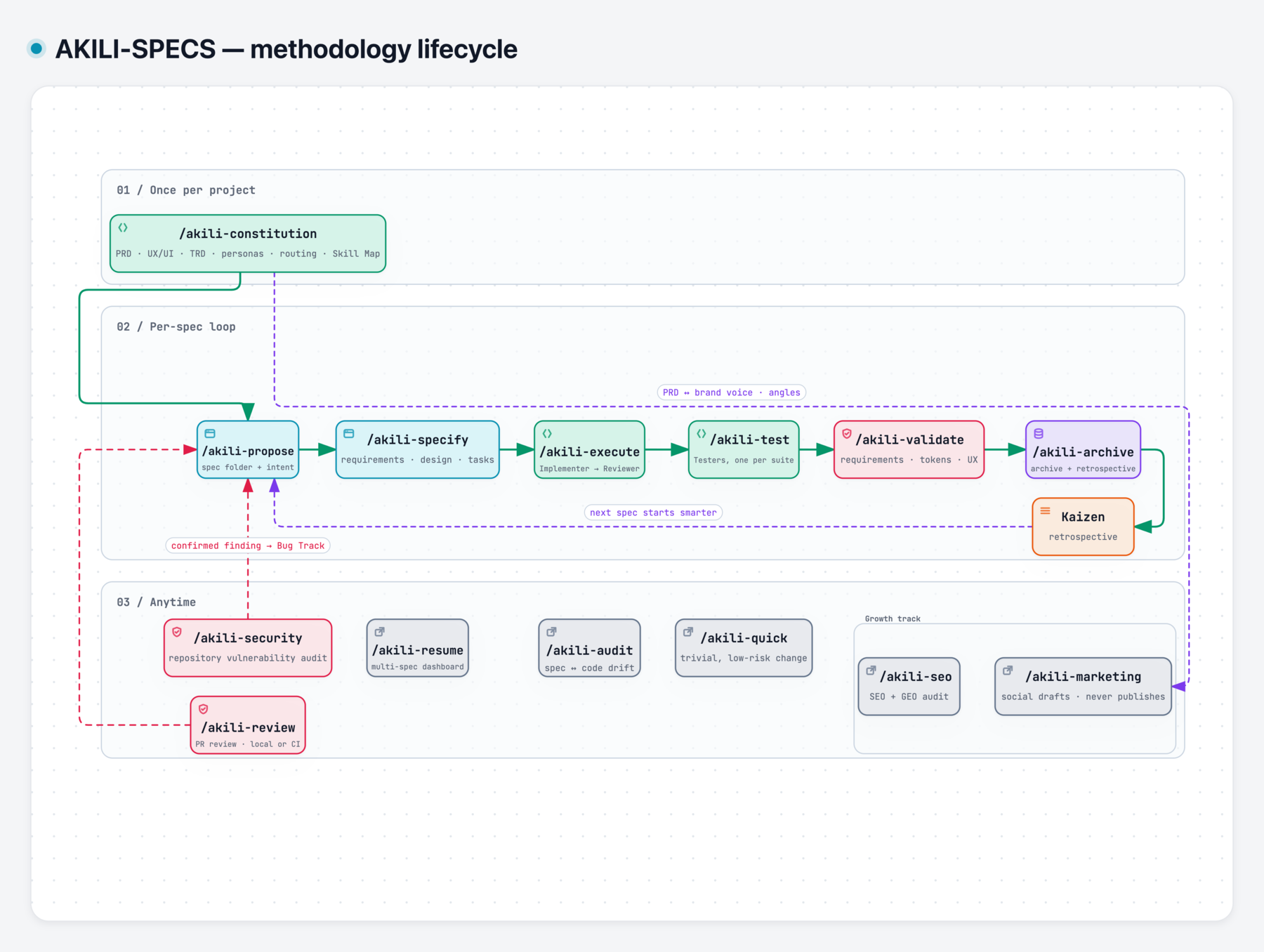
- Set up the project once with
/akili-constitution. - Each change then runs propose, specify, execute, test, validate, archive.
- Some commands work any time, outside that path.
- The full flow is in docs/flow.md.
Install
What you need
- Node.js 18 or newer
- Git
- One supported AI tool: Claude Code, OpenCode, Google Antigravity, OpenAI Codex CLI, Cursor or Grok Bot
Install
npx akili-specs init
The wizard asks which tool to set up and whether to install globally or in this project.
With pnpm, run pnpm dlx akili-specs init instead.
Check it worked
npx akili-specs doctor
Restart your AI tool, then type /akili- and the AKILI commands appear (in Codex, type $akili-).
Other tools, flags, manual install, updating and troubleshooting: see docs/cli.md.
Your first spec
Run these in your AI assistant, in order:
/akili-constitution: AKILI studies your project and writes the baseline docs and guides, such asdocs/prd.md./akili-propose <name>: you describe the change and AKILI writes a short proposal,proposal.md./akili-specify <spec-path>: AKILI plans the change inrequirements.md,design.mdandtasks.md./akili-execute <spec-path>: AKILI builds the approved tasks one by one and logs the work inexecution.md./akili-test,/akili-validate, then/akili-archive(each with the spec path): you gettest-report.md,validation-report.md, thenarchive-summary.md.
Tiny copy or color change? Use /akili-quick <change-name> and skip the steps.
Coming back after a break? Run /akili-resume to see where each spec stands.
A worked example with real names is in docs/flow.md.
Commands at a glance
In your AI assistant
| Command | Use it to… |
|---|---|
| Every change | |
/akili-constitution | set up or repair the project baseline docs and the guides your assistant reads |
/akili-propose <name> | write a short proposal that you review before full planning |
/akili-specify <spec-path> | plan one bounded change: requirements, design and a task list |
/akili-execute <spec-path> | build the approved tasks one by one, each independently checked |
/akili-test <spec-path> | write and run tests, and record the evidence |
/akili-validate <spec-path> | check that the finished work matches the approved spec |
/akili-archive <spec-path> | close a finished change and record what was learned |
| Any time | |
/akili-quick <change-name> | make a trivial, low-risk change in one step; it escalates if the change is bigger |
/akili-audit | check that the code still matches your product and design docs |
/akili-resume | pick up after a break with a briefing on your active specs |
/akili-seo <site-domain> | set up Google Search Console for a domain and audit its SEO |
/akili-security [<path>…] | audit your repository for security vulnerabilities; confirmed findings are routed to bug proposals. Not supported on native Windows (use WSL, Linux or macOS) |
/akili-marketing <mode> [args] | draft LinkedIn, Instagram and Facebook posts as Markdown files; it never publishes |
/akili-review [<pr> | <base>..<head> | --staged] | review a pull request or diff against its specs; posts one summary comment only when asked (--comment) or from CI; it never edits, approves or blocks |
In your terminal
| Command | Use it to… |
|---|---|
akili init | run the setup wizard |
akili install | install the commands and skills without the wizard |
akili update | update to the latest version and reinstall the files |
akili list | list what the package ships |
akili doctor | check that the expected files are installed; --agents checks that your project's agent instruction files are up to date (--fix updates them) |
akili routing | choose which AI model runs each step (model routing) |
akili check-update | print a line if a newer version is published |
akili notifications | turn update announcements on or off (Claude Code only) |
Every option and example: docs/cli.md.
Learn more
| I want to… | Read |
|---|---|
| see every command, skill and install target in one place | docs/overview.md |
| browse all the docs | docs/README.md |
| follow the whole flow, step by step | docs/flow.md |
| look up one command | docs/commands/README.md |
| look up one skill | docs/skills/README.md |
| review a product's design with Impeccable, or see the third-party skill AKILI ships, its licence and pin | docs/skills/impeccable-bridge.md, docs/skills/impeccable.md |
| use the terminal tool or fix an install | docs/cli.md |
| pick the AI model for each step | docs/model-routing.md |
| know how skills are chosen and kept | docs/skills/governance.md |
| compare AKILI with OpenSpec | docs/openspec-comparison.md |
| use AKILI from an MCP client with nothing installed (hosted AKILI MCP service, not live yet) | akili.com.co |
Contributing and license
Contributions: see CONTRIBUTING.md; releases follow docs/release-checklist.md.
Created and maintained by Juan Carlos Cadavid — jcadavid.com. Released under the MIT License.
Every command and every agent template carries this authorship notice.
The license lets you use, modify and redistribute AKILI, provided the copyright and attribution notices are kept. Third-party component. AKILI ships Impeccable by Paul Bakaus (Apache-2.0) as the impeccable skill, vendored unmodified apart from a declared frontmatter block, with its LICENSE and NOTICE beside it. AKILI-SPECS is not affiliated with the Impeccable project; see docs/skills/impeccable.md.