
hazeljs
Hazel edit boxes that extend ordinary JavaScript programs with custom behavior.
You bring the box, a text area or your own editor; hazeljs type-checks what is typed in it, says what is wrong and where, and runs it, even while it is unfinished.
Hazel, the typed functional programming language with holes, as a JavaScript library. Analyze and run Hazel programs from Node or a web page, and call the functions they define from JavaScript.
const Hazel = require("hazeljs");

const double = Hazel.run("fun (x : Int) -> x * 2").value;
double(21); // 42
Experimental. This is a prototype (0.0.x): the API may change in any release. It is built from the draft library in hazelgrove/hazel#2711 and #2719, at commit
0d66c36618(Hazel.buildnames it).
Why
Hazel type-checks and runs programs that are not finished: a program with holes or type errors still runs, around them. That makes it a good language for code a page lets people write and change while it runs: rules, scripts, exercises.
We call a JavaScript program whose event handlers are Hazel functions a Hazlet: the page calls a Hazel function with each event and acts on what it returns. The first is a game, below under Prototype use case.
Install
npm install hazeljs
Or in a web page, from a CDN that serves npm packages:
<script src="https://cdn.jsdelivr.net/npm/[email protected]/hazel-lib.js"></script>
<script>
  console.log(Hazel.run("1 + 2").value); // 3
</script>
The script defines a global Hazel (window.Hazel). The same file is at https://unpkg.com/[email protected]/hazel-lib.js.
Usage
CommonJS:
const Hazel = require("hazeljs");
ES modules, the whole object or its parts:
import Hazel from "hazeljs";
import { analyze, run, analyzeProgram, runProgram } from "hazeljs";
TypeScript types are included (index.d.ts).
Analyze and run
Hazel.analyze("1 + true");
// { errors: ["Error in term:\n  true\nNature of error: Expecting type Int but got inconsistent type Bool"] }

Hazel.run("let x = 2 in x * 21");
// { errors: [], value: 42 }
A program's errors do not stop it running: Hazel evaluates around its holes and errors, so value is there either way, and your code decides which errors it accepts.
Call Hazel functions from JavaScript
Analyze a program once, then call its functions as often as you like:
const rule = Hazel.run(`
  type Cmd = + Done + Flip(Int, Cmd) in
  type Event = + Pull(Int) in
  fun e : Event -> case e | Pull(l) => Flip(l, Done) end`).value;

rule({ tag: "Pull", value: 2 }); // { tag: "Flip", value: [2, { tag: "Done" }] }
API
| Call | Returns |
|---|---|
Hazel.analyze(text) | { errors }: the program's error messages, as strings. |
Hazel.run(text) | { errors, value }: the same, and the program's value. |
Hazel.analyzeProgram(spec) | { ok, errors, holes, programHoles, incomplete, programIncomplete, ms }, for a program of named modules (below). |
Hazel.runProgram(spec) | The same, and value. |
Hazel.version | The library's own label, such as "0.1 (draft, js-library)". |
Hazel.build | The hazelgrove/hazel commit this build is from. |
Values
Values convert both ways: Hazel's results come back as these, and a JavaScript value passed to a Hazel function goes in as these.
| Hazel | JavaScript |
|---|---|
Int, Float and the other numbers | number |
Bool | boolean |
String | string |
| a list | an array |
() | null |
a labeled tuple (x = 1, y = 2) | an object {x: 1, y: 2} |
another tuple (1, true) | an array [1, true] |
a constructor A, applied B(3) | {tag: "A"}, {tag: "B", value: 3} |
| a function | a JavaScript function (one argument, or several as a tuple) |
Anything else (a type, a hole) comes back as {hazel: "<its printing>"}.
A constructor from JavaScript has no type of its own, so Hazel checks it where a parameter is annotated (fun e : Event -> ...). An applied constructor is checked whole, tag and payload; one that does not fit the type stays stuck at the parameter, and the call returns {hazel: ...}.
A program of modules
For a page with an editor per module, hand Hazel the texts and let it build one program from them:
const result = Hazel.runProgram({
  preamble: "type Cmd = + Done + Say(String) in",  // definitions every module sees, ending in `in`
  modules: [
    { name: "Common", text: "let greet = fun (s : String) -> Say(s)" },
    { name: "Room", text: "let on_event = fun (n : Int) -> Common.greet(\"hi\")" },
  ],
  tail: "Room.on_event",  // what the program gives; () if left out
});

result.ok;       // true: no errors, no holes, nothing left unfinished
result.value(1); // { tag: "Say", value: "hi" }
Each module sees the preamble and the modules before it, as Common.greet, and the tail sees them all. A module's text is its body: its members, with no in.
errors:[{ module, message, id }], wheremoduleis the name of the module the error is in, ornullfor the preamble and the tail.holes: each module's holes, by name ({ Common: 0, Room: 1 });programHoles, the preamble's and the tail's.incomplete: each module's brackets and keywords left open (a(with no), acasewith noend) or closed with no opener;programIncomplete, the preamble's and the tail's.ok: no errors, no holes and nothing incomplete. A function still being written can have holes and no errors, so act onvalueonly whenok.ms: meant to be how long the call took, in milliseconds. In 0.0.1 to 0.0.3 it reads 0 (a known bug); time the call yourself.
Hazel remembers the texts of the last program it read, part by part, so calling again after one module changes reads only that module again.
Errors, holes and unfinished code
Hazel reads the whole program before it runs any of it, and it reports what is wrong as data, not as an exception. An example from Messed Up Dress Up's trap room: a lever is a Side, L or R, and the room's rule passes a number instead.
const result = Hazel.analyzeProgram({
  preamble: "type Side = + L + R in",
  modules: [
    { name: "Common", text: "let flip = fun (s : Side) -> s" },
    { name: "TrapRoom", text: "let answer = Common.flip(3)" },
  ],
  tail: "TrapRoom.answer",
});
{
  ok: false,
  errors: [{
    module: "TrapRoom",
    message: "Error in term:\n  3\nNature of error: Expecting type Side but got inconsistent type Int",
    id: "3d0f0000-0000-4000-b53b-3f45d4c660e0",
  }],
  holes: { Common: 0, TrapRoom: 0 }, programHoles: 0,
  incomplete: { Common: 0, TrapRoom: 0 }, programIncomplete: 0,
  // and ms
}
A program can be not ready in three ways, and each is counted where it is:
| What | Example | Where it shows |
|---|---|---|
| An error | Common.flip(3): a number where a Side is wanted | errors, each with its module |
| A hole: a part not written yet | Common.flip(?) | holes: { TrapRoom: 1 }, and no error |
| Something unfinished: a bracket or keyword without its partner | Common.flip(L | incomplete: { TrapRoom: 1 } |
A program with only text, read by Hazel.analyze or Hazel.run, reports its errors as strings, without a module:
Hazel.analyze("let x : Int = true in x").errors;
// ["Error in term:\n  true\nNature of error: Expecting type Int but got inconsistent type Bool"]
Showing them
Hazel's messages are written for Hazel's developers. Messed Up Dress Up says a type error the way a person reads it, with this function (its scriptErrorText, slightly shortened). Other messages pass through as they are:
function errorText(message) {
  const m = message.match(/^Error in term:\s*\n\s*([\s\S]*?)\nNature of error: Expecting type ([\s\S]*?) but got inconsistent type ([\s\S]*)$/);
  if (!m) return message;
  const a = t => (/^[AEIOU]/.test(t.trim()) ? "an " : "a ") + t.trim();
  return `${m[1].trim()}: ${a(m[2])} is wanted here, but this is ${a(m[3])}`;
}

for (const e of result.errors) console.log(`${e.module ?? "the program"}: ${errorText(e.message)}`);
// TrapRoom: 3: a Side is wanted here, but this is an Int
Two things to know when you show them:
- A sum type with no name is written out. Had
Sidebeen defined in a module instead of the preamble, the message would sayL + R. The game maps such types back to its own names. - A name that is not there is a missing label.
Common.flop(L)givesNature of error: Label not found, since a module's members are reached like a labeled tuple's.
The game shows a room's errors in three places: under the room's box, by name, with ⚠️ and a count in its outline, and as a check entry in its event log, before anything runs.
Running anyway
runProgram and run evaluate around errors and holes, as Hazel always does, so value is there even when ok is false. But where an error or a hole stopped the evaluation, the value comes back as { hazel: "…" }, a printout of the term it stopped at, and a page cannot act on that. Messed Up Dress Up keeps answering with its own JavaScript while a room's rule is not ok, and logs Hazel's answer beside it, so the game keeps working while the rule is fixed. For more, see the game's Game Scripts Guide, section 8, on broken scripts.
Prototype use case
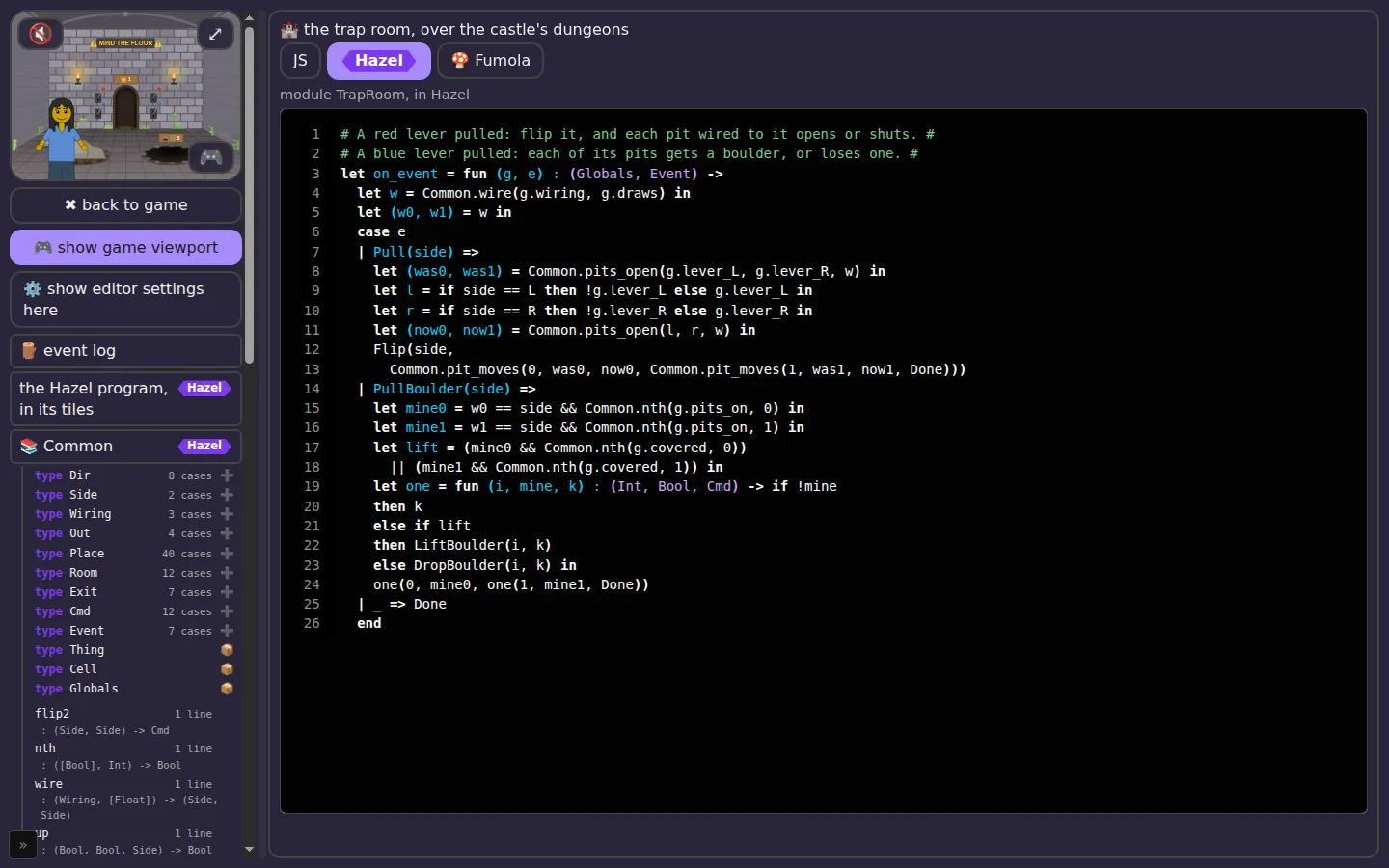
Messed Up Dress Up is a dress-up and adventure game in plain JavaScript, made with two young players. It is the first Hazlet: five of its rooms hand their events to a rule, a function on_event : (Globals, Event) -> Cmd, which players can write in Hazel (or in JavaScript, or in Fumola) in the game's 📜 Scripting panel, while they play. The game builds one program from the panel's modules with Hazel.runProgram, then calls the room's rule with each event and runs the commands it returns.
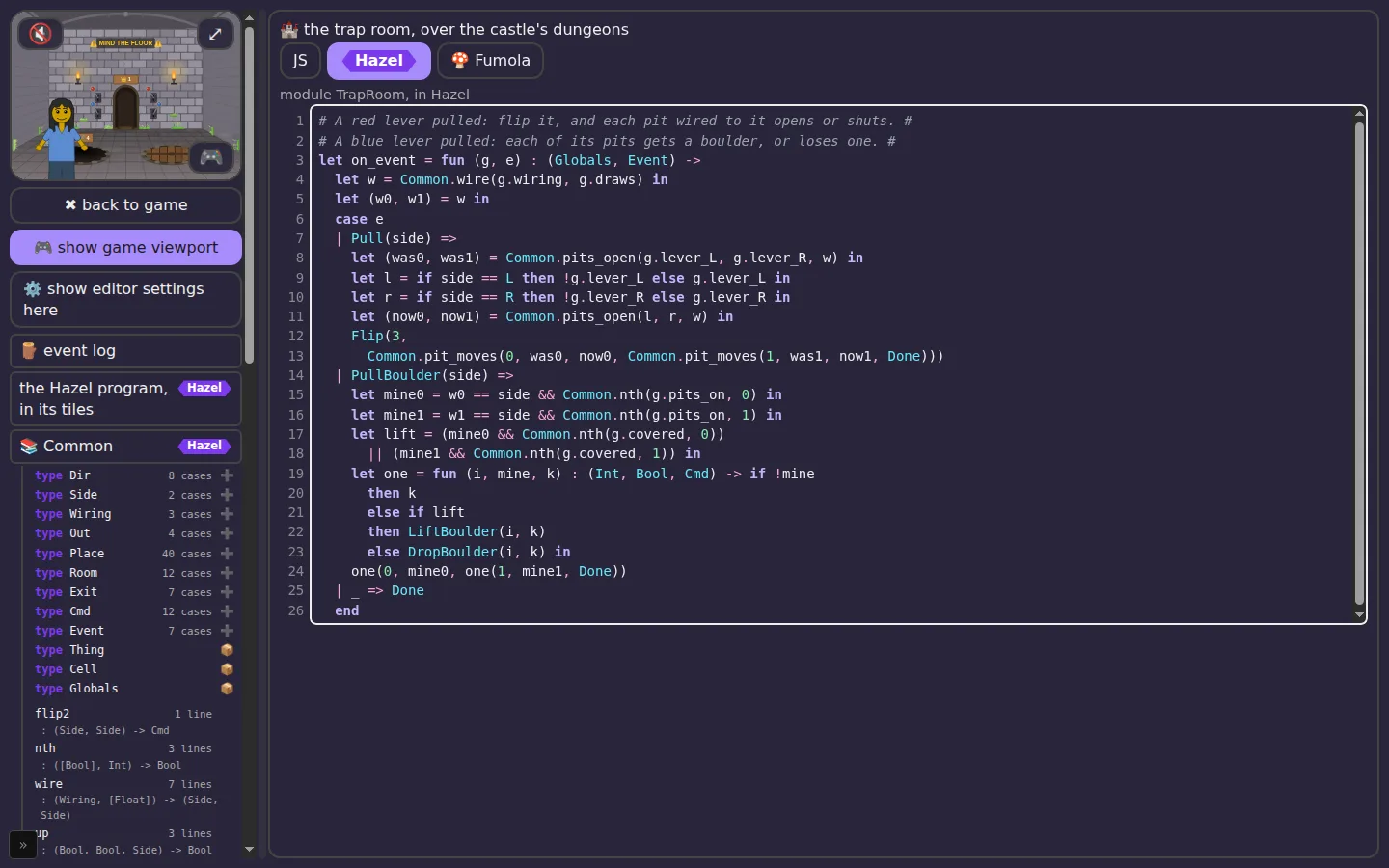
The trap room's rule in Hazel, beside the game:
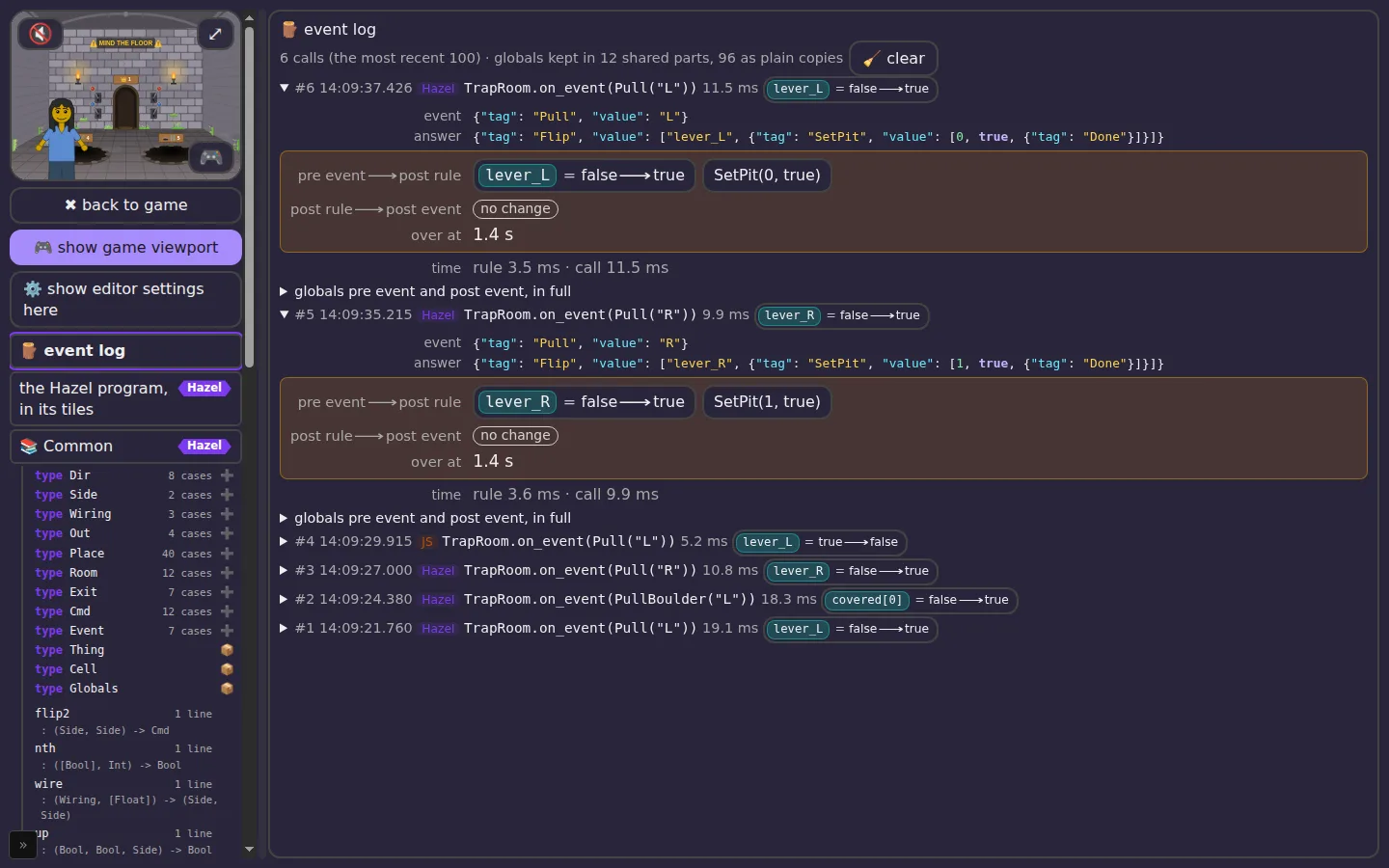
Playing and reading at once: each event the room hands to Hazel, and Hazel's answer, in the panel's event log:
The game's guide to its scripts, with more of these pictures: Game Scripts Guide.
Size and speed
hazel-lib.js is about 2.8 MB, 640 KB gzipped. Measured in Node 22 on a laptop: require("hazeljs") takes about 170 ms, and running a small program about 30 ms. A module of 100 short members takes about 110 ms to analyze, and one of 400 about 2.3 s; after an edit, only the modules whose text changed are read again.
Is it really Hazel?
hazel-lib.js is 2.8 MB of compiled JavaScript, so reading it tells you little. What you can check is that it is exactly what Hazel's source compiles to, at a commit you can read.
It names its commit. Hazel.build returns the hazelgrove/hazel commit it was built from, and the hazel field of package.json names the same commit, with its branch and pull request. For this release that is 0d66c36618ee709a60f91cf01fbf0b46121f2499.
Rebuild it and compare. With a clone of hazelgrove/hazel and its toolchain set up (see its README), run
scripts/verify-build.sh path/to/hazel
It checks out that commit, builds hazel-lib.js the way Hazel's own Deploy workflow does (the release profile, with GITHUB_SHA set to the commit), and compares the two files. Every byte must match except one comment line, //# buildInfo:, where js_of_ocaml names its own version label (5.9.1 from one install, 5.9.1+5.9.1 from Hazel's lock file). Without that line, this release's file has the SHA-256 4695853925917b8dc8514a78c3adbd3140a2277d79ab2c27612ce1595e08e856.
Or let GitHub rebuild it. This repository's Verify hazel-lib.js workflow runs the same script on GitHub's machines, from a fresh clone of Hazel. Anyone can run it from the Actions tab, and its runs are public.
Hazel's own CI built it too. Hazel's Deploy workflow builds every commit pushed to hazelgrove/hazel. Its build of this commit (run 39680368678) gives the same hash without the buildInfo line. That build is served at https://build.hazel.org/js-library-embed/hazel-lib.js only until the branch gets a newer commit:
curl -sL https://build.hazel.org/js-library-embed/hazel-lib.js | grep -v '^//# buildInfo:' | sha256sum
grep -v '^//# buildInfo:' node_modules/hazeljs/hazel-lib.js | sha256sum
What this shows is where the file came from. It is that commit of Hazel, compiled by the OCaml toolchain in Hazel's lock file, and nothing else. It does not show that the code at that commit does what you want; for that, read it, or trust the people who wrote it.
Limits
- Experimental. No promise of stability yet; pin an exact version.
- Synchronous. Every call runs on the calling thread, so a long-running program blocks it.
- One global. The library puts one
Hazelobject on the global object. - A console line for slow reads. A text that only Hazel's slower, recovering parser can read (an unclosed bracket, such as
let x = () prints aSLOW PARSE (...)line to the console when it is read. - No undo or redo. The library holds no editor: it reads the text you give it and answers. Undo and redo are part of Hazel's editor, not of this library, so the page that holds the text keeps its history: keep the texts (or each module's text) it has had, and pass an older one again to go back. Going back costs what an edit does: the modules whose text changed since the last call are read again, and the others are not.
- Errors name a term, not a place. An error's
idis the id of its term in Hazel's syntax tree; the library gives no line and column for it yet. - A stuck value is a debug printout. Where an error or a hole stopped the evaluation,
{ hazel }holds an OCaml printout of the term, not Hazel syntax. - Deep programs need a bigger stack. Hazel's analysis recurses deeply: in Node, a module of about 150 members overflows the default stack (
Stack overflow). Raise it:node --stack-size=32000 app.js, with the shell's own limit raised to match (ulimit -s 65536), or Node crashes instead.
About Hazel
Hazel is developed by the Hazel team: see hazel.org for the project, its papers and the people who make it, and the contributors on GitHub for who has worked on the code. Its source is hazelgrove/hazel, and questions and bugs go to its issue tracker.
License
MIT, as Hazel is. See LICENSE.