ireko
Composable graph and tree layout for TypeScript. Select a layout for each container, and get boxes and routed edges for any renderer.
Guide · Playground · Gallery · API · React Flow
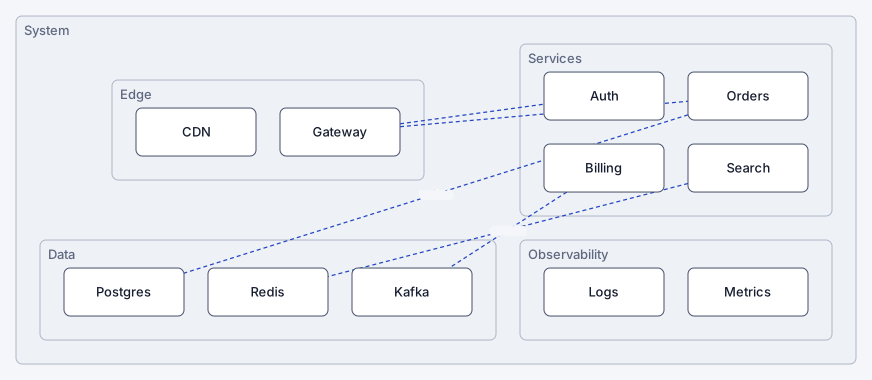
ireko (入れ子) is the Japanese word for a set of boxes that fit inside each other. The library lays out trees of nested boxes: a grid of rings of trees, an architecture diagram, a tidy organization chart or React Flow sub-flows. It has no runtime dependencies. The core is approximately 13 kB after minification and gzip.
Install
npm install ireko
Use it
import { grid, layout, radial } from "ireko";
import { toSVG } from "ireko/svg";

const root = grid.nested("system",
  radial.nested("web", "home", "cart", "search"),
  grid("api", "auth", "orders"),
);
const result = layout({ root, edges: [{ source: "cart", target: "orders", label: "checkout" }] });

result.nodes;  // a box for each node: { id, x, y, width, height, container, depth, ... }
result.edges;  // a route for each edge: { source, target, kind, points, label }
// The router avoid draws edges around the other boxes: layout(input, { router: "avoid" })
result.issues; // the findings of the audit: [] for this input
document.body.innerHTML = toSVG(result);
Two ideas
Each node with children selects two things:
- A strategy: how to arrange its children.
gridputs them in rows and columns.radialputs them on a ring.treemakes a tidy tree, for example an organization chart.layersmakes a flowchart from the edges between the children. - A mode: where its children go. In the
linkedmode, they are around the node, and edges connect them. In thenestedmode, they are inside the box of the node.
You can add your own strategy to the engine. The opt-in strategy force from ireko/strategies/force arranges a network with no hierarchy. Register it with createEngine.
The two choices apply to one node only, so each container has its own layout. The engine measures each subtree before it places it, so no two subtrees overlap. Each layout examines itself, and puts each problem in issues.
A text language
The same input in a few lines. The playground uses it.
import { layout } from "ireko";
import { toSVG } from "ireko/svg";
import { parse } from "ireko/text";

const parsed = parse(`
  system nested {
    web radial nested { home cart search }
    api { auth orders }
  }
  cart -> orders "checkout"
`);
if (parsed.ok) document.body.innerHTML = toSVG(layout(parsed.input));
Entry points
| Import | Contents |
|---|---|
ireko | The engine, the strategies, the routers, the audit and the builder. It imports nothing. |
ireko/text | parse and print for the text language |
ireko/svg | toSVG (a string, also on a server) and mountSvg (a live view) |
ireko/dom | mountDom: a live view with one element for each box |
ireko/canvas | mountCanvas: a live view on a canvas, for large layouts |
ireko/render | The themes, the viewport and the animation of the live views |
ireko/react | useLayout, LayoutSvg and LayoutView |
ireko/xyflow | layoutFlow, toXYFlow, PolylineEdge and GroupNode for React Flow 12 |
ireko/examples | The inputs of the gallery |
A live view has pan, zoom, selection and an animation from one layout to the next.
React
import { LayoutView, useLayout } from "ireko/react";

function Diagram({ input }) {
  const result = useLayout(input); // keep input in a memo or a state
  return <LayoutView layout={result} style={{ height: 400 }} onPick={(id) => console.log(id)} />;
}
LayoutSvg draws a static SVG with no effects, so it works with server rendering.
React Flow sub-flows
layoutFlow gives each group (a node with parentId children) a size that holds its children, and gives each node a position. Each group can have its own strategy.
import { ReactFlow } from "@xyflow/react";
import { edgeTypes, layoutFlow, nodeTypes } from "ireko/xyflow";

const { nodes, edges } = layoutFlow(myNodes, myEdges, {
  nodeSpec: (node) => (node.id === "server" ? { layout: "radial" } : undefined),
});

<ReactFlow nodes={nodes} edges={edges} nodeTypes={nodeTypes} edgeTypes={edgeTypes} fitView />;
The React Flow guide has a live demo.
When to use another library
This library lays out trees of containers. For a large directed graph with layers, for example a flow chart with long chains, use dagre or ELK. This library has no crossing reduction, no ports and no routing around obstacles. The comparison has the details.
Requirements
- A current browser, or Node.js 22.12 or later
- ESM only
- React 18 or later for
ireko/react, and@xyflow/react12 forireko/xyflow. Both are optional peer dependencies.
Links
- The guide: a tour, the modes, the strategies, the text language, edges and renderers
- Why two passes: how the engine prevents overlaps, with a test in your browser
- Write a strategy
- The changelog
- The source
License
MIT