@anchan828/typeorm-历史


说明
创建历史实体 类型ORM
被测试的: mysql, postgres and sqlite. 中国植物物种信息数据库.
3⁄4 ̄ ̧漯B
此软件包只与repository.save财务报告和审定财务报表repository.remove。 。 。 . 你用不着repository.insert编号 :repository.update编号 :repository.delete。 。 。 .
安装
$ npm i --save typeorm @anchan828/typeorm-history
快速启动
1. 创建实体
@Entity()
class TestEntity extends BaseEntity {
  @PrimaryGeneratedColumn()
  public id!: number;

  @Column()
  public test!: string;
}
2. 创建历史实体
您需要添加与 TestEntity。 。 。 .
@Entity()
class TestHistoryEntity extends BaseEntity implements HistoryEntityInterface<TestEntity> {
  // id is a property that holds the id of the TestHistoryEntity.
  @PrimaryGeneratedColumn()
  public id!: number;

  @Column()
  public test!: string;

  // originalID is a property that holds the id of the TestEntity.
  @HistoryOriginalIdColumn()
  public originalID!: number;

  @HistoryActionColumn()
  public action!: HistoryActionType;
}
注:从0.5.0版本起,可以自由定义列名.
@Entity()
class TestHistoryEntity extends BaseEntity implements HistoryEntityInterface<TestEntity> {
  @PrimaryGeneratedColumn()
  public id!: number;

  @Column()
  public test!: string;

  // You can use any property name you like.
  @HistoryOriginalIdColumn()
  public history_originalID!: number;

  // You can rename column name
  @HistoryActionColumn({ name: "history_action" })
  public action!: HistoryActionType;
}
继承实体类
@Entity()
class TestHistoryEntity extends TestEntity implements HistoryEntityInterface {
  @HistoryOriginalIdColumn()
  public originalID!: number;

  @HistoryActionColumn()
  public action!: HistoryActionType;
}
注:您可以通过继承原实体类来创建历史实体. 这对于简单的实体来说很容易做到。 然而,如果你想保留独特的索引,就有一个问题。 像很多用户一样 报告的问题,当您继承一个类时,您也继承了装饰器,您不能覆盖它。 这意味着,您无法取消对特殊索引的限制 @Index 包括:.
3. 创建历史实体订阅者
@EventSubscriber()
class TestHistoryEntitySubscriber extends HistoryEntitySubscriber<TestEntity, TestHistoryEntity> {
  public get entity() {
    return TestEntity;
  }
  public get historyEntity() {
    return TestHistoryEntity;
  }
}
4. 创建连接
await createConnection({
  type: "mysql",
  entities: [TestEntity, TestHistoryEntity],
  subscribers: [TestHistoryEntitySubscriber],
  username: "root",
  password: "test",
  database: "test",
});
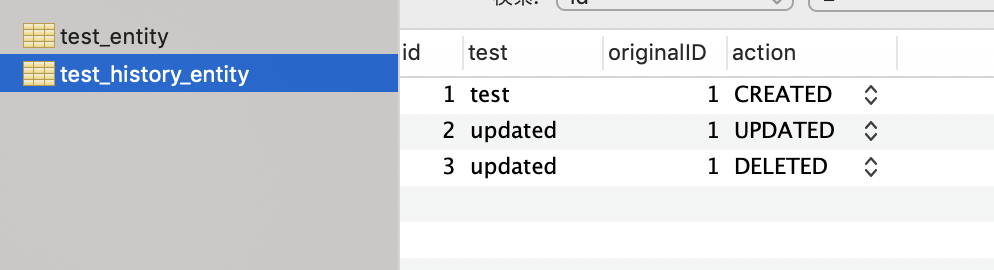
5. 插入/更新/删除实体
// Insert
const testEntity = await TestEntity.create({ test: "test" }).save();

// Update
testEntity.test = "updated";
await testEntity.save();

// Remove
await testEntity.remove();
高级
钩子
您可以在插入/更新/删除历史之前/之后勾通.
@EventSubscriber()
class TestHistoryEntitySubscriber extends HistoryEntitySubscriber<TestEntity, TestHistoryEntity> {
  public get entity() {
    return TestEntity;
  }

  public get historyEntity() {
    return TestHistoryEntity;
  }

  public beforeInsertHistory(
    history: HistoryEntityType,
    entity: Readonly<EntityType>,
  ): HistoryEntityType | Promise<HistoryEntityType> {
    return history;
  }

  public afterInsertHistory(history: HistoryEntityType, entity: Readonly<EntityType>): void | Promise<void> {}

  public beforeUpdateHistory(
    history: HistoryEntityType,
    entity: Readonly<EntityType>,
  ): HistoryEntityType | Promise<HistoryEntityType> {
    return history;
  }

  public afterUpdateHistory(history: HistoryEntityType, entity: Readonly<EntityType>): void | Promise<void> {}

  public beforeRemoveHistory(
    history: HistoryEntityType,
    entity: Readonly<EntityType>,
  ): HistoryEntityType | Promise<HistoryEntityType> {
    return history;
  }

  public afterRemoveHistory(history: HistoryEntityType, entity: Readonly<EntityType>): void | Promise<void> {}
}
丢弃独有索引
历史表存储着多个内容相同的实体,所以如果有一个独特的索引,就不会有很好的效果. 你需要放弃所有独特的指数. 所以我为移民准备了一个助手功能.
export class DropAllUniqueOfTestHistoryEntity1625470736630 {
  async up(queryRunner: QueryRunner): Promise<void> {
    await dropUniqueIndices(queryRunner, TestHistoryEntity /* "test_history_entity" */);
  }

  async down(queryRunner: QueryRunner): Promise<void> {}
}
如果您想要用被移除的唯一旗帜重新生成索引, 请设置Index 以真实性 .
export class DropAllUniqueOfTestHistoryEntity1625470736630 {
  async up(queryRunner: QueryRunner): Promise<void> {
    await dropUniqueIndices(queryRunner, "test_history_entity", true);
  }
}
覆盖动作列类型
默认情况下,动作列的类型使用enum. 然而,根据所使用的数据库,可能无法提供enum.
在这种情况下,您可以将 Collection 选项作为第一个参数传递给历史动作库来覆盖它 .
@HistoryActionColumn({ type: "varchar" })
public action!: HistoryActionType;