@anchan828/typeorm-history


Description
Create History Entity for TypeORM
Tested: mysql, postgres and sqlite.
Warning
This package only works withrepository.saveandrepository.remove. You can't userepository.insert/repository.update/repository.delete.
Installation
$ npm i --save typeorm @anchan828/typeorm-history
Quick Start
1. Create Entity
@Entity()
class TestEntity extends BaseEntity {
  @PrimaryGeneratedColumn()
  public id!: number;

  @Column()
  public test!: string;
}
2. Create History Entity
You need to add the same column properties as TestEntity.
@Entity()
class TestHistoryEntity extends BaseEntity implements HistoryEntityInterface<TestEntity> {
  // id is a property that holds the id of the TestHistoryEntity.
  @PrimaryGeneratedColumn()
  public id!: number;

  @Column()
  public test!: string;

  // originalID is a property that holds the id of the TestEntity.
  @HistoryOriginalIdColumn()
  public originalID!: number;

  @HistoryActionColumn()
  public action!: HistoryActionType;
}
Note: Starting with version 0.5.0, column names can be defined freely.
@Entity()
class TestHistoryEntity extends BaseEntity implements HistoryEntityInterface<TestEntity> {
  @PrimaryGeneratedColumn()
  public id!: number;

  @Column()
  public test!: string;

  // You can use any property name you like.
  @HistoryOriginalIdColumn()
  public history_originalID!: number;

  // You can rename column name
  @HistoryActionColumn({ name: "history_action" })
  public action!: HistoryActionType;
}
Inheriting a Entity class
@Entity()
class TestHistoryEntity extends TestEntity implements HistoryEntityInterface {
  @HistoryOriginalIdColumn()
  public originalID!: number;

  @HistoryActionColumn()
  public action!: HistoryActionType;
}
Note: You can create a History entity by inheriting from the original Entity class. This is easy to do for simple entities. However, if you want to keep unique indexes, there is a problem. As many users have reported the problem, when you inherit a class, you also inherit the decorator, and you cannot overwrite it. This means that you cannot remove the restriction of unique indexes of @Index etc.
3. Create Entity Subscriber for History
@EventSubscriber()
class TestHistoryEntitySubscriber extends HistoryEntitySubscriber<TestEntity, TestHistoryEntity> {
  public get entity() {
    return TestEntity;
  }
  public get historyEntity() {
    return TestHistoryEntity;
  }
}
4. Create connection
await createConnection({
  type: "mysql",
  entities: [TestEntity, TestHistoryEntity],
  subscribers: [TestHistoryEntitySubscriber],
  username: "root",
  password: "test",
  database: "test",
});
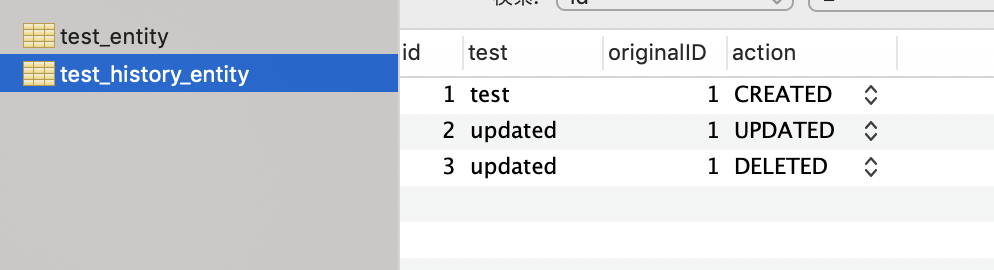
5. Insert/Update/Remove entity
// Insert
const testEntity = await TestEntity.create({ test: "test" }).save();

// Update
testEntity.test = "updated";
await testEntity.save();

// Remove
await testEntity.remove();
Advanced
Hooks
You can hook before/after insert/update/remove history.
@EventSubscriber()
class TestHistoryEntitySubscriber extends HistoryEntitySubscriber<TestEntity, TestHistoryEntity> {
  public get entity() {
    return TestEntity;
  }

  public get historyEntity() {
    return TestHistoryEntity;
  }

  public beforeInsertHistory(
    history: HistoryEntityType,
    entity: Readonly<EntityType>,
  ): HistoryEntityType | Promise<HistoryEntityType> {
    return history;
  }

  public afterInsertHistory(history: HistoryEntityType, entity: Readonly<EntityType>): void | Promise<void> {}

  public beforeUpdateHistory(
    history: HistoryEntityType,
    entity: Readonly<EntityType>,
  ): HistoryEntityType | Promise<HistoryEntityType> {
    return history;
  }

  public afterUpdateHistory(history: HistoryEntityType, entity: Readonly<EntityType>): void | Promise<void> {}

  public beforeRemoveHistory(
    history: HistoryEntityType,
    entity: Readonly<EntityType>,
  ): HistoryEntityType | Promise<HistoryEntityType> {
    return history;
  }

  public afterRemoveHistory(history: HistoryEntityType, entity: Readonly<EntityType>): void | Promise<void> {}
}
Drop unique indices
The history table stores multiple entities with the same content, so it won't work well if there is a unique index. You will need to drop the all unique indices. So I prepared a helper function for migration.
export class DropAllUniqueOfTestHistoryEntity1625470736630 {
  async up(queryRunner: QueryRunner): Promise<void> {
    await dropUniqueIndices(queryRunner, TestHistoryEntity /* "test_history_entity" */);
  }

  async down(queryRunner: QueryRunner): Promise<void> {}
}
If you want to regenerate the index with the unique flag removed, please set keepIndex to true.
export class DropAllUniqueOfTestHistoryEntity1625470736630 {
  async up(queryRunner: QueryRunner): Promise<void> {
    await dropUniqueIndices(queryRunner, "test_history_entity", true);
  }
}
Overwrite action column type
By default, the type of the action column uses enum. However, depending on the database used, enum may not be available.
In this case, you can pass ColumnOptions as the first argument to the HistoryActionColumn decorator to override it.
@HistoryActionColumn({ type: "varchar" })
public action!: HistoryActionType;