
@angular-material-extensions/google-maps-autocomplete - 用angular材料设计建造的google-maps自动完成输入组件


Please use lib v8 only with angular v15
由开发者建并供开发者使用 : 心脏 :
你有什么问题或建议吗? 请不要犹豫联系我们! 或者,提供 PR QQ 打开适当的 问题 这里
如果你喜欢这个项目,请支持 角-材料-扩展 由主演: 明星: 分享它 : 高音:
目录
演示
在行动中查看所有指令和组成部分 时间 https://angular-material-extension.github.io/google-maps-autocomplete (原始内容存档于2018-09-26)
依赖关系
- 角质 (单位:千美元)需求 最新动画
选项
npm i -D @types/googlemaps
安装
1. 通过 纳克后加. (建议)
如果角材料设计没有设置, 就
运行 ng add @angular/material 学习更多
现在通过 angular schematics 万事俱备
ng add @angular-material-extensions/google-maps-autocomplete
2. 通过 无. (备选案文)
现在安装 @angular-material-extensions/google-maps-autocomplete 通过:
npm install --save @angular-material-extensions/google-maps-autocomplete
要求(类依赖):
请考虑安装以下软件包
ng add @angular/material
所需额外经费
安装后需要导入主模块 :
import {MatGoogleMapsAutocompleteModule} from '@angular-material-extensions/google-maps-autocomplete';
剩下的唯一部分是在您的应用程序模块中列出导入的模块. 准确的方法是略微的
不同的根(顶级)模块,您最终应当使用类似于(顶级)的代码
通知 MatGoogleMapsAutocompleteModule.forRoot():
import {MatGoogleMapsAutocompleteModule} from '@angular-material-extensions/google-maps-autocomplete';

@NgModule({
  declarations: [AppComponent, ...],
  imports: [
    MatGoogleMapsAutocompleteModule.forRoot('YOUR_GOOGLE_MAPS_API_KEY'), ...],
  bootstrap: [AppComponent]
})
export class AppModule {
}
应用程序中的其他模块可以简单地导入 MatGoogleMapsAutocompleteModule数字 :
import {MatGoogleMapsAutocompleteModule} from '@angular-material-extensions/google-maps-autocomplete';

@NgModule({
  declarations: [OtherComponent, ...],
  imports: [
    MatGoogleMapsAutocompleteModule, ...],
})
export class OtherModule {
}
使用量
作为指令
添加 matGoogleMapsAutocomplete 到您的目标 html 输入元素, 使 google 地图自动完成 api 作为特性
<mat-form-field>
  <mat-label>Address << using the directive >></mat-label>
  <input matInput
         matGoogleMapsAutocomplete
         [country]="de"
         (onAutocompleteSelected)="onAutocompleteSelected($event)"
         (onLocationSelected)="onLocationSelected($event)">
</mat-form-field>
作为组件
或换用 mat-google-maps-auto-complete,UI包装器
添加 mat-google-maps-auto-complete 模板中的元素
mat-google-maps-auto-complete
<mat-google-maps-autocomplete [appearance]="appearance.OUTLINE"
                              (onAutocompleteSelected)="onAutocompleteSelected($event)"
                              (onLocationSelected)="onLocationSelected($event)">
</mat-google-maps-autocomplete>
一个定制的 mat-google-maps-autocomplete
<mat-google-maps-autocomplete country="us"
                              type="address"
                              (onAutocompleteSelected)="onAutocompleteSelected($event)"
                              (onLocationSelected)="onLocationSelected($event)">
</mat-google-maps-autocomplete>
结合 mat-google-maps-autocomplete 带有谷歌映射实例
<div class="container" fxLayout="column" fxLayoutAlign="center">

  <div fxFlex fxFlexAlign="center"
       class="autocomplete-container"
       [ngStyle.xs]="{'min-width.%': 100}"
       [ngStyle.sm]="{'width.%': 70}">
    <mat-google-maps-autocomplete (onAutocompleteSelected)="onAutocompleteSelected($event)"
                                  (onLocationSelected)="onLocationSelected($event)"
                                  (onGermanAddressMapped)="onGermanAddressMapped($event)">
    </mat-google-maps-autocomplete>
  </div>

</div>
在组件中,代码将类似于 -- >
import {Component, OnInit, ViewEncapsulation} from '@angular/core';
import {Title} from '@angular/platform-browser';
import {Location, Appearance, GermanAddress} from '@angular-material-extensions/google-maps-autocomplete';
import {} from '@types/googlemaps';
import PlaceResult = google.maps.places.PlaceResult;

@Component({
  selector: 'app-home',
  templateUrl: './home.component.html',
  styleUrls: ['./home.component.scss'],
  encapsulation: ViewEncapsulation.None,
})
export class HomeComponent implements OnInit {

  public appearance = Appearance;
  public zoom: number;
  public latitude: number;
  public longitude: number;
  public selectedAddress: PlaceResult;

  constructor(private titleService: Title) {
  }

  ngOnInit() {
    this.titleService.setTitle('Home | @angular-material-extensions/google-maps-autocomplete');

    this.zoom = 10;
    this.latitude = 52.520008;
    this.longitude = 13.404954;

    this.setCurrentPosition();

  }

  private setCurrentPosition() {
    if ('geolocation' in navigator) {
      navigator.geolocation.getCurrentPosition((position) => {
        this.latitude = position.coords.latitude;
        this.longitude = position.coords.longitude;
        this.zoom = 12;
      });
    }
  }

  onAutocompleteSelected(result: PlaceResult) {
    console.log('onAutocompleteSelected: ', result);
  }

  onLocationSelected(location: Location) {
    console.log('onLocationSelected: ', location);
    this.latitude = location.latitude;
    this.longitude = location.longitude;
  }

  onGermanAddressMapped($event: GermanAddress) {
    console.log('onGermanAddressMapped', $event);
  }

}
反应表单示例
<form [formGroup]="addressFormGroup">
  <mat-search-google-maps-autocomplete formControlName="address">
  </mat-search-google-maps-autocomplete>

  // OR

  <mat-google-maps-autocomplete formControlName="address">
  </mat-google-maps-autocomplete>

</form>
import {Component, OnInit} from '@angular/core';
import {FormControl, FormGroup} from '@angular/forms';

@Component({
  selector: 'app-root',
  templateUrl: './app.component.html',
  styleUrls: ['./app.component.scss']
})
export class AppComponent implements OnInit {

  addressFormGroup: FormGroup;

  ngOnInit(): void {
    this.addressFormGroup = new FormGroup({
      address: new FormControl(),
    });

    this.addressFormGroup.get('address').valueChanges.subscribe(value => console.log('value changed', value))
  }
}
API - 更多信息请访问官方文档 地图 JavaScript API
matGoogleMapsAutocomplete
| 选项 | 绑定 | 类型 | 默认 | 说明 |
|---|---|---|---|---|
| 价值 | Input() | 地方救济; | - 说吧 | |
| 地址 | Input() | 地点 | 字符串; | - 说吧 |
| 国家 | Input() | 字符串 | 字符串[ ]; | - 说吧 |
| 仅存的地方 | Input() | 布尔 | - 说吧 | 可用于指示自动完整部件只获取 Place ID。 在自动完整对象上调用 getPlace( ) 时, 可用的 PlaceResult 将只设置位置 ID、 类型和名称属性 。 您可以使用返回的地址ID, 并使用 Places, Geocoding, 方向或远程矩阵服务 . |
| 严格边界 | Input() | 布尔 | - 说吧 | 是一个布尔来指定 API 是否只必须返回严格在指定界限所定义区域内的位置 。 API即使匹配用户输入,也不会返回此区域以外的结果. |
| 类型 | Input() | 字符串 [] | - 说吧 | 一组类型指定了明确的类型或类型集合,如下文所支持的类型所列出. 如果没有指定,则返回所有类型。 一般来说,只允许单一类型。 例外是,您可以安全地混合地理代码和建立类型,但请注意,这将具有与指定任何类型相同的效果. 支持的类型如下:. |
| 类型 | Input() | 字符串 | - 说吧 | |
| 自动完成选项 | Input() | 自动完成选项 | - 说吧 | 所有以上输入在一个对象中! 传递到此对象的数据如果存在, 将会与输入合并 |
| 变化 | Output() | 地点 | 字符串 | 无效 |
| 自动完成 | Output() | 地点 | - 说吧 | 当通过 google 地图自动完成组件选择一个位置时, 事件将被启动 |
| 在德文地址夹上 | Output() | 德国语地址 | - 说吧 | 当一个位置被选中并映射到德国地址界面时, 事件将被解除 |
| 选中位置 | Output() | 地点 | - 说吧 | 当通过 google 地图自动完成组件选择一个位置时, 事件将被启动 |
支持类型
| 类型 | 说明 |
|---|---|
| 地理编码 | 指示Places服务只返回地理编码结果,而不是商业结果. |
| 地址 | 指示 Places 服务只返回带有精确地址的地理编码结果 . |
| 设立 | 指示 Places 服务只返回业务结果 . |
| 区域 | 指示 Places 服务返回符合以下类型的任何结果: 地点、 子地点、 邮政 代码、 国家、 行政 地区1、 行政 地区2 |
| 城市 | 指示地点服务处返回符合地点或行政区域3的结果. |
mat-google-maps-autocomplete
包括所有内容 matGoogleMapsAutocomplete +以下各项
| 选项 | 绑定 | 类型 | 默认 | 说明 |
|---|---|---|---|---|
| 地址标签文字 | Input() | 字符串; | 使用组件的地址 | 不言自明 |
| 占位符文本 | Input() | 字符串; | 请输入地址 | 不言自明 |
| 需要的错误文本 | Input() | 字符串; | 需要地址吗 | 不言自明 |
| 无效的错误文本 | Input() | 字符串; | 地址无效 | 不言自明 |
| 外观 | Input() | 外观 | 字符串; | 外观 |
mat-search-google-maps-autocomplete
| 选项 | 绑定 | 类型 | 默认 | 说明 |
|---|---|---|---|---|
| 搜索BarApearance 选项 | Input() | 外观 | 字符串; | 外观 |
| 外观 | Input() | 外观 | 字符串; | 外观 |
| 搜索地址标签 | Input() | 字符串; | Search Address | 输入标签 |
| 街道Name 标签 | Input() | 字符串; | Street | 输入标签 |
| 街道编号标签 | Input() | 字符串; | Nr. | 输入标签 |
| 邮政编码标签 | Input() | 字符串; | PLZ | 输入标签 |
| 标签附近 | Input() | 字符串; | Locality | 输入标签 |
| 方位标签 | Input() | 字符串; | Locality | 输入标签 |
| 显示维度 | Input() | 布尔; | false | 输入标签 - 是否显示节能 |
| 只读 | Input() | 布尔; | false | 只读输入 |
| 禁用搜索 | Input() | 布尔; | false | 禁用用户搜索一个地方 |
| 价值 | Input() | GermanAddress· ; | - 说吧 | 该组件的初始值 |
| 国家 | Input() | 字符串 | 字符串[ ]; | - 说吧 |
| 仅存的地方 | Input() | 布尔 | - 说吧 | 可用于指示自动完整部件只获取 Place ID。 在自动完整对象上调用 getPlace( ) 时, 可用的 PlaceResult 将只设置位置 ID、 类型和名称属性 。 您可以使用返回的地址ID, 并使用 Places, Geocoding, 方向或远程矩阵服务 . |
| 严格边界 | Input() | 布尔 | - 说吧 | 是一个布尔来指定 API 是否只必须返回严格在指定界限所定义区域内的位置 。 API即使匹配用户输入,也不会返回此区域以外的结果. |
| 类型 | Input() | 字符串 [] | - 说吧 | 一组类型指定了明确的类型或类型集合,如下文所支持的类型所列出. 如果没有指定,则返回所有类型。 一般来说,只允许单一类型。 例外是,您可以安全地混合地理代码和建立类型,但请注意,这将具有与指定任何类型相同的效果. 支持的类型如下:. |
| 类型 | Input() | 字符串 | - 说吧 | |
| 在德文地址夹上 | Output() | 事件编辑器 | 字符串; | 外观 |
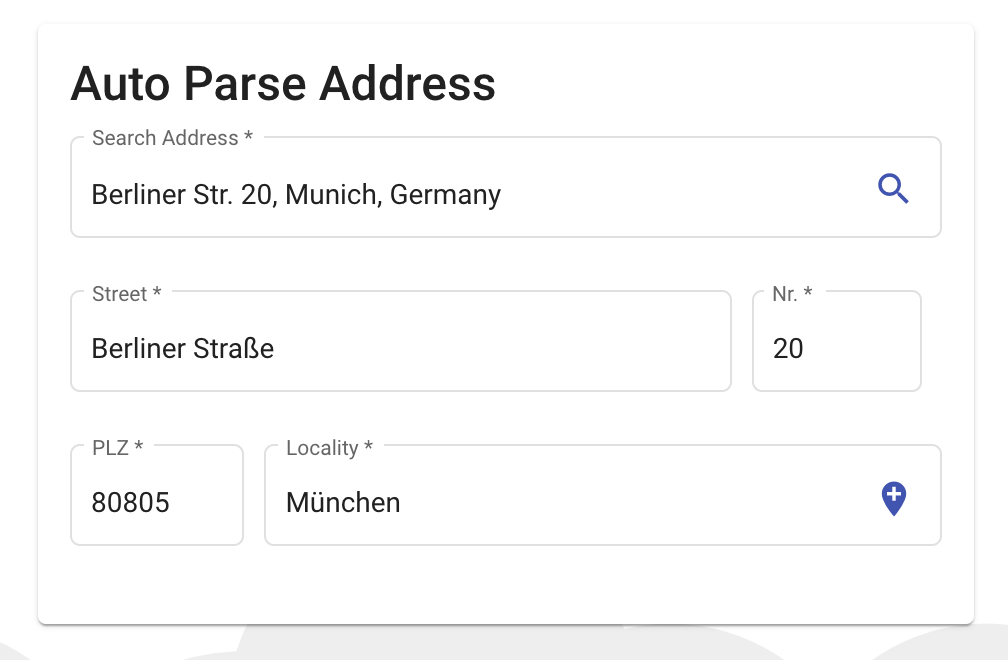
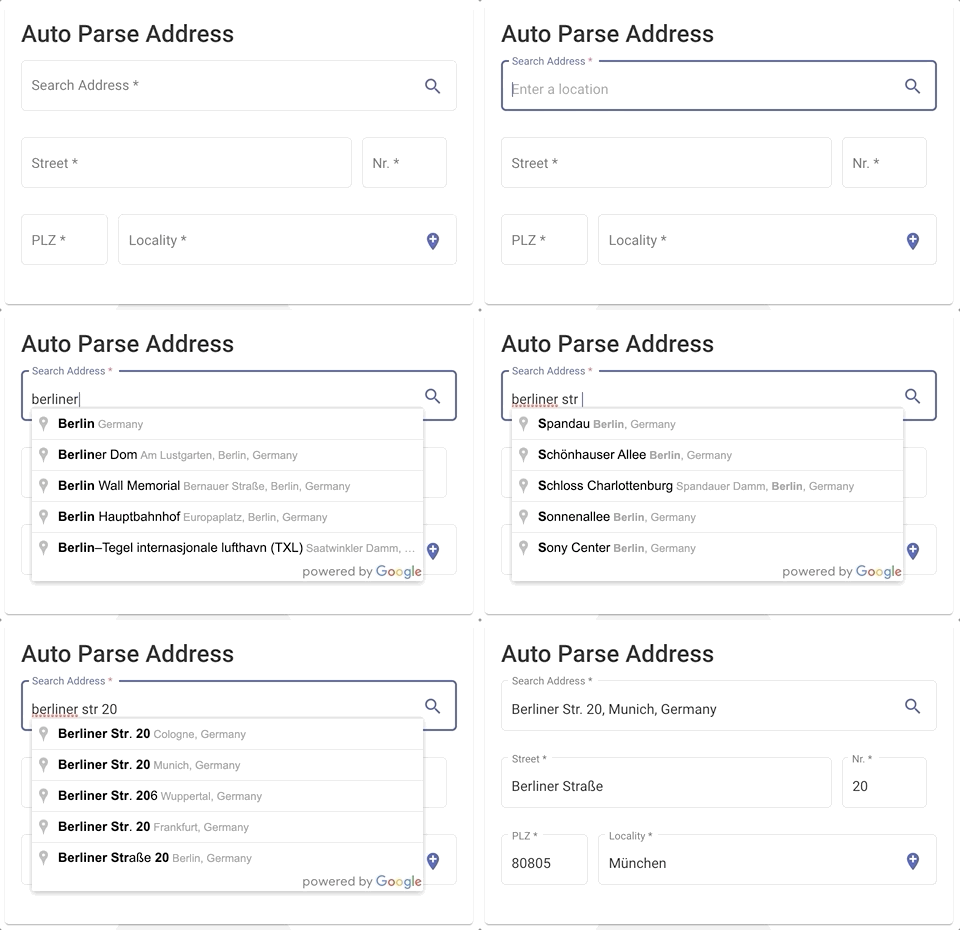
<mat-card>
  <mat-card-title>Auto Parse Address</mat-card-title>
  <mat-card-content>
    <!-- #######   here we go !! ######-->
    <mat-search-google-maps-autocomplete appearance="outline"
                                         country="de"
                                         (onGermanAddressMapped)="onGermanAddressMapped($event)">
      >
    </mat-search-google-maps-autocomplete>
  </mat-card-content>
</mat-card>
import {Appearance, GermanAddress, Location} from '@angular-material-extensions/google-maps-autocomplete';

onGermanAddressMapped($event;
:
GermanAddress;
)
{
  console.log('onGermanAddressMapped', $event);
}
文档
本地运行 Demo 应用程序
- 复制此 repo 通过运行
$ git clone https://github.com/angular-material-extensions/google-maps-autocomplete.git
- 链接 @angular-material-extension/google-maps-自动完成 软件包
$ gulp link
- 导航到演示应用程序目录, 安装依赖并服务应用程序
$ cd demo && npm i && npm start
- 该应用程序现在由
http://localhost:4200/
发展
- 复制这个 还原
- 通过运行安装依赖关系
npm i - 转到 lib 目录
projects/angular-material-extensions/google-maps-autocomplete - 建立图书馆
npm run build
其他角图书馆
- ngx-auth-fire-baseui (英语)
- ngx-链接js
- ngx-mailto (英语)
- @ firebaseui/ng-bootstrap (英语)
- @angular-material-extensions/页面
- @angular-material-extensions/link-preview (英语)
- @angular-material-extensions/password-strength (原始内容存档于2019-09-26) (英语)
- @angular-material-extensions/select-country (英语)
- @angular-material-extension/select-icon (原始内容存档于2018-09-28)
- @angular-material-extensions/fab-menu (法语)
- @angular-材料扩展/faq
- @angular-material-extensions/ contacts (英语)
支助
由开发商建造
谁在使用ngx -mailto? 伟大的应用程序?
你错过了你的项目还是你的应用? 公关我发表在读本上
许可证
版权(c) 2019-2024 安东尼·纳哈斯获得麻省理工学院许可 (麻省理工学院)
