
@angular-material-extensions/google-maps-autocomplete - Autocomplete input component for google-maps built with angular material design


Please use lib v8 only with angular v15
Built by and for developers :heart:
Do you have any question or suggestion ? Please do not hesitate to contact us! Alternatively, provide a PR | open an appropriate issue here
If did you like this project, support angular-material-extensions by starring :star: and sharing it :loudspeaker:
Table of Contents
- Demo
- Dependencies
- Peer Dependencies
- Additional Requirements - material (Include a theme)
- Installation
- Usage
- Documentation
- Run Demo App Locally
- Development
- Other Angular Libraries
- Support
- License
Demo
View all the directives and components in action at https://angular-material-extensions.github.io/google-maps-autocomplete
Dependencies
- Angular (requires Angular latest | we are using already v16 ;)
optional
npm i -D @types/googlemaps
Installation
1. Install via ng add. (Recommended)
If Angular Material Design is not setup, just
run ng add @angular/material learn more
Now add the library via the angular schematics and everything will be setup for you
ng add @angular-material-extensions/google-maps-autocomplete
2. Install via npm. (Alternative)
Now install @angular-material-extensions/google-maps-autocomplete via:
npm install --save @angular-material-extensions/google-maps-autocomplete
Requirements (peer dependencies):
for the ui input component, please consider installing the following packages
ng add @angular/material
Additional requirements Theme (Material Design)
Once installed you need to import the main module:
import {MatGoogleMapsAutocompleteModule} from '@angular-material-extensions/google-maps-autocomplete';
The only remaining part is to list the imported module in your application module. The exact method will be slightly
different for the root (top-level) module for which you should end up with the code similar to (
notice MatGoogleMapsAutocompleteModule.forRoot()):
import {MatGoogleMapsAutocompleteModule} from '@angular-material-extensions/google-maps-autocomplete';

@NgModule({
  declarations: [AppComponent, ...],
  imports: [
    MatGoogleMapsAutocompleteModule.forRoot('YOUR_GOOGLE_MAPS_API_KEY'), ...],
  bootstrap: [AppComponent]
})
export class AppModule {
}
Other modules in your application can simply import MatGoogleMapsAutocompleteModule:
import {MatGoogleMapsAutocompleteModule} from '@angular-material-extensions/google-maps-autocomplete';

@NgModule({
  declarations: [OtherComponent, ...],
  imports: [
    MatGoogleMapsAutocompleteModule, ...],
})
export class OtherModule {
}
Usage
As directive
add matGoogleMapsAutocomplete to your target html input element to enable the google maps autocomplete api as feature
<mat-form-field>
  <mat-label>Address << using the directive >></mat-label>
  <input matInput
         matGoogleMapsAutocomplete
         [country]="de"
         (onAutocompleteSelected)="onAutocompleteSelected($event)"
         (onLocationSelected)="onLocationSelected($event)">
</mat-form-field>
As components
or alternatively use mat-google-maps-auto-complete, the UI wrapper
add mat-google-maps-auto-complete element to your template
mat-google-maps-auto-complete
<mat-google-maps-autocomplete [appearance]="appearance.OUTLINE"
                              (onAutocompleteSelected)="onAutocompleteSelected($event)"
                              (onLocationSelected)="onLocationSelected($event)">
</mat-google-maps-autocomplete>
A customized mat-google-maps-autocomplete
<mat-google-maps-autocomplete country="us"
                              type="address"
                              (onAutocompleteSelected)="onAutocompleteSelected($event)"
                              (onLocationSelected)="onLocationSelected($event)">
</mat-google-maps-autocomplete>
combine the result of the mat-google-maps-autocomplete with a google map instance
<div class="container" fxLayout="column" fxLayoutAlign="center">

  <div fxFlex fxFlexAlign="center"
       class="autocomplete-container"
       [ngStyle.xs]="{'min-width.%': 100}"
       [ngStyle.sm]="{'width.%': 70}">
    <mat-google-maps-autocomplete (onAutocompleteSelected)="onAutocompleteSelected($event)"
                                  (onLocationSelected)="onLocationSelected($event)"
                                  (onGermanAddressMapped)="onGermanAddressMapped($event)">
    </mat-google-maps-autocomplete>
  </div>

</div>
in your component, the code will be similar to -->
import {Component, OnInit, ViewEncapsulation} from '@angular/core';
import {Title} from '@angular/platform-browser';
import {Location, Appearance, GermanAddress} from '@angular-material-extensions/google-maps-autocomplete';
import {} from '@types/googlemaps';
import PlaceResult = google.maps.places.PlaceResult;

@Component({
  selector: 'app-home',
  templateUrl: './home.component.html',
  styleUrls: ['./home.component.scss'],
  encapsulation: ViewEncapsulation.None,
})
export class HomeComponent implements OnInit {

  public appearance = Appearance;
  public zoom: number;
  public latitude: number;
  public longitude: number;
  public selectedAddress: PlaceResult;

  constructor(private titleService: Title) {
  }

  ngOnInit() {
    this.titleService.setTitle('Home | @angular-material-extensions/google-maps-autocomplete');

    this.zoom = 10;
    this.latitude = 52.520008;
    this.longitude = 13.404954;

    this.setCurrentPosition();

  }

  private setCurrentPosition() {
    if ('geolocation' in navigator) {
      navigator.geolocation.getCurrentPosition((position) => {
        this.latitude = position.coords.latitude;
        this.longitude = position.coords.longitude;
        this.zoom = 12;
      });
    }
  }

  onAutocompleteSelected(result: PlaceResult) {
    console.log('onAutocompleteSelected: ', result);
  }

  onLocationSelected(location: Location) {
    console.log('onLocationSelected: ', location);
    this.latitude = location.latitude;
    this.longitude = location.longitude;
  }

  onGermanAddressMapped($event: GermanAddress) {
    console.log('onGermanAddressMapped', $event);
  }

}
Reactive Forms Example
<form [formGroup]="addressFormGroup">
  <mat-search-google-maps-autocomplete formControlName="address">
  </mat-search-google-maps-autocomplete>

  // OR

  <mat-google-maps-autocomplete formControlName="address">
  </mat-google-maps-autocomplete>

</form>
import {Component, OnInit} from '@angular/core';
import {FormControl, FormGroup} from '@angular/forms';

@Component({
  selector: 'app-root',
  templateUrl: './app.component.html',
  styleUrls: ['./app.component.scss']
})
export class AppComponent implements OnInit {

  addressFormGroup: FormGroup;

  ngOnInit(): void {
    this.addressFormGroup = new FormGroup({
      address: new FormControl(),
    });

    this.addressFormGroup.get('address').valueChanges.subscribe(value => console.log('value changed', value))
  }
}
API - for more info please visit the official documentation Maps JavaScript API
matGoogleMapsAutocomplete
| option | bind | type | default | description |
|---|---|---|---|---|
| value | Input() | PlaceResult ; | - | |
| address | Input() | PlaceResult | string; | - |
| country | Input() | string | string[]; | - |
| placeIdOnly | Input() | boolean | - | can be used to instruct the Autocomplete widget to retrieve only Place IDs. On calling getPlace() on the Autocomplete object, the PlaceResult made available will only have the place id, types and name properties set. You can use the returned place ID with calls to the Places, Geocoding, Directions or Distance Matrix services. |
| strictBounds | Input() | boolean | - | is a boolean specifying whether the API must return only those places that are strictly within the region defined by the given bounds. The API does not return results outside this region even if they match the user input. |
| types | Input() | string[] | - | An array of types specifies an explicit type or a type collection, as listed in the supported types below. If nothing is specified, all types are returned. In general only a single type is allowed. The exception is that you can safely mix the geocode and establishment types, but note that this will have the same effect as specifying no types. Supported types are listed below. |
| type | Input() | string | - | |
| autoCompleteOptions | Input() | AutocompleteOptions | - | all above inputs in one object! The passed data to this object will be merged with the input if they exists |
| onChange | Output() | PlaceResult | string | null |
| onAutocompleteSelected | Output() | PlaceResult | - | the event will be fired when a place has been selected via the google maps autocomplete component |
| onGermanAddressMapped | Output() | GermanAddress | - | the event will be fired when a place has been selected and mapped to the german address interface |
| onLocationSelected | Output() | Location | - | the event will be fired when a place has been selected via the google maps autocomplete component |
Supported Types
| type | description |
|---|---|
| geocode | instructs the Places service to return only geocoding results, rather than business results. |
| address | instructs the Places service to return only geocoding results with a precise address. |
| establishment | instructs the Places service to return only business results. |
| regions | instructs the Places service to return any result matching the following types: locality, sublocality, postal_code, country, administrative_area1, administrative_area2 |
| cities | instructs the Places service to return results that match either locality or administrative_area3. |
mat-google-maps-autocomplete
everything included in matGoogleMapsAutocomplete + the following
| option | bind | type | default | description |
|---|---|---|---|---|
| addressLabelText | Input() | string; | Address using the component | self explanatory |
| placeholderText | Input() | string; | Please enter the address | self explanatory |
| requiredErrorText | Input() | string; | The address is required | self explanatory |
| invalidErrorText | Input() | string; | The address is not valid | self explanatory |
| appearance | Input() | Appearance | string; | Appearance.STANDARD |
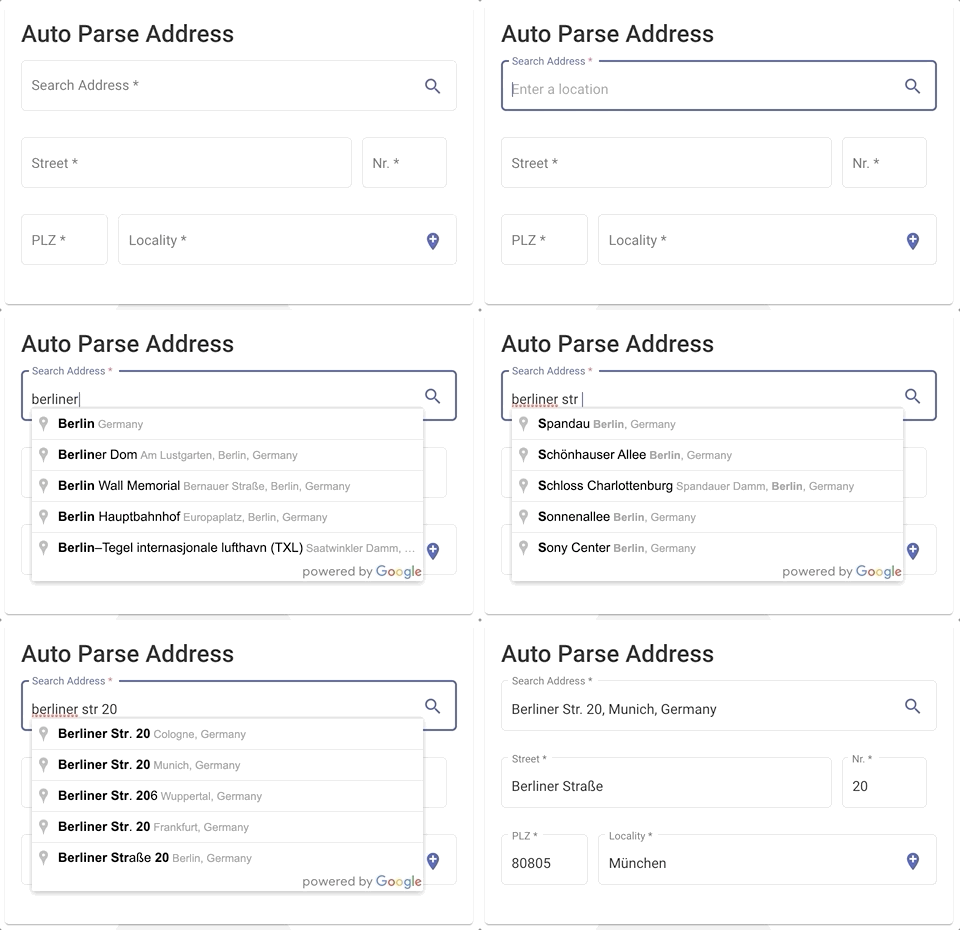
mat-search-google-maps-autocomplete
| option | bind | type | default | description |
|---|---|---|---|---|
| searchBarAppearance | Input() | Appearance | string; | Appearance.STANDARD |
| appearance | Input() | Appearance | string; | Appearance.STANDARD |
| searchAddressLabel | Input() | string; | Search Address | input label |
| streetNameLabel | Input() | string; | Street | input label |
| streetNumberLabel | Input() | string; | Nr. | input label |
| postalCodeLabel | Input() | string; | PLZ | input label |
| vicinityLabel | Input() | string; | Locality | input label |
| localityLabel | Input() | string; | Locality | input label |
| showVicinity | Input() | boolean; | false | input label - whether to display the vecinity |
| readonly | Input() | boolean; | false | readonly input |
| disableSearch | Input() | boolean; | false | disabled users to search a place |
| value | Input() | GermanAddress; | - | the initial value of the component |
| country | Input() | string | string[]; | - |
| placeIdOnly | Input() | boolean | - | can be used to instruct the Autocomplete widget to retrieve only Place IDs. On calling getPlace() on the Autocomplete object, the PlaceResult made available will only have the place id, types and name properties set. You can use the returned place ID with calls to the Places, Geocoding, Directions or Distance Matrix services. |
| strictBounds | Input() | boolean | - | is a boolean specifying whether the API must return only those places that are strictly within the region defined by the given bounds. The API does not return results outside this region even if they match the user input. |
| types | Input() | string[] | - | An array of types specifies an explicit type or a type collection, as listed in the supported types below. If nothing is specified, all types are returned. In general only a single type is allowed. The exception is that you can safely mix the geocode and establishment types, but note that this will have the same effect as specifying no types. Supported types are listed below. |
| type | Input() | string | - | |
| onGermanAddressMapped | Output() | EventEmitter | string; | Appearance.STANDARD |
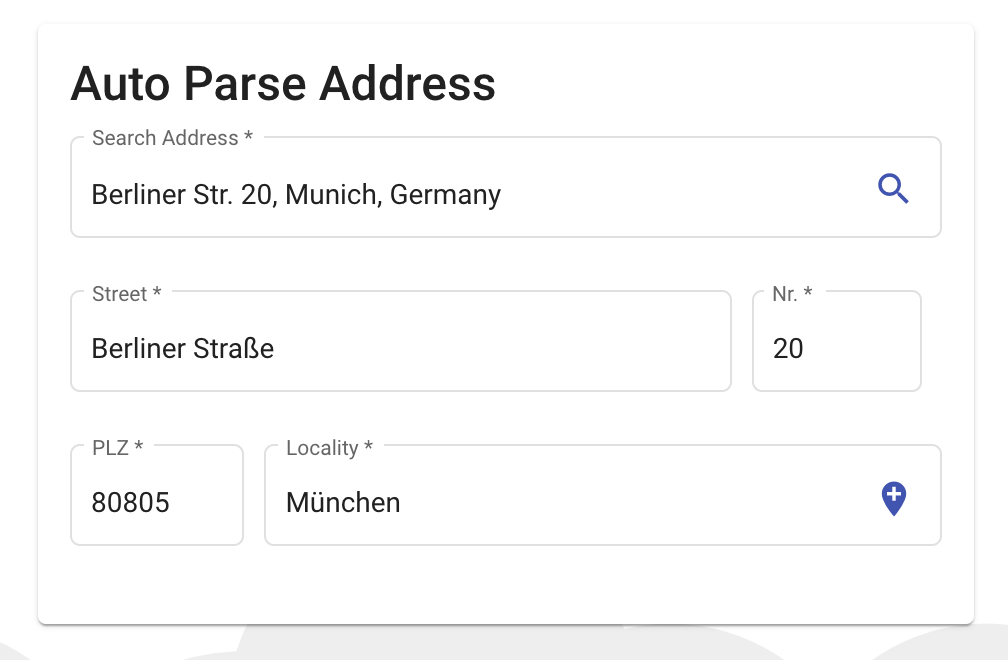
<mat-card>
  <mat-card-title>Auto Parse Address</mat-card-title>
  <mat-card-content>
    <!-- #######   here we go !! ######-->
    <mat-search-google-maps-autocomplete appearance="outline"
                                         country="de"
                                         (onGermanAddressMapped)="onGermanAddressMapped($event)">
      >
    </mat-search-google-maps-autocomplete>
  </mat-card-content>
</mat-card>
import {Appearance, GermanAddress, Location} from '@angular-material-extensions/google-maps-autocomplete';

onGermanAddressMapped($event;
:
GermanAddress;
)
{
  console.log('onGermanAddressMapped', $event);
}
Documentation
Please checkout the full documentation here or follow the official tutorial
Run Demo App Locally
- clone this repo by running
$ git clone https://github.com/angular-material-extensions/google-maps-autocomplete.git
- link the @angular-material-extensions/google-maps-autocomplete package
$ gulp link
- navigate to the demo app directory, install the dependencies and serve the app
$ cd demo && npm i && npm start
- the app is now hosted by
http://localhost:4200/
Development
- clone this repo
- Install the dependencies by running
npm i - go to lib directory under
projects/angular-material-extensions/google-maps-autocomplete - build the library
npm run build
Other Angular Libraries
- ngx-auth-firebaseui
- ngx-linkifyjs
- ngx-mailto
- @firebaseui/ng-bootstrap
- @angular-material-extensions/pages
- @angular-material-extensions/link-preview
- @angular-material-extensions/password-strength
- @angular-material-extensions/select-country
- @angular-material-extensions/select-icon
- @angular-material-extensions/fab-menu
- @angular-material-extensions/faq
- @angular-material-extensions/contacts
Support
- Drop an email to: Anthony Nahas
- or open an appropriate issue
- let us chat on Gitter
Built by and for developers :heart: we will help you :punch:
Who is using ngx-mailto? Awesome apps?
Are you missing your project or you app? PR me to publish it on the README
License
Copyright (c) 2019-2024 Anthony Nahas. Licensed under the MIT License ( MIT)
