亚马逊事件 Bridge 管道构造库

本单元中更高层次的构件的API是实验性的并正在积极开发中. 在今后任何版本中,它们都须作非背向相容的修改或去除。 这些是 不适用 语义版本 模型和断开的更改 在发行笔记中宣布. 这意味着虽然你可能使用它们,但可能需要更新 当更新到此软件包的更新版本时,您的源代码.
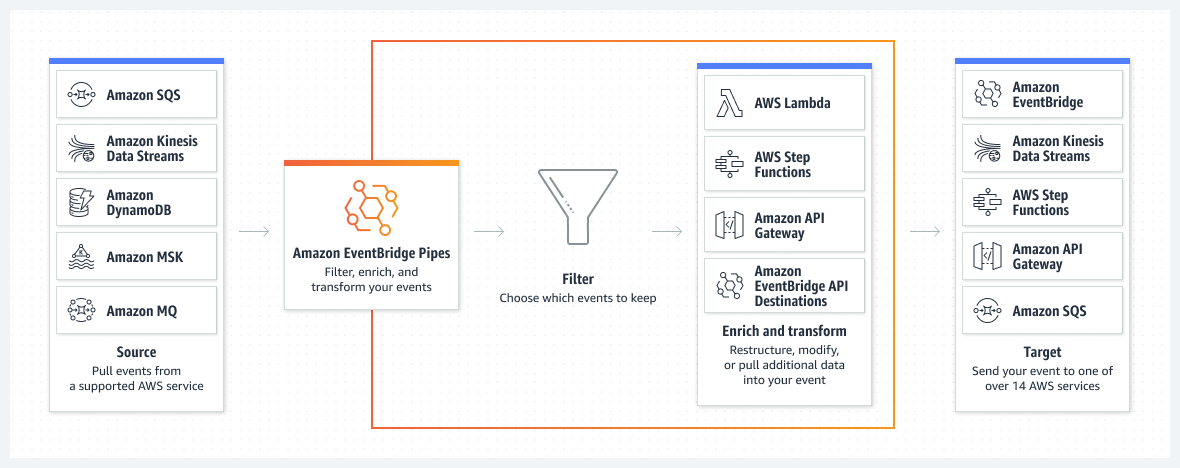
EventBridge Pipes 允许您创建源以瞄准多个连接 AWS服务. 当将消息从来源传送到目标时 可以过滤、转化和丰富.
详情见 服务文件。 。 。 .
管道
事件桥管 是一种完全管理的服务,能够实现点对点之间的整合 事件生产者和消费者。 管道可用于连接多个 AWS 服务 互通,或连接AWS服务与外部服务.
管子有源和靶子. 源事件可以过滤并丰富 在到达目标之前.
示例 - 管道使用量
要定义管道, 您需要创建一个新管道 Pipe 构造。 这个 Pipe 构造需要一个源和一个目标.
declare const sourceQueue: sqs.Queue;
declare const targetQueue: sqs.Queue;

const pipe = new pipes.Pipe(this, 'Pipe', {
  source: new SqsSource(sourceQueue),
  target: new SqsTarget(targetQueue),
});
这个最小的例子创建一个以 SQS 队列为源而以 SQS 队列为目标的管道. 从源消息被放入目标消息正文.
来源
来源是接受调查的AWS服务. 可能的来源如下:
目前,DynamoDB,Kinesis,以及SQS都得到了支持. 如果您有兴趣支持额外的来源, 请让我们知道,打开一个 GitHub 问题或提出公关.
示例来源
declare const sourceQueue: sqs.Queue;
const pipeSource = new SqsSource(sourceQueue);
过滤器
在事件发生之前, 可以用过滤器从源头过滤事件 被转移至浓缩物,如果没有浓缩物,则采取目标步骤。 多个过滤表达式是可能的. 如果过滤表达式之一匹配,事件会被传送到浓缩或目标步骤.
示例 - 过滤器使用
declare const sourceQueue: sqs.Queue;
declare const targetQueue: sqs.Queue;

const sourceFilter = new pipes.Filter(
  [
    pipes.FilterPattern.fromObject({
      body: {
        // only forward events with customerType B2B or B2C
        customerType: ['B2B', 'B2C']
      },
    })
  ]
)

const pipe = new pipes.Pipe(this, 'Pipe', {
  source: new SqsSource(sourceQueue),
  target: new SqsTarget(targetQueue),
  filter: sourceFilter,
});
此示例显示一个过滤器,该过滤器仅转发与 customerType B2B或从源消息取出B2C. 不匹配过滤器的信件不会被传送到浓缩或目标步骤.
您可以定义多个过滤模式,这些模式与逻辑相结合 OR。 。 。 .
其他过滤图案和细节可见于 EventBridge 管道 文档。 。 。 .
输入转换
对于浓缩物和靶子,输入事件可以被改变. 转换适用于批次的每个项目. 变换可以访问输入事件,也可以访问管子本身的一些上下文信息,如管子的名称. 见 文档 详细情况.
示例 - 从对象输入转换
输入转换可以由对象产生. 对象可以包含静态值,动态值或管变量.
declare const sourceQueue: sqs.Queue;
declare const targetQueue: sqs.Queue;

const targetInputTransformation = pipes.InputTransformation.fromObject({
  staticField: 'static value',
  dynamicField: pipes.DynamicInput.fromEventPath('$.body.payload'),
  pipeVariable: pipes.DynamicInput.pipeName,
});

const pipe = new pipes.Pipe(this, 'Pipe', {
  pipeName: 'MyPipe',
  source: new SqsSource(sourceQueue),
  target: new SqsTarget(targetQueue, {
    inputTransformation: targetInputTransformation,
  }),
});
这个例子显示了一个向输入事件添加静态字段,动态字段和管变量的转换. 动态字段取自输入事件. 管子变量取自管子上下文.
所以,当下面一批输入事件被管子处理
[
  {
    ...
    "body": "{\"payload\": \"Test message.\"}",
    ...
  }
]
改为下列有效载荷:
[
  {
    ...
    "staticField": "static value",
    "dynamicField": "Test message.",
    "pipeVariable": "MyPipe",
    ...
  }
]
如果将转换应用到目标上,它可能会被转换成字符串表示. 例如,由此产生的SQS消息正体看起来像这样:
[
  {
    ...
    "body": "{\"staticField\": \"static value\", \"dynamicField\": \"Test message.\", \"pipeVariable\": \"MyPipe\"}",
    ...
  }
]
示例 - 从事件路径输入转换
如果您想要将事件的一部分转发给目标, 您可以使用转换事件路径 .
这只对目标有效,因为浓缩需要有一个有效的json作为输入.
declare const sourceQueue: sqs.Queue;
declare const targetQueue: sqs.Queue;

const targetInputTransformation = pipes.InputTransformation.fromEventPath('$.body.payload')

const pipe = new pipes.Pipe(this, 'Pipe', {
  source: new SqsSource(sourceQueue),
  target: new SqsTarget(targetQueue, {
    inputTransformation: targetInputTransformation,
  }),
});
这种转变取出事体.
所以,当下面一批输入事件被管子处理
 [
  {
    ...
    "body": "\"{\"payload\": \"Test message.\"}\"",
    ...
  }
]
它被转化为以下目标有效载荷:
[
  {
    ...
    "body": "Test message."
    ...
  }
]
这个 隐含的有效载荷分析 (例如SQS消息正文给JSON)只有在输入是源有效载荷的情况下才有效. 隐形体剖析不适用于浓缩结果.
示例 - 从文本输入转换
如果您想要将静态文本转发到目标或使用自己的格式 inputTemplate 您可以使用文本中的转换.
declare const sourceQueue: sqs.Queue;
declare const targetQueue: sqs.Queue;

const targetInputTransformation = pipes.InputTransformation.fromText('My static text');

const pipe = new pipes.Pipe(this, 'Pipe', {
  source: new SqsSource(sourceQueue),
  target: new SqsTarget(targetQueue, {
    inputTransformation: targetInputTransformation,
  }),
});
这种转变将静态文本推进到目标上.
[
  {
    ...
    "body": "My static text"
    ...
  }
]
浓缩
在浓缩步骤中,来自源头的(未过滤出)有效载荷可用于援引下列一种服务:
- API 目的地
- 亚马逊 API 网关
- Lambda 函数
- Step 函数状态机器
- 只表达工作流程
实例浓缩实施
目前没有任何支持的浓缩措施得到执行。 以下例子说明执行的外观。 实际执行不是这一一揽子计划的一部分,而是单独执行.
class LambdaEnrichment implements pipes.IEnrichment {
  enrichmentArn: string;
  private inputTransformation: pipes.InputTransformation  | undefined;

  constructor(private readonly lambda: lambda.Function, props: {inputTransformation?: pipes.InputTransformation} = {}) {
    this.enrichmentArn = lambda.functionArn;
    this.inputTransformation = props?.inputTransformation
  }

  bind(pipe: pipes.IPipe): pipes.EnrichmentParametersConfig {
    return {
      enrichmentParameters: {
        inputTemplate: this.inputTransformation?.bind(pipe).inputTemplate,
      },
    };
  }

  grantInvoke(pipeRole: cdk.aws_iam.IRole): void {
    this.lambda.grantInvoke(pipeRole);
  }
}
浓缩实施需要提供 enrichmentArn, (中文(简体) ), enrichmentParameters 并赋予管道角色 援引获得浓缩.
示例 - 浓缩使用
declare const sourceQueue: sqs.Queue;
declare const targetQueue: sqs.Queue;
declare const enrichmentLambda: lambda.Function;

const enrichmentInputTransformation = pipes.InputTransformation.fromObject({
  staticField: 'static value',
  dynamicField: pipes.DynamicInput.fromEventPath('$.body.payload'),
  pipeVariable: pipes.DynamicInput.pipeName,
});

const pipe = new pipes.Pipe(this, 'Pipe', {
  source: new SqsSource(sourceQueue),
  target: new SqsTarget(targetQueue),
  enrichment: new LambdaEnrichment(enrichmentLambda, {
    inputTransformation: enrichmentInputTransformation,
  }),
});
这个例子增加了羊肉达功能作为管道的浓缩. lambda函数在应用了变换后随批发源信息一起被引用. lambda 函数可以返回向目标传输的结果.
因此,下面一批输入事件由管子处理
[
  {
    ...
    "body": "{\"payload\": \"Test message.\"}",
    ...
  }
]
它被转换成以下有效载荷,并被传送到羊肉达函数上.
[
  {
    ...
    "staticField": "static value",
    "dynamicField": "Test message.",
    "pipeVariable": "MyPipe",
    ...
  }
]
Lambda 函数可以返回向目标传输的结果. 例如, lambda 函数返回静态字段、 动态字段和管变量的连接
export async function handler (event: any) {
  return event.staticField + "-" + event.dynamicField + "-" + event.pipeVariable;
};
将在目标 SQS 队列中生成以下目标消息.
[
  {
    ...
    "body": "static value-Test message.-MyPipe",
    ...
  }
]
目标
一个目标就是管道的尽头 在从源头取出有效载荷后, 过滤和浓缩后转呈目标。 目前情况如下: 目标得到支持:
- API 目的地
- API 网关
- 批量任务队列
- 云表日志组
- ECS任务
- 同一账户和区域的活动总线
- 火花快递流
- 检查员评估模板
- Kinesis 溪流
- Lambda 函数(SYNC或ASYNC)
- 红移集群数据 API 查询
- SageMaker 管道
- SNS专题
- SQS 队列
- Step 函数状态机器
- 快速工作流程(ASYNC)
- 标准工作流程(SYNC或ASYNC)
目标事件在传送到目标之前可以转换,使用 与浓缩步骤相同的输入转换.
示例目标
declare const targetQueue: sqs.Queue;
const pipeTarget = new SqsTarget(targetQueue);
日志目标
管可以产生日志事件,被传送到不同的日志目的地. 您可以配置多个目的地, 但所有目的地共享相同的日志级别和日志数据 . 详细查一下官员 文档。 。 。 .
日志事件包含的日志级别和数据在管类本身上配置. 实际目的地是独立的,有三种选择:
CloudwatchLogsLogDestinationFirehoseLogDestinationS3LogDestination
日志目的使用示例
declare const sourceQueue: sqs.Queue;
declare const targetQueue: sqs.Queue;
declare const logGroup: logs.LogGroup;

const cwlLogDestination = new pipes.CloudwatchLogsLogDestination(logGroup);

const pipe = new pipes.Pipe(this, 'Pipe', {
  source: new SqsSource(sourceQueue),
  target: new SqsTarget(targetQueue),
  logLevel: pipes.LogLevel.TRACE,
  logIncludeExecutionData: [pipes.IncludeExecutionData.ALL],
  logDestinations: [cwlLogDestination],
});
此示例使用 CloudWatch 日志组来存储管道执行过程中释放的日志 .
日志级别设定为 TRACE 所以管道的所有步骤都被记录下来了.
此外,还记录了所有执行数据.
用 KMS 加密管道数据
您可以指定 EventBridge 使用客户管理的密钥加密存储在休息时的管道数据, 而不是像默认那样使用 AWS 拥有的密钥. 详情见 文档。 。 。 .
要做到这一点,请在 kmsKey 管道的属性.
declare const sourceQueue: sqs.Queue;
declare const targetQueue: sqs.Queue;
declare const kmsKey: kms.Key;

const pipe = new pipes.Pipe(this, 'Pipe', {
  source: new SqsSource(sourceQueue),
  target: new SqsTarget(targetQueue),
  kmsKey,
  // pipeName is required when using a KMS key
  pipeName: 'MyPipe',
});