Amazon EventBridge Pipes Construct Library

The APIs of higher level constructs in this module are experimental and under active development. They are subject to non-backward compatible changes or removal in any future version. These are not subject to the Semantic Versioning model and breaking changes will be announced in the release notes. This means that while you may use them, you may need to update your source code when upgrading to a newer version of this package.
EventBridge Pipes let you create source to target connections between several AWS services. While transporting messages from a source to a target the messages can be filtered, transformed and enriched.
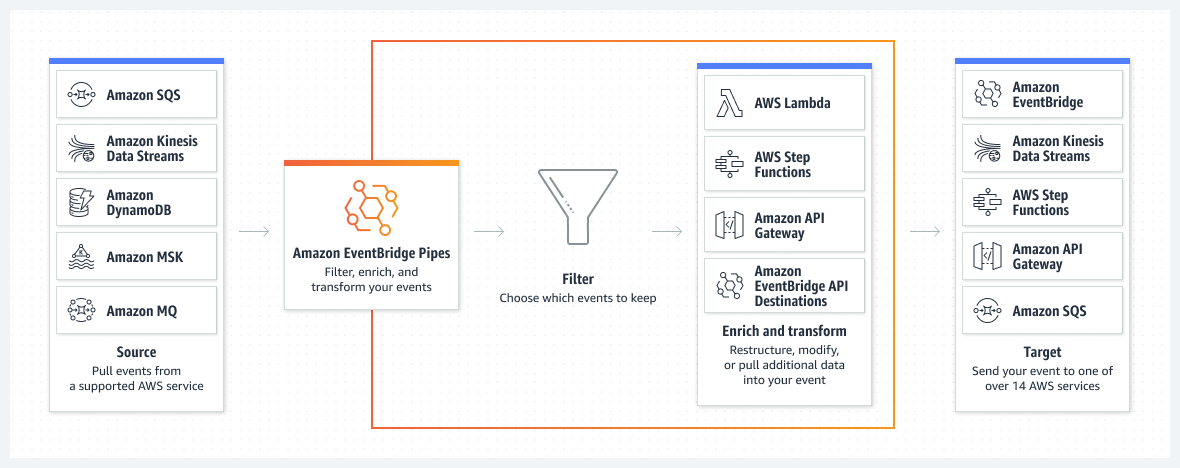
For more details see the service documentation.
Pipe
EventBridge Pipes is a fully managed service that enables point-to-point integrations between event producers and consumers. Pipes can be used to connect several AWS services to each other, or to connect AWS services to external services.
A pipe has a source and a target. The source events can be filtered and enriched before reaching the target.
Example - pipe usage
The following code examples use an example implementation of a source and target.
To define a pipe you need to create a new Pipe construct. The Pipe construct needs a source and a target.
declare const sourceQueue: sqs.Queue;
declare const targetQueue: sqs.Queue;

const pipe = new pipes.Pipe(this, 'Pipe', {
  source: new SqsSource(sourceQueue),
  target: new SqsTarget(targetQueue),
});
This minimal example creates a pipe with a SQS queue as source and a SQS queue as target. Messages from the source are put into the body of the target message.
Source
A source is a AWS Service that is polled. The following sources are possible:
- Amazon DynamoDB stream
- Amazon Kinesis stream
- Amazon MQ broker
- Amazon MSK stream
- Amazon SQS queue
- Apache Kafka stream
Currently, DynamoDB, Kinesis, and SQS are supported. If you are interested in support for additional sources, kindly let us know by opening a GitHub issue or raising a PR.
Example source
declare const sourceQueue: sqs.Queue;
const pipeSource = new SqsSource(sourceQueue);
Filter
A filter can be used to filter the events from the source before they are forwarded to the enrichment or, if no enrichment is present, target step. Multiple filter expressions are possible. If one of the filter expressions matches, the event is forwarded to the enrichment or target step.
Example - filter usage
declare const sourceQueue: sqs.Queue;
declare const targetQueue: sqs.Queue;

const sourceFilter = new pipes.Filter(
  [
    pipes.FilterPattern.fromObject({
      body: {
        // only forward events with customerType B2B or B2C
        customerType: ['B2B', 'B2C']
      },
    })
  ]
)

const pipe = new pipes.Pipe(this, 'Pipe', {
  source: new SqsSource(sourceQueue),
  target: new SqsTarget(targetQueue),
  filter: sourceFilter,
});
This example shows a filter that only forwards events with the customerType B2B or B2C from the source messages. Messages that are not matching the filter are not forwarded to the enrichment or target step.
You can define multiple filter pattern which are combined with a logical OR.
Additional filter pattern and details can be found in the EventBridge pipes docs.
Input transformation
For enrichments and targets the input event can be transformed. The transformation is applied for each item of the batch. A transformation has access to the input event as well to some context information of the pipe itself like the name of the pipe. See docs for details.
Example - input transformation from object
The input transformation can be created from an object. The object can contain static values, dynamic values or pipe variables.
declare const sourceQueue: sqs.Queue;
declare const targetQueue: sqs.Queue;

const targetInputTransformation = pipes.InputTransformation.fromObject({
  staticField: 'static value',
  dynamicField: pipes.DynamicInput.fromEventPath('$.body.payload'),
  pipeVariable: pipes.DynamicInput.pipeName,
});

const pipe = new pipes.Pipe(this, 'Pipe', {
  pipeName: 'MyPipe',
  source: new SqsSource(sourceQueue),
  target: new SqsTarget(targetQueue, {
    inputTransformation: targetInputTransformation,
  }),
});
This example shows a transformation that adds a static field, a dynamic field and a pipe variable to the input event. The dynamic field is extracted from the input event. The pipe variable is extracted from the pipe context.
So when the following batch of input events is processed by the pipe
[
  {
    ...
    "body": "{\"payload\": \"Test message.\"}",
    ...
  }
]
it is converted into the following payload:
[
  {
    ...
    "staticField": "static value",
    "dynamicField": "Test message.",
    "pipeVariable": "MyPipe",
    ...
  }
]
If the transformation is applied to a target it might be converted to a string representation. For example, the resulting SQS message body looks like this:
[
  {
    ...
    "body": "{\"staticField\": \"static value\", \"dynamicField\": \"Test message.\", \"pipeVariable\": \"MyPipe\"}",
    ...
  }
]
Example - input transformation from event path
In cases where you want to forward only a part of the event to the target you can use the transformation event path.
This only works for targets because the enrichment needs to have a valid json as input.
declare const sourceQueue: sqs.Queue;
declare const targetQueue: sqs.Queue;

const targetInputTransformation = pipes.InputTransformation.fromEventPath('$.body.payload')

const pipe = new pipes.Pipe(this, 'Pipe', {
  source: new SqsSource(sourceQueue),
  target: new SqsTarget(targetQueue, {
    inputTransformation: targetInputTransformation,
  }),
});
This transformation extracts the body of the event.
So when the following batch of input events is processed by the pipe
 [
  {
    ...
    "body": "\"{\"payload\": \"Test message.\"}\"",
    ...
  }
]
it is converted into the following target payload:
[
  {
    ...
    "body": "Test message."
    ...
  }
]
The implicit payload parsing (e.g. SQS message body to JSON) only works if the input is the source payload. Implicit body parsing is not applied on enrichment results.
Example - input transformation from text
In cases where you want to forward a static text to the target or use your own formatted inputTemplate you can use the transformation from text.
declare const sourceQueue: sqs.Queue;
declare const targetQueue: sqs.Queue;

const targetInputTransformation = pipes.InputTransformation.fromText('My static text');

const pipe = new pipes.Pipe(this, 'Pipe', {
  source: new SqsSource(sourceQueue),
  target: new SqsTarget(targetQueue, {
    inputTransformation: targetInputTransformation,
  }),
});
This transformation forwards the static text to the target.
[
  {
    ...
    "body": "My static text"
    ...
  }
]
Enrichment
In the enrichment step the (un)filtered payloads from the source can be used to invoke one of the following services:
- API destination
- Amazon API Gateway
- Lambda function
- Step Functions state machine
- only express workflow
Example enrichment implementation
Currently no implementation exist for any of the supported enrichments. The following example shows how an implementation can look like. The actual implementation is not part of this package and will be in a separate one.
class LambdaEnrichment implements pipes.IEnrichment {
  enrichmentArn: string;
  private inputTransformation: pipes.InputTransformation  | undefined;

  constructor(private readonly lambda: lambda.Function, props: {inputTransformation?: pipes.InputTransformation} = {}) {
    this.enrichmentArn = lambda.functionArn;
    this.inputTransformation = props?.inputTransformation
  }

  bind(pipe: pipes.IPipe): pipes.EnrichmentParametersConfig {
    return {
      enrichmentParameters: {
        inputTemplate: this.inputTransformation?.bind(pipe).inputTemplate,
      },
    };
  }

  grantInvoke(pipeRole: cdk.aws_iam.IRole): void {
    this.lambda.grantInvoke(pipeRole);
  }
}
An enrichment implementation needs to provide the enrichmentArn, enrichmentParameters and grant the pipe role invoke access to the enrichment.
Example - enrichment usage
declare const sourceQueue: sqs.Queue;
declare const targetQueue: sqs.Queue;
declare const enrichmentLambda: lambda.Function;

const enrichmentInputTransformation = pipes.InputTransformation.fromObject({
  staticField: 'static value',
  dynamicField: pipes.DynamicInput.fromEventPath('$.body.payload'),
  pipeVariable: pipes.DynamicInput.pipeName,
});

const pipe = new pipes.Pipe(this, 'Pipe', {
  source: new SqsSource(sourceQueue),
  target: new SqsTarget(targetQueue),
  enrichment: new LambdaEnrichment(enrichmentLambda, {
    inputTransformation: enrichmentInputTransformation,
  }),
});
This example adds a lambda function as enrichment to the pipe. The lambda function is invoked with the batch of messages from the source after applying the transformation. The lambda function can return a result which is forwarded to the target.
So the following batch of input events is processed by the pipe
[
  {
    ...
    "body": "{\"payload\": \"Test message.\"}",
    ...
  }
]
it is converted into the following payload which is sent to the lambda function.
[
  {
    ...
    "staticField": "static value",
    "dynamicField": "Test message.",
    "pipeVariable": "MyPipe",
    ...
  }
]
The lambda function can return a result which is forwarded to the target. For example a lambda function that returns a concatenation of the static field, dynamic field and pipe variable
export async function handler (event: any) {
  return event.staticField + "-" + event.dynamicField + "-" + event.pipeVariable;
};
will produce the following target message in the target SQS queue.
[
  {
    ...
    "body": "static value-Test message.-MyPipe",
    ...
  }
]
Target
A Target is the end of the Pipe. After the payload from the source is pulled, filtered and enriched it is forwarded to the target. For now the following targets are supported:
- API destination
- API Gateway
- Batch job queue
- CloudWatch log group
- ECS task
- Event bus in the same account and Region
- Firehose delivery stream
- Inspector assessment template
- Kinesis stream
- Lambda function (SYNC or ASYNC)
- Redshift cluster data API queries
- SageMaker Pipeline
- SNS topic
- SQS queue
- Step Functions state machine
- Express workflows (ASYNC)
- Standard workflows (SYNC or ASYNC)
The target event can be transformed before it is forwarded to the target using the same input transformation as in the enrichment step.
Example target
declare const targetQueue: sqs.Queue;
const pipeTarget = new SqsTarget(targetQueue);
Log destination
A pipe can produce log events that are forwarded to different log destinations. You can configure multiple destinations, but all the destination share the same log level and log data. For details check the official documentation.
The log level and data that is included in the log events is configured on the pipe class itself. The actual destination is defined independently, and there are three options:
CloudwatchLogsLogDestinationFirehoseLogDestinationS3LogDestination
Example log destination usage
declare const sourceQueue: sqs.Queue;
declare const targetQueue: sqs.Queue;
declare const logGroup: logs.LogGroup;

const cwlLogDestination = new pipes.CloudwatchLogsLogDestination(logGroup);

const pipe = new pipes.Pipe(this, 'Pipe', {
  source: new SqsSource(sourceQueue),
  target: new SqsTarget(targetQueue),
  logLevel: pipes.LogLevel.TRACE,
  logIncludeExecutionData: [pipes.IncludeExecutionData.ALL],
  logDestinations: [cwlLogDestination],
});
This example uses a CloudWatch Logs log group to store the log emitted during a pipe execution.
The log level is set to TRACE so all steps of the pipe are logged.
Additionally all execution data is logged as well.
Encrypt pipe data with KMS
You can specify that EventBridge use a customer managed key to encrypt pipe data stored at rest, rather than use an AWS owned key as is the default. Details can be found in the documentation.
To do this, you need to specify the key in the kmsKey property of the pipe.
declare const sourceQueue: sqs.Queue;
declare const targetQueue: sqs.Queue;
declare const kmsKey: kms.Key;

const pipe = new pipes.Pipe(this, 'Pipe', {
  source: new SqsSource(sourceQueue),
  target: new SqsTarget(targetQueue),
  kmsKey,
  // pipeName is required when using a KMS key
  pipeName: 'MyPipe',
});