Video Indexer widgets


This repo contains the Video Indexer widgets package. Below you can find documentation and examples on how to use these pieces.
Introduction
Azure AI Video Indexer is a cloud application, part of Azure AI services, built on Azure AI services (such as the Face, Translator, Azure AI Vision, and Speech). It enables you to extract the insights from your videos using Azure AI Video Indexer video and audio models.
The material in this repository is designed to help in embedding Video Indexer widgets in your own service and customize its style and data.
The package supports two types of insights widgets:
- Standard Video Indexer widget
- Customizable insights widget - allowing you full flexibility and customization to meet your business needs.
Below you'll find sections on:
- Installing the Video Indexer widgets package
- Embed standard Video Indexer insights widget
- Embed Video Indexer customizable insights widget
- Enable custom styling to meet your application look and feel
We also have samples & implementation details located in our official GitHub.
Installing the Video Indexer widgets package
The widgets are distributed as an NPM package. There are a couple ways to install the library:
-
Installation using NPM - For consuming the NPM package directly, you can install it using the npm command.
npm install @azure/video-indexer-widgets -
Importing using CDN - You can import the latest version of the widget directly into your HTML file by using following snipper -
... <script type="module" src="https://unpkg.com/@azure/video-indexer-widgets"></script> </body> </html> -
If you want expose the widget code on the window, you can import the latest version by using the following snippet -
        ...
        <script src="https://unpkg.com/@azure/video-indexer-widgets@latest/dist/global.min.js"></script>
    </body>
</html>
Embed standard Video Indexer insights widget
Instead of adding an iframe element to embed the insight widget, this package allows you to embed using JS code. The section below details:
- How to add a insight widget to your application
- Samples showing use of the widget
Creating the insights widget
The insight widget is created at runtime. The widget will be created based on a container you provide.
Creating at runtime using the package:
   const widget = new window.vi.widgets.Insights(
       '<container-id>',
       <widget-option-object>,
       <widget-configuration>
   );
Please review our official GitHub to find more information about the interfaces and classes involved.
Code samples
This code shows how to create a widget at runtime with Javascript code.
<script>
    function onPackageLoad() {
        // Create widget config
        const config = {
            accountId: '<ACCOUNT-ID>',
            videoId: '<VIDEO-ID>',
            accessToken: '' // Add access token only if your video is private
        };
        let widget = new window.vi.widgets.Insights(
            'widget-container',
            {
                height: 780,
                width: 580
            },
            config
        );

        widget.render();
    }
</script>
<script src="https://unpkg.com/@azure/video-indexer-widgets@latest/dist/global.min.js" onload="onPackageLoad()"></script>
<body>
    <div id="widget-container"></div>
</body>
Typescript example -
In the following example, we create an insight widget, with Spanish localization. The selected tab is the timeline, and the selected components are emotions, sentiments, transcript and keywords. The initial search param is 'hello'.
    import {
        IInsightsWidgetConfig,
        InsightsWidget
    } from '@azure/video-indexer-widgets';

    const config: IInsightsWidgetConfig = {
        accountId: '<ACCOUNT-ID>',
        videoId: '<VIDEO-ID>',
        accessToken: '<ACCESS-TOKEN>',
        locale: 'es-es',
        tab: 'timeline',
        search: 'hello',
        components: ['emotions', 'sentiments', 'transcript', 'keywords']
    };

    const insightsWidget = new InsightsWidget(
        'container',
        {
            height: 780,
            width: 580
        },
        config
    );

    insightsWidget.render();
Embed Video Indexer customizable insights widget
Embed Video Indexer insights widget with original data from the embedded video, combined with your own custom data and raw Video Indexer data. The below section shows a few details:
- How to add a custom insight widget to your application
- Samples showing use of the widget
Creating the custom insight widget
The custom insight widget is created at runtime.
Creating at runtime using the package:
   const widget = new window.vi.widgets.CustomInsights(
       '<container-id>',
       <widget-option>,
       <widget-configuration>
   );
Please review our official GitHub to find more information about the interfaces and classes involved.
Code samples:
This code shows how to create a generic custom insight widget at runtime with JavaScript code:
<script>
    function onPackageLoad() {
        // Create widget config
        const config = {
            duration: <duration>,
            accountId: '<VI-ACCOUNT-ID>',
            videoId: '<VI-VIDEO-ID>',
            viInsightsKeys: <insights-key-list-array>,
            rawInsightsData: <raw-insights-data-array>,
            customData: <custom-data-array>
        };
        let widget = new window.vi.widgets.CustomInsights(
            'widget-container',
            {
                height: 780,
                width: 580
            },
            config
        );

        widget.render();
    }
</script>
<script src="https://unpkg.com/@azure/video-indexer-widgets@latest/dist/global.min.js" onload="onPackageLoad()"></script>
<body>
    <div id="widget-container"></div>
</body>
Typescript example:
This code shows how to create a custom insight widget at runtime with typescript code.
In the following example, we create a custom insight widget at runtime using all the data types the widget supports.
- Video duration is 634 seconds
- The widget will show brands, keywords, scenes and blocks provided from Video Indexer video (according to the account + video id provided). Video is public since no access token is provided.
- The widget will have 2 raw insights data. emotions and topics.
- Widget will have 2 custom data components. One as capsule and the other color map.
    import {
        ICustomInsightsWidgetConfig,
        CustomInsightsWidget,
        VIInsightsKey,
        IEmotion,
        ITopic,
        IVRawIInsightsData,
        ICustomElement,
        ICustomData,
        ICustomColorElement
    } from '@azure/video-indexer-widgets';

    /**
    *    Using data from Video Indexer video parameters
    **/
    // VI account ID
    const viAccountID = '00000000-0000-0000-0000-000000000000'
    // VI video ID
    const viVideoID = 'd9d4860279'
    // VI insights key list.
    const viInsightsKeys : VIInsightsKey[] =  ['brands', 'keywords', 'scenes', 'blocks'];


    /**
    *    Using raw Video Indexer insights parameters
    **/
   // Using raw emotions data, with two emotions - one is Joy and other is Sad.
   const emotionsList: IEmotion[] [
            {
                id: 1,
                type: 'Joy',
                instances: [
                    {
                        adjustedEnd: '0:06:46.15',
                        adjustedStart: '0:06:42.086',
                        confidence: 0.6808,
                        end: '0:06:46.15',
                        start: '0:06:42.086'
                    }
                ]
            },
            {
                id: 2,
                type: 'Sad',
                instances: [
                    {
                        adjustedEnd: '0:10:18.957',
                        adjustedStart: '0:09:59.306',
                        confidence: 0.8383,
                        end: '0:10:18.957',
                        start: '0:09:59.306'
                    }
                ]
            }
    ];

    // Using raw topics data, with 3 topics.
    const topicsList: ITopic[] = [
            {
                confidence: 0.7577,
                id: 1,
                name: 'Brand Audit',
                referenceId: 'Brand Audit',
                language: 'en-US',
                instances: [
                    {
                        adjustedEnd: '0:01:52.838',
                        adjustedStart: '0:00:13.712',
                        end: '0:01:52.838',
                        start: '0:00:13.712'
                    },
                    {
                        adjustedEnd: '0:03:16.21',
                        adjustedStart: '0:02:08.093',
                        end: '0:03:16.21',
                        start: '0:02:08.093'
                    }
                ]
            },
            {
                confidence: 0.4893,
                iabName: 'News and Politics',
                id: 23,
                instances: [
                    {
                        adjustedEnd: '0:02:59.015',
                        adjustedStart: '0:00:08.421',
                        end: '0:02:59.015',
                        start: '0:00:08.421'
                    }
                ],
                iptcName: 'Politics/election',
                language: 'en-US',
                name: 'Political Campaigns and Elections',
                referenceId: 'Politics and Government/Political Campaigns and Elections',
                referenceType: 'VideoIndexer'
            },
            {
                confidence: 0.6453,
                iabName: 'Business and Finance',
                id: 14,
                instances: [
                    {
                        adjustedEnd: '0:02:37.644',
                        adjustedStart: '0:00:00',
                        end: '0:02:37.644',
                        start: '0:00:00'
                    },
                    {
                        adjustedEnd: '0:04:01.497',
                        adjustedStart: '0:03:39.322',
                        end: '0:04:01.497',
                        start: '0:03:39.322'
                    },
                    {
                        adjustedEnd: '0:05:00.968',
                        adjustedStart: '0:04:36.6',
                        end: '0:05:00.968',
                        start: '0:04:36.6'
                    }
                ],
                iptcName: 'Economy, Business and Finance/business (general)',
                language: 'en-US',
                name: 'Brand Strategy',
                referenceId: 'Business/Product Development/Brand Strategy',
                referenceType: 'VideoIndexer'
            }
    ];

    // Raw VI insights array.
    const rawInsightsData: IVRawIInsightsData[] = [
        {
            rawInsightsKey: 'emotions',
            insightsItems: emotionsList
        },
        {
            rawInsightsKey: 'topics',
            insightsItems: topicsList
        }
    ];

    /**
    *    Using custom insights data
    **/
   // Create a custom data with UI as a capsule.

    // Create a custom element with name 'custom element 2', that has 4 instances.
   const customElement2 : ICustomElement = {
        id: 1,
        text: 'Custom element 2',
        instances: [
          {
            adjustedEnd: '0:00:12.44',
            adjustedStart: '0:00:11.54',
            end: '0:00:12.44',
            start: '0:00:11.54'
          },
          {
            adjustedEnd: '0:05:27.96',
            adjustedStart: '0:05:19.89',
            end: '0:05:27.96',
            start: '0:05:19.89'
          },
          {
            adjustedEnd: '0:02:06.443',
            adjustedStart: '0:02:00.83',
            end: '0:02:06.443',
            start: '0:02:00.83'
          },
          {
            adjustedEnd: '0:03:45.44',
            adjustedStart: '0:03:43.21',
            end: '0:03:45.44',
            start: '0:03:43.21'
          }
        ]
      };

    // Create a custom element with name 'custom element 1', that has 3 instances.
      const customElement1 : ICustomElement = {
        id: 1,
        text: 'Custom Element 1',
        instances: [
          {
            adjustedEnd: '0:02:37.644',
            adjustedStart: '0:00:00',
            end: '0:02:37.644',
            start: '0:00:00'
          },
          {
            adjustedEnd: '0:04:01.497',
            adjustedStart: '0:03:39.322',
            end: '0:04:01.497',
            start: '0:03:39.322'
          },
          {
            adjustedEnd: '0:05:00.968',
            adjustedStart: '0:04:36.6',
            end: '0:05:00.968',
            start: '0:04:36.6'
          }
        ]
    };

   // Create the custom data element, with title 'My data', controlled by all and captioning presets, from type capsule, with 2 elements.
   const customCapsuleData: ICustomData = {
        title: 'My Data',
        key: 'myData',
        presets: ['all', 'captioning'],
        type: 'capsule',
        items: [customElement, customElement2]
    };

    // Create custom color element, with text 'My Custom color Element!', with blue color and 3 instances.
    const customColorElement : ICustomColorElement = {
        id: 1,
        text: 'My Custom color Element!',
        color: 'blue',
        instances: [
          {
            adjustedEnd: '0:02:37.644',
            adjustedStart: '0:00:00',
            end: '0:02:37.644',
            start: '0:00:00'
          },
          {
            adjustedEnd: '0:04:01.497',
            adjustedStart: '0:03:39.322',
            end: '0:04:01.497',
            start: '0:03:39.322'
          },
          {
            adjustedEnd: '0:05:00.968',
            adjustedStart: '0:04:36.6',
            end: '0:05:00.968',
            start: '0:04:36.6'
          }
        ]
    };

    // Create custom color element, with text 'Second custom Color Element', with darkmagenta color and 1 instance.
    const customColorElement2 : ICustomColorElement = {
        id: 2,
        text: 'Second custom Color Element',
        color: 'darkmagenta',
        instances: [
          {
            adjustedEnd: '0:06:46.15',
            adjustedStart: '0:06:42.086',
            end: '0:06:46.15',
            start: '0:06:42.086'
          }
        ]
      };

    // Create custom color element, with text 'customColorElement3', with #FFFFF color and 1 instance.
    const customColorElement3 : ICustomColorElement = {
        id: 3,
        text: 'customColorElement3',
        color: '#FFFFF',
        instances: [
          {
            adjustedEnd: '0:10:18.957',
            adjustedStart: '0:09:59.306',
            confidence: 0.8383,
            end: '0:10:18.957',
            start: '0:09:59.306'
          }
        ]
      };

    // Create the custom data element, with title 'My color', controlled by all and accessibility presets, from type color-map, with 3 elements.
    // The custom data element will be sorted by the provided name, desc.
    const customColorData : ICustomData = {
        title: 'My Color',
        key: 'myColor',
        presets: ['all', 'accessibility'],
        type: 'color-map',
        sortedBy: {
            order: 'desc',
            property: 'name'
        },
        items: [customColorElement, customColorElement2, customColorElement3]
      };

    const customDataList : ICustomData[] = [customCapsuleData, customColorData];

    const config : ICustomInsightsWidgetConfig = {
        duration: 634, // Video duration - mandatory parameter
        accountId: viAccountID, // VI account ID. Should be provided only if using data from VI.
        videoId: viVideoID,  // VI video ID. Should be provided only if using data from VI.
        viInsightsKeys: viInsightsKeys, // VI insights key list. Mandatory parameter. If you don't want to use data from VI, send an empty array.
        rawInsightsData: rawInsightsData, // raw VI insights array. Mandatory parameter. If you don't want to use raw data, send an empty array.
        customData: customDataList,  // custom data array. Mandatory parameter. If you don't want to use custom data, send an empty array.
        preset: 'all' // select preset 'All'
    };

    this.customInsightsWidget = new CustomInsightsWidget(
        'container',
        {
            width: 800,
            height: 1800
        },
        config
    );

    this.customInsightsWidget.render();
The final insight will be look like this:

You can find more examples in our official GitHub.
Enable custom styling to meet your application look and feel
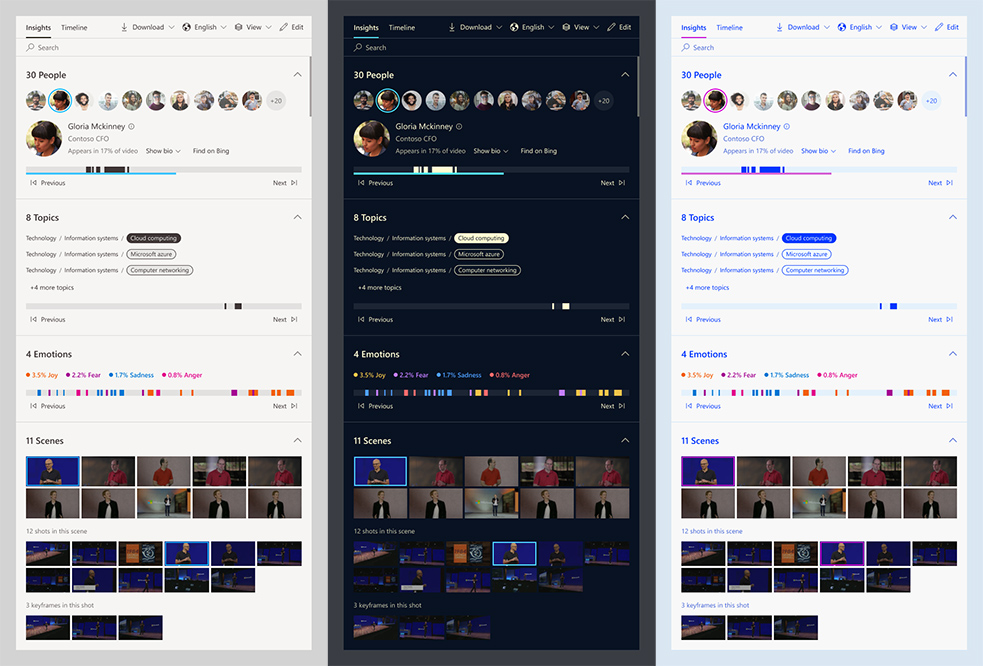
Both widgets supports customizing the UI color. You can send your own color palette, select one of VI theme, or select a default theme and customize part of the colors.
To implement that you should send as part of the configuration object a style object of type IInsightsStyle.
Please review our official GitHub to find more information about the interfaces and classes involved.
Code sample:
The following typescript example creates a insight widget with 'Dark' theme, and changes two colors.
    import {
        IInsightsWidgetConfig,
        InsightsWidget,
        IBaseStyleConfig,
        IWidgetStyle
    } from '@azure/video-indexer-widgets';

    // Change two colors of the base style config
    const insightsStyleConfig : IBaseStyleConfig = {
        primary: 'yellow',
        dividers: 'rgba(134,28,173,1)'
    };

    // Select dark mode theme and send new style
    const style: IWidgetStyle = {
        customStyle: insightsStyleConfig,
        theme: 'Dark'
    };
    const config: IVIInsightsWidgetConfig = {
        accountId: '<ACCESS-TOKEN>',
        videoId: '<VIDEO-ID>',
        accessToken: '<ACCESS-TOKEN>',
        style: style
    };

    this.insightsWidget = new InsightsWidget(
        'container',
        {
            height: 780,
            width: 580
        },
        config
    );

    this.insightsWidget.render();
Trademarks
This project may contain trademarks or logos for projects, products, or services. Authorized use of Microsoft trademarks or logos is subject to and must follow Microsoft's Trademark & Brand Guidelines. Use of Microsoft trademarks or logos in modified versions of this project must not cause confusion or imply Microsoft sponsorship. Any use of third-party trademarks or logos are subject to those third-party's policies.
Code of Conduct
This project has adopted the Microsoft Open Source Code of Conduct. For more information see the Code of Conduct FAQ or contact [email protected] with any additional questions or comments.