@chessviewer-org chess-viewer
象棋图生成器和FEN实用程序。解析和编辑FEN位置,渲染SVG板图,操纵板,使用颜色,板主题,预设,图像和历史-在Node.js或浏览器 不需要依赖,也不需要DOM.






- 零依赖关系 -没有东西撞到你的树。
- 通用 -运行在Node.js和浏览器,没有DOM,没有画布,没有网络。
- 双ESM + CJS 使用一等TypeScript类型。
- 电池包括 - FEN解析/编辑,SVG渲染与内联块集,20板主题,颜色和DPI实用程序,以及更多。
安装
npm install @chessviewer-org/chess-viewer
# or
pnpm add @chessviewer-org/chess-viewer
# or
yarn add @chessviewer-org/chess-viewer
要求: Node.js≥18,或任何现代浏览器。
快速启动
import { generateDiagram, parseFEN, validateFEN } from '@chessviewer-org/chess-viewer';

// Generate a self-contained SVG diagram
const svg = generateDiagram({
  fen: 'rnbqkbnr/pppppppp/8/8/8/8/PPPPPPPP/RNBQKBNR w KQkq - 0 1',
  size: 400,
  showCoords: true,
  lightSquare: '#f0d9b5',
  darkSquare: '#b58863',
});

// Write to a file (Node.js)
import { writeFileSync } from 'fs';
writeFileSync('board.svg', svg);

// Or embed directly in HTML
document.getElementById('board').innerHTML = svg;
示例输出
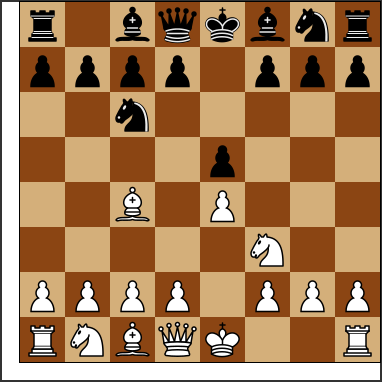
下图是由 generateDiagram -没有图像,没有画布;
版本控制
这个包如下 语义版本控制:
- 补丁 (
1.0.x) - bug修复,没有API更改 - 小 (
1.x.0添加了新的导出,完全向后兼容 - 主要的 (
x.0.0破坏API的变化
安装特定版本
# Latest stable
npm install @chessviewer-org/chess-viewer

# Specific version
npm install @chessviewer-org/[email protected]

# Latest minor of a major (e.g. 1.x)
npm install @chessviewer-org/chess-viewer@^1.0.0

# Exact patch
npm install @chessviewer-org/chess-viewer@~1.0.0
检查你有什么版本
npm list @chessviewer-org/chess-viewer
在npm上检查最新版本
npm view @chessviewer-org/chess-viewer version
# or all published versions:
npm view @chessviewer-org/chess-viewer versions --json
升级到最新版本
npm update @chessviewer-org/chess-viewer
# or force latest:
npm install @chessviewer-org/chess-viewer@latest
看到 CHANGELOG.md 查看每个版本中的变化。
API参考
generateDiagram(options)
生成一个自包含的SVG象棋图。没有DOM,没有网络请求。
import { generateDiagram } from '@chessviewer-org/chess-viewer';

const svg = generateDiagram({
  fen: 'rnbqkbnr/pppppppp/8/8/4P3/8/PPPP1PPP/RNBQKBNR b KQkq e3 0 1',
  size: 480,            // board pixel size (default: 400)
  showCoords: true,     // show a/b/c… and 1/2/3… labels (default: false)
  coordStyle: 'inner',  // 'border' (default) or 'inner' — labels drawn inside the squares
  flipped: false,       // show from Black's perspective (default: false)
  showFrame: false,     // thin outer frame (default: false)
  lightSquare: '#d4af7a',
  darkSquare: '#8b4513',
  coordColor: 'white',  // hex or 'white' | 'black' — keep coords legible on dark boards (default: '#000000')
  label: 'Starting position after 1.e4',  // aria-label (default: 'Chess position')
  annotations: {
    highlights: [{ square: 'e4', style: 'fill' }, { square: 'e2', style: 'ring' }],
    arrows: [{ from: 'e2', to: 'e4', color: '#15781b' }],
    check: { square: 'e8', type: 'check' },
  },
});
// → '<svg xmlns="http://www.w3.org/2000/svg" …>…</svg>'
暗色方块
习题书把黑色方块画成对角线,而不是用实线填充。
squarePattern: 'hatched' 深色方块会变成浅色吗
用深色的线交叉,所以 print 主题(白色和黑色)
给经典书籍的外观和任何其他主题保持可识别。
import { BOARD_THEMES, generateDiagram } from '@chessviewer-org/chess-viewer';

const { light, dark } = BOARD_THEMES.print;
generateDiagram({ fen, lightSquare: light, darkSquare: dark, squarePattern: 'hatched' });
板被放置在一个轻的基础上,孵化是作为一个单一的
路径裁剪到黑暗的正方形,所以没有瓷砖的边缘或接缝显示在任何缩放
或显示比例。几何图形被导出到其他渲染器:
hatchSegments(squareSize) 返回局部一个正方形的线段
坐标, hatchBoardPath(originX, originY, squareSize) 的路径数据
整个董事会, hatchLineWidth(squareSize) 它们的笔画宽度,和
hatchPatternSVG() SVG <pattern> 锚定在船板原点。件上
孵出的正方形会在下面画一个更宽的轮廓,
哪一个 pieceHaloStyleSVG() 作为样式表提供,因此它在任何地方都保持清晰
大小,而不是通过过滤器光栅化。
董事会注释
绘制方形高光,移动/威胁箭头,以及将死/将死的光芒
一个图表。直接传给 generateDiagram 通过 annotations,或者
如果您正在编写自己的板,则可以自己渲染SVG片段。
import {
  renderHighlightsSVG,
  renderArrowsSVG,
  renderCheckIndicatorSVG,
  sanitizeAnnotations,
} from '@chessviewer-org/chess-viewer';

// bad squares, colors, or degenerate arrows are dropped, not thrown
const clean = sanitizeAnnotations({
  highlights: [{ square: 'e4' }, { square: 'not-a-square' }],
  arrows: [{ from: 'e2', to: 'e4' }],
  check: { square: 'e1', type: 'check' },
});

// each render function needs a square → pixel mapping (same one the board
// itself is drawn with, so everything lines up)
const toPixel = (square: string) => squareToPoint(square, { size: 400 });
renderHighlightsSVG(clean.highlights ?? [], toPixel, 50);
renderArrowsSVG(clean.arrows ?? [], toPixel, 50);
renderCheckIndicatorSVG(clean.check!, toPixel, 50);
拖放/点击移动
纯粹的帮助建立一个互动板在这个库的顶部-击中 测试,移动应用程序,以及触摸/可访问性的点击移动回退。
import {
  parseFEN, STARTING_FEN,
  pointToSquare, squareToPoint,
  applyDragMove, applyDragRemove, applyPaletteDrop,
  resolveClick,
} from '@chessviewer-org/chess-viewer';

const board = parseFEN(STARTING_FEN);

// what square is under this pointer position?
pointToSquare({ x: 210, y: 260 }, { size: 400 });  // → 'e3'

// where should a square's ghost/preview element be drawn?
squareToPoint('e4', { size: 400 });  // → { x: 200, y: 200, size: 50 }

// drop a dragged piece onto a square
const { board: next, moved, captured } = applyDragMove(board, 'e2', 'e4');

// drag a piece off the board to delete it
applyDragRemove(board, 'e2');

// drop a piece from an outside palette/tray
applyPaletteDrop(board, 'e4', 'Q');

// tap-to-move: call on every square click with the current selection
resolveClick('e4', 'e2', board);
// → { kind: 'move', from: 'e2', to: 'e4' }
沼泽公用事业
import {
  parseFEN,
  validateFEN,
  validateFENDetailed,
  getFENValidationError,
  boardToFEN,
  createEmptyBoard,
  isBoardEmpty,
  pieceToName,
  describeBoardPosition,
  FENParseError,
} from '@chessviewer-org/chess-viewer';

// Parse FEN → 8×8 matrix
const board = parseFEN('rnbqkbnr/pppppppp/8/8/8/8/PPPPPPPP/RNBQKBNR w KQkq - 0 1');
// board[0][0] === 'r', board[7][4] === 'K'

// Quick validity check
validateFEN('rnbqkbnr/pppppppp/8/8/8/8/PPPPPPPP/RNBQKBNR');  // → true

// Human-readable error for UI
getFENValidationError('bad/fen');  // → 'Board must have 8 ranks'

// Detailed error with user-facing messages
const result = validateFENDetailed('rnbqkbnr/pppppppp/8/8/8/8/PPPPPPPP/RNBQKBNR w KQkq - 0 1');
// → { isValid: true, errorMessage: null }

// Matrix → FEN piece placement
boardToFEN(board);  // → 'rnbqkbnr/pppppppp/8/8/8/8/PPPPPPPP/RNBQKBNR'

// Screen-reader description of position
describeBoardPosition(board);
// → 'White: white king e1, white queen d1, … Black: black king e8, …'

// FEN parse errors
try {
  parseFEN('not-valid');
} catch (e) {
  if (e instanceof FENParseError) console.error(e.message);
}
满分记录
解析和序列化所有六个FEN字段-棋盘,侧面移动,易位权, 越过目标,移动时钟。只有位置的字符串也解析,填充 标准的默认值。
import {
  parseFENRecord,
  buildFENRecord,
  toggleActiveColor,
  fenPlacementField,
  normalizeFEN,
} from '@chessviewer-org/chess-viewer';

const record = parseFENRecord('rnbqkbnr/pp1ppppp/8/2p5/4P3/8/PPPP1PPP/RNBQKBNR b KQkq e3 5 12');
// → { board, activeColor: 'b', castling: 'KQkq', enPassant: 'e3', halfmove: 5, fullmove: 12 }

buildFENRecord(record);              // → 'rnbqkbnr/pp1ppppp/8/2p5/4P3/8/PPPP1PPP/RNBQKBNR b KQkq e3 5 12'
toggleActiveColor(record).activeColor; // → 'w'  (pure, no mutation)

fenPlacementField('rnbqkbnr/… w KQkq - 0 1'); // → 'rnbqkbnr/…'
normalizeFEN('rnbqkbnr/pppppppp/8/8/8/8/PPPPPPPP/RNBQKBNR');
// → 'rnbqkbnr/pppppppp/8/8/8/8/PPPPPPPP/RNBQKBNR w - - 0 1'
板操作
用于编辑位置的纯助手-每个函数返回一个新的board和
从不改变它的输入。平方可以接受代数字符串('e4')或
[row, col] 矩阵指数。
import {
  cloneBoard,
  getPieceAt, setPieceAt, removePieceAt, movePiece,
  flipBoard, listPieces, countPieces,
  materialBalance, findKing, hasBothKings,
} from '@chessviewer-org/chess-viewer';

const board = parseFEN('rnbqkbnr/pppppppp/8/8/8/8/PPPPPPPP/RNBQKBNR');

getPieceAt(board, 'e1');            // → 'K'
const next = movePiece(board, 'b1', 'c3');  // develops the knight, returns a new board
removePieceAt(next, 'd8');          // → new board with Black's queen removed

flipBoard(board);                   // rotate 180° for Black's perspective
listPieces(board);                  // → [{ square: 'a8', piece: 'r' }, …]  (a8 → h1)
countPieces(board);                 // → { r: 2, n: 2, …, P: 8 }
materialBalance(board);             // → 0  (positive = White ahead)
findKing(board, 'w');               // → 'e1'
hasBothKings(board);                // → true  (exactly one king per side)
主题和预设助手
查找板的主题,片集,和质量预设,与对比意识 帮助清晰的坐标。
import {
  getBoardTheme, listThemeIds,
  getPieceSet, pieceSetsByPopularity,
  getQualityPreset,
  themeContrast, themeCoordinateColor,
} from '@chessviewer-org/chess-viewer';

getBoardTheme('ocean');             // → { name: 'Ocean', light: '#c9e4f5', dark: '#4a90a4' }
listThemeIds();                     // → ['classic', 'brown', 'wood', …]

getPieceSet('cburnett');            // → { id: 'cburnett', name: 'Classic (CBurnett)' }
pieceSetsByPopularity()[0];         // → { id: 'cburnett', … }  (most popular first)

getQualityPreset(2);                // → { value: 2, label: 'Print 2× (600 DPI)', … }

const theme = getBoardTheme('classic')!;
themeContrast(theme);               // → WCAG contrast ratio between squares
themeCoordinateColor(theme);        // → 'white' | 'black'  (best on dark squares)
图像工具
读取光栅尺寸直接从PNG/JPEG头(没有解码,没有DOM)和
计算物理打印尺寸-自然配对 changeDPI.
import { readImageDimensions, physicalSize } from '@chessviewer-org/chess-viewer';

const bytes = new Uint8Array(await blob.arrayBuffer());
readImageDimensions(bytes);         // → { width: 1200, height: 1200 } | null

physicalSize(1200, 300);            // → { inches: 4, mm: 101.6 }
棋盘主题和常量
import {
  BOARD_THEMES,
  PIECE_SETS,
  PIECE_SET_POPULARITY,
  QUALITY_PRESETS,
  DEFAULT_LIGHT_SQUARE,
  DEFAULT_DARK_SQUARE,
  STARTING_FEN,
  EMPTY_FEN,
} from '@chessviewer-org/chess-viewer';

// 20 built-in board color themes
BOARD_THEMES.classic   // { name: 'Classic', light: '#f0d9b5', dark: '#b58863' }
BOARD_THEMES.ocean     // { name: 'Ocean', light: '#c9e4f5', dark: '#4a90a4' }

// 23 Lichess-compatible piece sets
PIECE_SETS[0]  // { id: 'alpha', name: 'Alpha' }

// Popularity-ranked piece set ids (most → least)
PIECE_SET_POPULARITY[0]  // 'cburnett'

// Print/social quality presets (DPI multipliers)
QUALITY_PRESETS  // [{value:1, label:'Print 1× (300 DPI)', mode:'print', …}, …]

// Convenient FEN constants
STARTING_FEN  // 'rnbqkbnr/pppppppp/8/8/8/8/PPPPPPPP/RNBQKBNR w KQkq - 0 1'
EMPTY_FEN     // '8/8/8/8/8/8/8/8 w - - 0 1'
颜色工具
import {
  hexToRgb, rgbToHex,
  rgbToHsv, hsvToRgb,
  hexToHsv, hsvToHex,
  relativeLuminance,
  contrastRatio,
  bestTextColor,
} from '@chessviewer-org/chess-viewer';

hexToRgb('#b58863')   // → { r: 181, g: 136, b: 99 }
rgbToHex(181, 136, 99) // → '#b58863'

const { h, s, v } = hexToHsv('#b58863');
hsvToHex(h, s, v)     // → '#b58863'

contrastRatio('#000000', '#ffffff')  // → 21
bestTextColor('#b58863')             // → 'white' | 'black'
协调公用事业
import {
  squareToIndices,
  indicesToSquare,
  getSquareBounds,
  isLightSquare,
  getCoordinateParams,
} from '@chessviewer-org/chess-viewer';

squareToIndices('e4')    // → [4, 4]  (row 0 = rank 8)
indicesToSquare(4, 4)    // → 'e4'
squareToIndices('a8')    // → [0, 0]
squareToIndices('h1')    // → [7, 7]

isLightSquare(0, 0)      // → true  (a8 is light)
isLightSquare(7, 0)      // → false (a1 is dark)

// Pixel bounds of a square (for canvas rendering)
getSquareBounds(0, 0, 50)  // → { x:0, y:0, width:50, height:50, centerX:25, centerY:25 }
历史公用事业
import {
  createHistoryEntry,
  calculateStatus,
  sortByMostRecent,
  applyFilters,
  mergeById,
  convertToArchivedEntry,
} from '@chessviewer-org/chess-viewer';

const entry = createHistoryEntry(
  'rnbqkbnr/pppppppp/8/8/8/8/PPPPPPPP/RNBQKBNR w KQkq - 0 1',
  'manual'
);
// → { id: 1234567890, fen: '…', createdAt: …, lastActiveAt: …, source: 'manual', isFavorite: false }

calculateStatus(entry.lastActiveAt)  // → 'green' | 'yellow' | 'red'

// Filter entries
applyFilters(entries, { fenSearch: 'e4', favoritesOnly: false, source: 'manual' });

// Merge two lists (e.g. cloud + local), primary wins on id collision
mergeById(cloudEntries, localEntries);
验证工具
import {
isValidHexColor,
sanitizeHexColor,
sanitizeFileName,
sanitizeInput,
safeJSONParse,
} from '@chessviewer-org/chess-viewer';
isValidHexColor('#f0d9b5') // → true
isValidHexColor('red') // → false
sanitizeHexColor('bad', '#fff') // → '#fff'
sanitizeHexColor('#aabbcc') // → '#aabbcc'
sanitizeFileName('my<board>') // → 'my-board-'
sanitizeInput('<script>xss') // → '<script>xss'
safeJSONParse('{"a":1}', {}) // → { a: 1 }
safeJSONParse('bad json', {}) // → {} (fallback, no throw)
DPI编码
import { changeDPI } from '@chessviewer-org/chess-viewer';

// Rewrite DPI metadata in a PNG or JPEG blob
const correctedBlob = await changeDPI(originalBlob, 300, 'png');
const correctedJpeg = await changeDPI(originalBlob, 150, 'jpeg');
乳胶出口
将位置转换为可立即粘贴的标记 skak, chessboard 或者
diagram (chess-problem-diagrams) LaTeX包。板的方向和协调的可见度延续下去
mode: 'document' 将关系图包装在按原样编译的文件中。
import { generateBoardLatex } from '@chessviewer-org/chess-viewer';

generateBoardLatex({ fen: 'rnbqkbnr/pppppppp/8/8/8/8/PPPPPPPP/RNBQKBNR w KQkq - 0 1' });
// → '\\usepackage{skak}\n\\fenboard{rnbqkbnr/… w KQkq - 0 1}\n\\showboard'

generateBoardLatex({
  fen: 'r5k1/1b1p1ppp/p7/1p1Q4/2p1r3/PP4Pq/BBP2b1P/R4R1K w - - 0 20',
  latexPackage: 'chessboard',
  flipped: true,
  showCoords: false,
  mode: 'document',
});
| 板状态 | skak | 棋盘 |
|---|---|---|
| 翻 | \showinverseboard | inverse=true |
| 坐标隐藏 | \notationoff … \notationon | label=false |
boardSize: 'small' | \smallboard … \normalboard | boardfontsize=15pt |
showMover: false | -(需要PostScript) | showmover=false |
boardSize 需要 'tiny' | 'small' | 'normal' | 'large' (10/15/20/30
广场)。skak全局应用的交换机将在关系图之后恢复,因此
代码片段永远不会改变它后面的关系图。
问题集和书籍
generateLatexDocument 一次排版多个位置并添加问题
元数据编写者期望。选择 latexPackage: 'diagram' 为
chess-problem-diagrams 包,与作者一起印刷孵化板,
每块板下的来源、奖励、规定和件数。
import { generateLatexDocument } from '@chessviewer-org/chess-viewer';

generateLatexDocument({
  latexPackage: 'diagram',
  mode: 'document',
  columns: 2,
  solutions: true,
  title: 'Two-movers',
  positions: [
    {
      fen: '8/8/8/3k4/8/4K3/3Q4/8 w - - 0 1',
      author: 'Loyd, Sam',
      source: 'Chess Monthly, 1903',
      award: '1st Prize',
      stipulation: '#2',
      solution: '1.Qd2-c3!'
    }
  ]
});
| 选项 | 值 | 笔记 |
|---|---|---|
mode | 'snippet', 'document', 'standalone' | standalone 产生裁剪后的图形 varwidth |
columns | 1 - 4 | 每排板子,用 minipage |
documentClass, paper, fontSize, marginMm | article/report/book, a4/a5/letter, 10/11/12, 5-50 | 仅支持文档模式 |
title, documentAuthor | 文本 | 添加标题页 |
numbering, pieceCount, solutions | 布尔 | 编号板,打印 (white+black),在最后列出解决方案 |
showCoords, showMover, boardSize | 如上所述 | 适用于每一块板 |
captionStyle | 'classic', 'problem', 'study', 'game', 'plain' | 每个板周围的文字布局;每个位置也可以设置 |
每个职位都接受 fen, flipped, caption, author, source, award,
stipulation, remark, solution,作曲家字段 dedication,
version, after, condition 和 twins,比赛场地 white, black,
event 和 date,它自己 captionStyle,以及任意槽位的免费文本:
captionTop 光明正大的 captionLeft, captionCenter,
captionRight 在它下面,每个替换样式将在那里打印的内容。这个 problem 样式打印数字
在黑板的上方有左下角的规定
(white+black) 右下,作为 diagram 包做; game 打印球员,事件和日期上面和
下面移动的一侧。与 chessboard 包,
highlights 和 arrows (与SVG呈现器采用的形状相同)变成
backfields/markfields/markmoves 颜色匹配的钥匙;满
方块被画在棋子的后面,这样高亮的棋子就能被看到。这个 diagram 包
总是在底部打印白色,没有坐标,并将作者写为
Surname, First name (一个普通 First Last 是为您重写的)。
一个文档最多容纳一个 LATEX_MAX_POSITIONS (100);看到
乳胶出口指南 对于每个选项。
所有的自由文本都被转义,所以 #2, 50% 和 R&D 按原样输入是安全的。当
文本包含阿塞拜疆语的短元音(ə, Ə)序言宣布它为
pdfLaTeX。输出目标pdfLaTeX;这个 tlmgr 所需的软件包有 skak,
chessboard 或者 chess-problem-diagrams,再加上 geometry 或者 standalone.
TeX需要的不仅仅是最小的安装:skak加载 lambda.sty
(collection-plaingeneric)和棋盘负载 xifthen.sty
(collection-latexextra)除了 collection-games.
FEN被规范化、验证,并根据允许列表进行检查
(/^[A-Za-z0-9/ -]+$/),所以 \, {, }, %
和 $ 不能注射。无效输入抛出
LaTeX export failed: <reason>. 也出口: LATEX_PACKAGES,
LATEX_PACKAGE_META, LATEX_DOCUMENT_CLASSES, LATEX_PAPER_SIZES,
LATEX_FONT_SIZES, LATEX_COLUMN_RANGE, LATEX_MARGIN_RANGE_MM,
LATEX_MAX_POSITIONS, LATEX_DIAGRAM_SIZE_PT, escapeLatex, pieceCounts,
isLatexPackage, isLatexBoardSize, LATEX_CAPTION_STYLES,
isLatexCaptionStyle.
嵌套式svg
import { getPieceSVG, PIECES } from '@chessviewer-org/chess-viewer';

getPieceSVG('K')   // → '<svg …>…</svg>'  (white king, CBurnett style)
getPieceSVG('k')   // → '<svg …>…</svg>'  (black king)
getPieceSVG('X')   // → null

// All 12 pieces
Object.keys(PIECES)  // → ['wK','wQ','wR','wB','wN','wP','bK','bQ','bR','bB','bN','bP']
打印稿
这个包提供了完整的TypeScript类型。否 @types/… 包装需要。
import type {
  PieceSymbol,
  BoardMatrix,
  DiagramOptions,
  ValidationResult,
  FENRecord,
  ActiveColor,
  SquareRef,
  PiecePlacement,
  ActiveHistoryEntry,
  ArchivedHistoryEntry,
  HistoryFilters,
  BoardTheme,
  QualityPreset,
  PieceSet,
  CoordinateParams,
  SquareBounds,
  ImageDimensions,
  SquareHighlight,
  Arrow,
  CheckIndicator,
  BoardAnnotations,
  BoardPoint,
  HitTestOptions,
  DragMoveResult,
  ClickResolution,
} from '@chessviewer-org/chess-viewer';