@chessviewer-org/chess-viewer
Chess diagram generator and FEN utilities. Parse and edit FEN positions, render SVG board diagrams, manipulate boards, work with colors, board themes, presets, images, and history — in Node.js or the browser with no dependencies and no DOM required.






- Zero dependencies — nothing pulled into your tree.
- Universal — runs in Node.js and the browser, no DOM, no canvas, no network.
- Dual ESM + CJS with first-class TypeScript types.
- Batteries included — FEN parsing/editing, SVG rendering with an inline piece set, 20 board themes, color & DPI utilities, and more.
Install
npm install @chessviewer-org/chess-viewer
# or
pnpm add @chessviewer-org/chess-viewer
# or
yarn add @chessviewer-org/chess-viewer
Requirements: Node.js ≥ 18, or any modern browser.
Quick start
import { generateDiagram, parseFEN, validateFEN } from '@chessviewer-org/chess-viewer';

// Generate a self-contained SVG diagram
const svg = generateDiagram({
  fen: 'rnbqkbnr/pppppppp/8/8/8/8/PPPPPPPP/RNBQKBNR w KQkq - 0 1',
  size: 400,
  showCoords: true,
  lightSquare: '#f0d9b5',
  darkSquare: '#b58863',
});

// Write to a file (Node.js)
import { writeFileSync } from 'fs';
writeFileSync('board.svg', svg);

// Or embed directly in HTML
document.getElementById('board').innerHTML = svg;
Example output
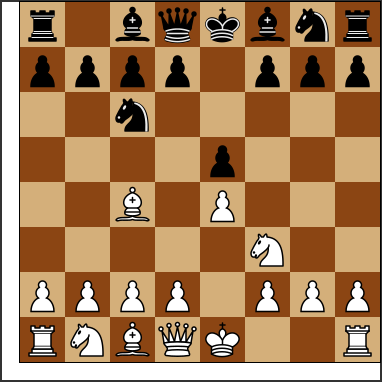
The diagram below is real SVG produced by generateDiagram — no images, no canvas:
Versioning
This package follows Semantic Versioning:
- Patch (
1.0.x) — bug fixes, no API changes - Minor (
1.x.0) — new exports added, fully backward-compatible - Major (
x.0.0) — breaking API changes
Install a specific version
# Latest stable
npm install @chessviewer-org/chess-viewer

# Specific version
npm install @chessviewer-org/[email protected]

# Latest minor of a major (e.g. 1.x)
npm install @chessviewer-org/chess-viewer@^1.0.0

# Exact patch
npm install @chessviewer-org/chess-viewer@~1.0.0
Check what version you have
npm list @chessviewer-org/chess-viewer
Check the latest version on npm
npm view @chessviewer-org/chess-viewer version
# or all published versions:
npm view @chessviewer-org/chess-viewer versions --json
Upgrade to latest
npm update @chessviewer-org/chess-viewer
# or force latest:
npm install @chessviewer-org/chess-viewer@latest
See CHANGELOG.md for what changed in each release.
API Reference
generateDiagram(options)
Generates a self-contained SVG chess diagram. No DOM, no network requests.
import { generateDiagram } from '@chessviewer-org/chess-viewer';

const svg = generateDiagram({
  fen: 'rnbqkbnr/pppppppp/8/8/4P3/8/PPPP1PPP/RNBQKBNR b KQkq e3 0 1',
  size: 480,            // board pixel size (default: 400)
  showCoords: true,     // show a/b/c… and 1/2/3… labels (default: false)
  coordStyle: 'inner',  // 'border' (default) or 'inner' — labels drawn inside the squares
  flipped: false,       // show from Black's perspective (default: false)
  showFrame: false,     // thin outer frame (default: false)
  lightSquare: '#d4af7a',
  darkSquare: '#8b4513',
  coordColor: 'white',  // hex or 'white' | 'black' — keep coords legible on dark boards (default: '#000000')
  label: 'Starting position after 1.e4',  // aria-label (default: 'Chess position')
  annotations: {
    highlights: [{ square: 'e4', style: 'fill' }, { square: 'e2', style: 'ring' }],
    arrows: [{ from: 'e2', to: 'e4', color: '#15781b' }],
    check: { square: 'e8', type: 'check' },
  },
});
// → '<svg xmlns="http://www.w3.org/2000/svg" …>…</svg>'
Hatched dark squares
Problem books draw dark squares as diagonal lines instead of a solid fill.
squarePattern: 'hatched' does the same: dark squares become the light colour
crossed by lines in the dark colour, so the print theme (white and black)
gives the classic book look and any other theme stays recognisable.
import { BOARD_THEMES, generateDiagram } from '@chessviewer-org/chess-viewer';

const { light, dark } = BOARD_THEMES.print;
generateDiagram({ fen, lightSquare: light, darkSquare: dark, squarePattern: 'hatched' });
The board is laid on one light base and the hatching is drawn as a single
path clipped to the dark squares, so no tile edges or seams show at any zoom
or display scale. The geometry is exported for other renderers:
hatchSegments(squareSize) returns the line segments of one square in local
coordinates, hatchBoardPath(originX, originY, squareSize) the path data for
the whole board, hatchLineWidth(squareSize) their stroke width, and
hatchPatternSVG() an SVG <pattern> anchored at the board origin. Pieces on
hatched squares get a light halo drawn as a wider outline beneath the piece,
which pieceHaloStyleSVG() provides as a stylesheet, so it stays sharp at any
size instead of being rasterised by a filter.
Board annotations
Draw square highlights, move/threat arrows, and a check/checkmate glow on top
of a diagram. Pass them straight to generateDiagram via annotations, or
render the SVG fragments yourself if you're composing your own board.
import {
  renderHighlightsSVG,
  renderArrowsSVG,
  renderCheckIndicatorSVG,
  sanitizeAnnotations,
} from '@chessviewer-org/chess-viewer';

// bad squares, colors, or degenerate arrows are dropped, not thrown
const clean = sanitizeAnnotations({
  highlights: [{ square: 'e4' }, { square: 'not-a-square' }],
  arrows: [{ from: 'e2', to: 'e4' }],
  check: { square: 'e1', type: 'check' },
});

// each render function needs a square → pixel mapping (same one the board
// itself is drawn with, so everything lines up)
const toPixel = (square: string) => squareToPoint(square, { size: 400 });
renderHighlightsSVG(clean.highlights ?? [], toPixel, 50);
renderArrowsSVG(clean.arrows ?? [], toPixel, 50);
renderCheckIndicatorSVG(clean.check!, toPixel, 50);
Drag & drop / click-to-move
Pure helpers for building an interactive board on top of this library — hit testing, move application, and a tap-to-move fallback for touch/accessibility.
import {
  parseFEN, STARTING_FEN,
  pointToSquare, squareToPoint,
  applyDragMove, applyDragRemove, applyPaletteDrop,
  resolveClick,
} from '@chessviewer-org/chess-viewer';

const board = parseFEN(STARTING_FEN);

// what square is under this pointer position?
pointToSquare({ x: 210, y: 260 }, { size: 400 });  // → 'e3'

// where should a square's ghost/preview element be drawn?
squareToPoint('e4', { size: 400 });  // → { x: 200, y: 200, size: 50 }

// drop a dragged piece onto a square
const { board: next, moved, captured } = applyDragMove(board, 'e2', 'e4');

// drag a piece off the board to delete it
applyDragRemove(board, 'e2');

// drop a piece from an outside palette/tray
applyPaletteDrop(board, 'e4', 'Q');

// tap-to-move: call on every square click with the current selection
resolveClick('e4', 'e2', board);
// → { kind: 'move', from: 'e2', to: 'e4' }
FEN utilities
import {
  parseFEN,
  validateFEN,
  validateFENDetailed,
  getFENValidationError,
  boardToFEN,
  createEmptyBoard,
  isBoardEmpty,
  pieceToName,
  describeBoardPosition,
  FENParseError,
} from '@chessviewer-org/chess-viewer';

// Parse FEN → 8×8 matrix
const board = parseFEN('rnbqkbnr/pppppppp/8/8/8/8/PPPPPPPP/RNBQKBNR w KQkq - 0 1');
// board[0][0] === 'r', board[7][4] === 'K'

// Quick validity check
validateFEN('rnbqkbnr/pppppppp/8/8/8/8/PPPPPPPP/RNBQKBNR');  // → true

// Human-readable error for UI
getFENValidationError('bad/fen');  // → 'Board must have 8 ranks'

// Detailed error with user-facing messages
const result = validateFENDetailed('rnbqkbnr/pppppppp/8/8/8/8/PPPPPPPP/RNBQKBNR w KQkq - 0 1');
// → { isValid: true, errorMessage: null }

// Matrix → FEN piece placement
boardToFEN(board);  // → 'rnbqkbnr/pppppppp/8/8/8/8/PPPPPPPP/RNBQKBNR'

// Screen-reader description of position
describeBoardPosition(board);
// → 'White: white king e1, white queen d1, … Black: black king e8, …'

// FEN parse errors
try {
  parseFEN('not-valid');
} catch (e) {
  if (e instanceof FENParseError) console.error(e.message);
}
Full FEN record
Parse and serialize all six FEN fields — board, side to move, castling rights, en passant target, and move clocks. Placement-only strings parse too, filling standard defaults.
import {
  parseFENRecord,
  buildFENRecord,
  toggleActiveColor,
  fenPlacementField,
  normalizeFEN,
} from '@chessviewer-org/chess-viewer';

const record = parseFENRecord('rnbqkbnr/pp1ppppp/8/2p5/4P3/8/PPPP1PPP/RNBQKBNR b KQkq e3 5 12');
// → { board, activeColor: 'b', castling: 'KQkq', enPassant: 'e3', halfmove: 5, fullmove: 12 }

buildFENRecord(record);              // → 'rnbqkbnr/pp1ppppp/8/2p5/4P3/8/PPPP1PPP/RNBQKBNR b KQkq e3 5 12'
toggleActiveColor(record).activeColor; // → 'w'  (pure, no mutation)

fenPlacementField('rnbqkbnr/… w KQkq - 0 1'); // → 'rnbqkbnr/…'
normalizeFEN('rnbqkbnr/pppppppp/8/8/8/8/PPPPPPPP/RNBQKBNR');
// → 'rnbqkbnr/pppppppp/8/8/8/8/PPPPPPPP/RNBQKBNR w - - 0 1'
Board manipulation
Pure helpers for editing positions — every function returns a new board and
never mutates its input. Squares accept either algebraic strings ('e4') or
[row, col] matrix indices.
import {
  cloneBoard,
  getPieceAt, setPieceAt, removePieceAt, movePiece,
  flipBoard, listPieces, countPieces,
  materialBalance, findKing, hasBothKings,
} from '@chessviewer-org/chess-viewer';

const board = parseFEN('rnbqkbnr/pppppppp/8/8/8/8/PPPPPPPP/RNBQKBNR');

getPieceAt(board, 'e1');            // → 'K'
const next = movePiece(board, 'b1', 'c3');  // develops the knight, returns a new board
removePieceAt(next, 'd8');          // → new board with Black's queen removed

flipBoard(board);                   // rotate 180° for Black's perspective
listPieces(board);                  // → [{ square: 'a8', piece: 'r' }, …]  (a8 → h1)
countPieces(board);                 // → { r: 2, n: 2, …, P: 8 }
materialBalance(board);             // → 0  (positive = White ahead)
findKing(board, 'w');               // → 'e1'
hasBothKings(board);                // → true  (exactly one king per side)
Theme & preset helpers
Look up board themes, piece sets, and quality presets, with contrast-aware helpers for legible coordinates.
import {
  getBoardTheme, listThemeIds,
  getPieceSet, pieceSetsByPopularity,
  getQualityPreset,
  themeContrast, themeCoordinateColor,
} from '@chessviewer-org/chess-viewer';

getBoardTheme('ocean');             // → { name: 'Ocean', light: '#c9e4f5', dark: '#4a90a4' }
listThemeIds();                     // → ['classic', 'brown', 'wood', …]

getPieceSet('cburnett');            // → { id: 'cburnett', name: 'Classic (CBurnett)' }
pieceSetsByPopularity()[0];         // → { id: 'cburnett', … }  (most popular first)

getQualityPreset(2);                // → { value: 2, label: 'Print 2× (600 DPI)', … }

const theme = getBoardTheme('classic')!;
themeContrast(theme);               // → WCAG contrast ratio between squares
themeCoordinateColor(theme);        // → 'white' | 'black'  (best on dark squares)
Image utilities
Read raster dimensions straight from PNG/JPEG headers (no decoding, no DOM) and
compute physical print sizes — pairs naturally with changeDPI.
import { readImageDimensions, physicalSize } from '@chessviewer-org/chess-viewer';

const bytes = new Uint8Array(await blob.arrayBuffer());
readImageDimensions(bytes);         // → { width: 1200, height: 1200 } | null

physicalSize(1200, 300);            // → { inches: 4, mm: 101.6 }
Board themes & constants
import {
  BOARD_THEMES,
  PIECE_SETS,
  PIECE_SET_POPULARITY,
  QUALITY_PRESETS,
  DEFAULT_LIGHT_SQUARE,
  DEFAULT_DARK_SQUARE,
  STARTING_FEN,
  EMPTY_FEN,
} from '@chessviewer-org/chess-viewer';

// 20 built-in board color themes
BOARD_THEMES.classic   // { name: 'Classic', light: '#f0d9b5', dark: '#b58863' }
BOARD_THEMES.ocean     // { name: 'Ocean', light: '#c9e4f5', dark: '#4a90a4' }

// 23 Lichess-compatible piece sets
PIECE_SETS[0]  // { id: 'alpha', name: 'Alpha' }

// Popularity-ranked piece set ids (most → least)
PIECE_SET_POPULARITY[0]  // 'cburnett'

// Print/social quality presets (DPI multipliers)
QUALITY_PRESETS  // [{value:1, label:'Print 1× (300 DPI)', mode:'print', …}, …]

// Convenient FEN constants
STARTING_FEN  // 'rnbqkbnr/pppppppp/8/8/8/8/PPPPPPPP/RNBQKBNR w KQkq - 0 1'
EMPTY_FEN     // '8/8/8/8/8/8/8/8 w - - 0 1'
Color utilities
import {
  hexToRgb, rgbToHex,
  rgbToHsv, hsvToRgb,
  hexToHsv, hsvToHex,
  relativeLuminance,
  contrastRatio,
  bestTextColor,
} from '@chessviewer-org/chess-viewer';

hexToRgb('#b58863')   // → { r: 181, g: 136, b: 99 }
rgbToHex(181, 136, 99) // → '#b58863'

const { h, s, v } = hexToHsv('#b58863');
hsvToHex(h, s, v)     // → '#b58863'

contrastRatio('#000000', '#ffffff')  // → 21
bestTextColor('#b58863')             // → 'white' | 'black'
Coordinate utilities
import {
  squareToIndices,
  indicesToSquare,
  getSquareBounds,
  isLightSquare,
  getCoordinateParams,
} from '@chessviewer-org/chess-viewer';

squareToIndices('e4')    // → [4, 4]  (row 0 = rank 8)
indicesToSquare(4, 4)    // → 'e4'
squareToIndices('a8')    // → [0, 0]
squareToIndices('h1')    // → [7, 7]

isLightSquare(0, 0)      // → true  (a8 is light)
isLightSquare(7, 0)      // → false (a1 is dark)

// Pixel bounds of a square (for canvas rendering)
getSquareBounds(0, 0, 50)  // → { x:0, y:0, width:50, height:50, centerX:25, centerY:25 }
History utilities
import {
  createHistoryEntry,
  calculateStatus,
  sortByMostRecent,
  applyFilters,
  mergeById,
  convertToArchivedEntry,
} from '@chessviewer-org/chess-viewer';

const entry = createHistoryEntry(
  'rnbqkbnr/pppppppp/8/8/8/8/PPPPPPPP/RNBQKBNR w KQkq - 0 1',
  'manual'
);
// → { id: 1234567890, fen: '…', createdAt: …, lastActiveAt: …, source: 'manual', isFavorite: false }

calculateStatus(entry.lastActiveAt)  // → 'green' | 'yellow' | 'red'

// Filter entries
applyFilters(entries, { fenSearch: 'e4', favoritesOnly: false, source: 'manual' });

// Merge two lists (e.g. cloud + local), primary wins on id collision
mergeById(cloudEntries, localEntries);
Validation utilities
import {
isValidHexColor,
sanitizeHexColor,
sanitizeFileName,
sanitizeInput,
safeJSONParse,
} from '@chessviewer-org/chess-viewer';
isValidHexColor('#f0d9b5') // → true
isValidHexColor('red') // → false
sanitizeHexColor('bad', '#fff') // → '#fff'
sanitizeHexColor('#aabbcc') // → '#aabbcc'
sanitizeFileName('my<board>') // → 'my-board-'
sanitizeInput('<script>xss') // → '<script>xss'
safeJSONParse('{"a":1}', {}) // → { a: 1 }
safeJSONParse('bad json', {}) // → {} (fallback, no throw)
DPI encoding
import { changeDPI } from '@chessviewer-org/chess-viewer';

// Rewrite DPI metadata in a PNG or JPEG blob
const correctedBlob = await changeDPI(originalBlob, 300, 'png');
const correctedJpeg = await changeDPI(originalBlob, 150, 'jpeg');
LaTeX export
Turn a position into ready-to-paste markup for the skak, chessboard or
diagram (chess-problem-diagrams) LaTeX packages. Board orientation and coordinate visibility carry over, and
mode: 'document' wraps the diagram in a file that compiles as-is.
import { generateBoardLatex } from '@chessviewer-org/chess-viewer';

generateBoardLatex({ fen: 'rnbqkbnr/pppppppp/8/8/8/8/PPPPPPPP/RNBQKBNR w KQkq - 0 1' });
// → '\\usepackage{skak}\n\\fenboard{rnbqkbnr/… w KQkq - 0 1}\n\\showboard'

generateBoardLatex({
  fen: 'r5k1/1b1p1ppp/p7/1p1Q4/2p1r3/PP4Pq/BBP2b1P/R4R1K w - - 0 20',
  latexPackage: 'chessboard',
  flipped: true,
  showCoords: false,
  mode: 'document',
});
| Board state | skak | chessboard |
|---|---|---|
| Flipped | \showinverseboard | inverse=true |
| Coordinates hidden | \notationoff … \notationon | label=false |
boardSize: 'small' | \smallboard … \normalboard | boardfontsize=15pt |
showMover: false | — (needs PostScript) | showmover=false |
boardSize takes 'tiny' | 'small' | 'normal' | 'large' (10/15/20/30 pt per
square). Switches that skak applies globally are restored after the diagram, so
a snippet never changes the diagrams that follow it.
Problem collections and books
generateLatexDocument typesets many positions at once and adds the problem
metadata composers expect. Pick latexPackage: 'diagram' for the
chess-problem-diagrams package, which prints hatched boards with the author,
source, award, stipulation and piece count under each board.
import { generateLatexDocument } from '@chessviewer-org/chess-viewer';

generateLatexDocument({
  latexPackage: 'diagram',
  mode: 'document',
  columns: 2,
  solutions: true,
  title: 'Two-movers',
  positions: [
    {
      fen: '8/8/8/3k4/8/4K3/3Q4/8 w - - 0 1',
      author: 'Loyd, Sam',
      source: 'Chess Monthly, 1903',
      award: '1st Prize',
      stipulation: '#2',
      solution: '1.Qd2-c3!'
    }
  ]
});
| Option | Values | Notes |
|---|---|---|
mode | 'snippet', 'document', 'standalone' | standalone produces a cropped figure with varwidth |
columns | 1–4 | Boards per row, laid out with minipage |
documentClass, paper, fontSize, marginMm | article/report/book, a4/a5/letter, 10/11/12, 5–50 | Document mode only |
title, documentAuthor | text | Adds a title page |
numbering, pieceCount, solutions | boolean | Number boards, print (white+black), list solutions at the end |
showCoords, showMover, boardSize | as above | Apply to every board |
captionStyle | 'classic', 'problem', 'study', 'game', 'plain' | Text layout around each board; also settable per position |
Each position accepts fen, flipped, caption, author, source, award,
stipulation, remark, solution, the composer fields dedication,
version, after, condition and twins, the game fields white, black,
event and date, its own captionStyle, and free text for any slot:
captionTop above the board and captionLeft, captionCenter,
captionRight below it, each replacing what the style would print there. The problem style prints the number
and credits above the board with the stipulation bottom-left and
(white+black) bottom-right, as the diagram package does; game prints the players, event and date above and
the side to move below. With the chessboard package,
highlights and arrows (the same shapes the SVG renderer takes) become
backfields/markfields/markmoves keys with matching colours; filled
squares are drawn behind the pieces so a highlighted piece stays visible. The diagram package
always prints White at the bottom and no coordinates, and writes authors as
Surname, First name (a plain First Last is rewritten for you).
A document holds at most LATEX_MAX_POSITIONS (100) positions; see the
LaTeX export guide for every option.
All free text is escaped, so #2, 50% and R&D are safe to type as-is. When
text contains the Azerbaijani schwa (ə, Ə) the preamble declares it for
pdfLaTeX. Output targets pdfLaTeX; the tlmgr packages needed are skak,
chessboard or chess-problem-diagrams, plus geometry or standalone.
TeX needs more than a minimal install: skak loads lambda.sty
(collection-plaingeneric) and chessboard loads xifthen.sty
(collection-latexextra) besides collection-games.
The FEN is normalized, validated, and checked against an allowlist
(/^[A-Za-z0-9/ -]+$/) before it reaches the markup, so \, {, }, %
and $ can never be injected. Invalid input throws
LaTeX export failed: <reason>. Also exported: LATEX_PACKAGES,
LATEX_PACKAGE_META, LATEX_DOCUMENT_CLASSES, LATEX_PAPER_SIZES,
LATEX_FONT_SIZES, LATEX_COLUMN_RANGE, LATEX_MARGIN_RANGE_MM,
LATEX_MAX_POSITIONS, LATEX_DIAGRAM_SIZE_PT, escapeLatex, pieceCounts,
isLatexPackage, isLatexBoardSize, LATEX_CAPTION_STYLES,
isLatexCaptionStyle.
Inline piece SVGs
import { getPieceSVG, PIECES } from '@chessviewer-org/chess-viewer';

getPieceSVG('K')   // → '<svg …>…</svg>'  (white king, CBurnett style)
getPieceSVG('k')   // → '<svg …>…</svg>'  (black king)
getPieceSVG('X')   // → null

// All 12 pieces
Object.keys(PIECES)  // → ['wK','wQ','wR','wB','wN','wP','bK','bQ','bR','bB','bN','bP']
TypeScript
This package ships full TypeScript types. No @types/… package needed.
import type {
  PieceSymbol,
  BoardMatrix,
  DiagramOptions,
  ValidationResult,
  FENRecord,
  ActiveColor,
  SquareRef,
  PiecePlacement,
  ActiveHistoryEntry,
  ArchivedHistoryEntry,
  HistoryFilters,
  BoardTheme,
  QualityPreset,
  PieceSet,
  CoordinateParams,
  SquareBounds,
  ImageDimensions,
  SquareHighlight,
  Arrow,
  CheckIndicator,
  BoardAnnotations,
  BoardPoint,
  HitTestOptions,
  DragMoveResult,
  ClickResolution,
} from '@chessviewer-org/chess-viewer';
Documentation & project
- Documentation — guides, architecture, and references.
- Roadmap — what's planned and what's out of scope.
- Changelog — what changed in each release.
- Contributing — how to propose and submit changes.
- Security policy — how to report a vulnerability.
- Discussions — questions and ideas.