克罗伊

互联网档案馆的存檔,存档日期2013-12-04: 文档、示例和参考文献.
情报员负责你的密码.
Chloe在自己的机器上运行你的人工智能特工 工作是简单的代码,一个 只有当一个步骤需要判断时,才会询问LLM. 工作按时间表进行,从 聊天或用手 工作 运行 内存和evals都是你的文件 可以读取任何LLM.
npm install @chloejs/core
npx chloe setup       # the files, a model, a free port: it asks, and checks
npx chloe             # the agents, the cron lines, one port, and a link that opens the page
- 一等兵,请进. 运行在您的机器上, 在一个进程和一个 SQLite 文件 .
- 可见相. 每个步骤,其投入,答案和成本.
- 你来驾驶. 代理改变的是一种你能够取消的承诺.
在您的项目中,没有建设步骤, 编辑到一个工作是活在一秒钟 它需要节点22.18或更新.
从你自己的助手开始
大多数人在建造其他设备之前 和克洛伊见面 它,所以它是一个好的.
setup 写入 chloe.config.ts 和一个特工, agents/assistant,带有
目的和没有别的。 打开链接 npx chloe 印出并告诉你什么
想要: 每天早上一张纸条 上面写着你们邮件里的紧急事项 一张价钱表,
在账单到期前提醒你 它会改变自己来完成它,它的话语,它的工作
及其代码,每个更改都是您可以在页面上读取和撤销的承诺.
从那里它是你的 就像其他密码:
- 到达你的位置. 电报、Slack、Discord、WhatsApp、电子邮件或
页 次 只有人们在
allowFrom请回答. - 给它你的东西,捆绑. 邮件、日历、驱动器和笔记文件夹, 每个工具都绑在您选择的搜索或文件夹上,所以转错 不能扩大范围.
- 它记得. 每个代理商的笔记文件夹, 在它的 git 仓库中 自己,每跑一次.
- 随便你. 克劳德订阅 查特GPT计划 谷歌AI Pro 计划,打开代码,或钥匙。 在密钥出现之前, 需要订阅 .
- 它告诉任何人. 没有遥测, 没有复制你的运行, 没有远程仪表板.
例行公事就是它能赚到钱 一份早上简报 一个模特儿写的 刮伤每天都要花一天时间 回来时又不一样 在克罗伊 接取,过滤和发送都是代码,模型被问到一个问题. 这是相同的运行时间, 和相同的文件, 你会用来做生意.
import { defineAgent, prompt } from "@chloejs/core";
import * as gmail from "@chloejs/core/tools/gmail";
import * as calendar from "@chloejs/core/tools/calendar";
import * as web from "@chloejs/core/tools/web";
import { telegramChannel } from "@chloejs/core/channels";
import morningBrief from "./jobs/morning-brief.ts";

export default defineAgent({
  id: "assistant",
  identity: "Reads my mail and calendar, and tells me what matters.",
  purpose: prompt("purpose.md"),
  memory: { folder: "/home/you/notes", commit: true },
  tools: {
    gmailReadEmail: gmail.readEmail({ search: "in:inbox", what: "my inbox" }),
    calendarListEvents: calendar.listEvents({ calendars: ["primary"] }),
    webReadPage: web.readPage(),
  },
  jobs: [morningBrief],
  channels: { telegram: telegramChannel({ allowFrom: [123456789] }) },
});
或者问你的编码代理 想要的代理. npx chloe setup 问什么
当没有键盘并按下每个默认值时,其最后一行发送
向导提供编码代理 node_modules/@chloejs/core/dist/docs/,用于
版本已安装 . npx skills add carlosmartinezt/chloejs 得到它这么远
在安装之前.
没有设置密码 : npx chloe 打印打开页面的链接
一小时之内签过一次 npx chloe link 打印另一个.
谁负责
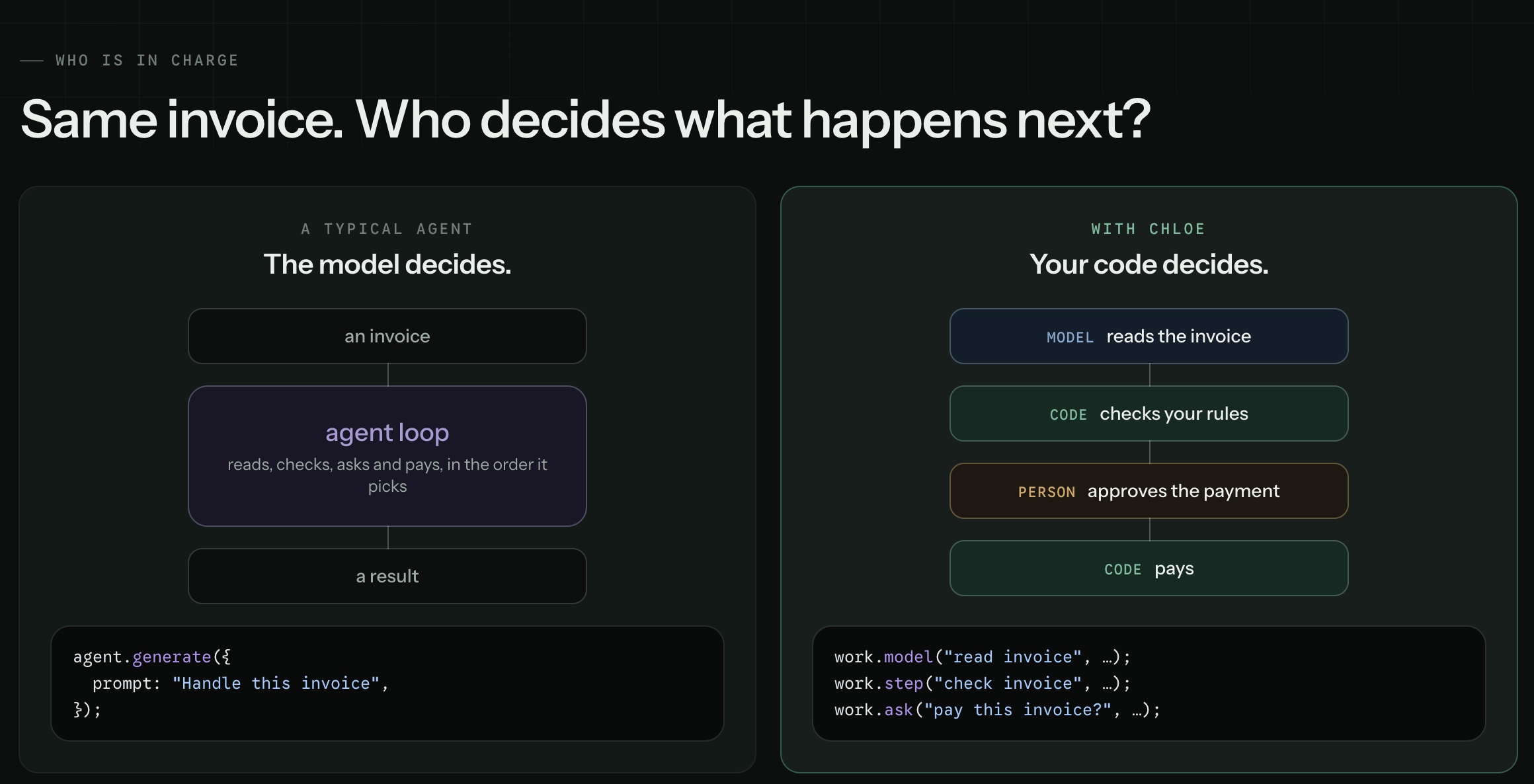
克洛伊一方,满口:
export default defineJob({
  id: "pay-invoice",
  run: async (work) => {
    const invoice = await work.model("read invoice", {
      prompt: work.input.text,
      output: Invoice,
    });

    const problems = await work.step("check invoice", () => checkRules(invoice));
    if (problems.length) return { held: problems };

    const yes = await work.ask("pay this invoice?", {
      question: `Pay ${invoice.vendor} ${invoice.total}?`,
      answer: z.boolean(),
      within: "2d",
      otherwise: false,
    });
    if (yes) await work.step("pay", () => pay(invoice));
    return { paid: yes };
  },
});
对一个要求的回答要对照它命名的形状来检查. 没有模特儿看. 如果需要的话,运行会等上几天,然后在等待时能活过重启.
给模型的量只够一步
四通相唤. 从顶部开始, 只有在你需要的时候才能向下移动.
work.step() | 我知道该怎么做. | 定想:同入同入同出同出同出同出同出同出同出同出同出同出同出同出同出同出同出同出同出同出同出同出同出同出同出同出同出同出同出同出同出同出同出同出同出同出同出同出同出同出同出同出同出同出同出同出同出同出同出同出同出同出同出同出同出同出同出同出同出同出同出同出同出同出同出同出同出同出同出同出同出同出同出同出同出同出同出同出同出同出同出同出同出同出同出同出同出同出同出同出同出同出同出同出同出同出同出同出同出同出同出同出同出同出同出同出同出同出同出同出同出同出同出同出同出同出同出同出同出同出同出同出同出同出同出同出. |
work.model() | 我知道该问什么. | 一个问题,一个打出答案. |
work.agent() | 我知道我想怎样. | 模特儿选顺序,在你的限度内. |
work.ask() | 一个人应该决定. | 跑步要等几天,如果必须的话. |
您的规则、 循环和查询都保留在 TypeScript 中 if 在模型上方
打电话决定是否问。 一个早上,没有报告费用
没什么.
把球交给我,不是钥匙
当你只知道结果时,一个代理步骤会选择命令. 你选什么
用AI SDK自己的话来说,它能够达到并且能够走多远: tools 仅此而已
它可以到达, toolApproval 这些电话中哪一个可以运行, stopWhen 财务报告和审定财务报表
克卢的 budget 它能走多远和花费多少.
export default defineJob({
  id: "order-issues",
  cron: every(15).minutes,
  identity: "Reads what customers wrote in and looks into the ones that need looking into.",
  run: async (work) => {
    const messages = await work.step("load messages", () => unread());

    const looked: string[] = [];
    for (const message of messages) {
      const issue = await work.model("classify issue", {
        prompt: message.text,
        output: Issue,
      });
      if (!issue.needsInvestigation) continue;

      const found = await work.agent("investigate issue", {
        prompt: `Find out what went wrong for customer ${message.customer}, and put it right if a refund will.`,
        tools: { getOrders, pastMessages, refund },
        stopWhen: isStepCount(6),
        budget: 0.05,
      });

      looked.push(`${message.id}: ${found}`);
    }

    return { looked };
  },
});
看看哪个步骤问了一个模型
跑步记录每步有一行, 是什么, 花了多长时间和 多少钱? 一份静悄悄地成长了第二个模特儿的工作 出现了第二个 和更大的数字.
- 完成的一步从记录中重放.
- 因重启而中断的运行因失败而关闭, 下次重新开始 .
- 等待一个人的工作在重启中存活下来.
- 每一个工具呼叫一个代理被记录.
- 同一工作的两跑从不重叠.
一条规则使重播安全: 工作在一步内进行,代码在一旁 步骤只决定. 完成的一步被重放,而不是再次运行,当运行 在等待继续。 外面的一行又在每张简历上运行 所以 不得发送、撰写或花费.
怎么会这样
| 长期工作 | 完成步骤重放在简历上 . |
| 时间表 | Cron in TypeScript, 在你的时区. |
| 任何型号 | 任何提供商,每个工作的模型, 订阅或钥匙. |
| 探员 | 工具、批准和预算,设置步骤. |
| 服务 | 电子邮件 谷歌 文档 脚本 网络. |
| 工具 | 内建的,你自己的,或者任何MCP服务器. |
| 核准 | 跑步要等几天才能得到答案. |
| 频道 | Telegram,Slack,Discord,WhatsApp,电子邮件,您网站上的聊天盒,以及HTTP. |
| 内存 | 笔记和技能 代理,在git. |
| 自我改进 | 代理在其所有者询问时会改变其词,工作和代码. 每一个变化都是你能够解除的承诺. |
| 运行历史 | 每一步,它的输入和答案. |
| 费用 | 每个步骤,每个跑步,每个工作. |
| 测试和测试 | 测试代码,计分提示. |
代码测试。 语已得分.
也不花真正的钱:测试一下真实的工作与站岗 网关,一个eval 回答每个工具 从案件.
npm run test          # the jobs: does it do the thing
npm run evals <id>    # the prompts: did the model decide well
送给你的
大多数个人AI特工在计时器上运行了提示. 克洛伊在查你的密码.
选克洛伊,如果:
- 你想要一个自己的助手,你可以读取,改变和成长为 真实的工作.
- 您想要用代码写您的代理, 并选择哪个步骤 LLM 控件 .
- 您的代理是工作: 在一个时间表上, 从聊天开始, 或者从手工开始.
- 你想看看每一步都做了什么 花了多少钱.
- 你想拥有它:用自己的机器,用任何LLM,在一个过程和一个过程中 SQLite 文件 (中文(简体) ).
选择其他的,如果:
- 您想要 LLM 选择每个步骤, 就像聊天助理所做的那样 .
- 你需要在许多机器上共享工作 或者一个主机平台来运行.
- 你正在制作一个应用 围绕一个模型, 其中聊天是产品.
在节点运行的地方运行
一个进程为页面服务,保持每条克龙行并解答频道. 它的依赖性是zod和AI SDK,它的状态是一个SQLite文件,所以 移动机器正在复制文件夹 .
三个文件,你有一个特工:
package.json           with "type": "module", so node reads your .ts files
chloe.config.ts        the agents this copy runs, and every setting
your-agent/agent.ts    what the agent is: its jobs, tools and channels
一个小特工可以是一个平地 .ts 无文件 chloe.config.ts运行
工作一次并退出,它叫 agent.run({ job, settings })为了继续奔跑,
它的曲线和频道 startChloe({ agents, settings })。 。 。 .
不管怎样, node morning.ts 启动它。 见
实例。 。 。 .
给AI SDK的代理 ToolLoopAgent 移动方式
id, (中文(简体) ), model, (中文(简体) ), purpose, (中文(简体) ), tools, (中文(简体) ), stopWhen 财务报告和审定财务报表 toolApproval 进入
defineAgent 所以每个电话都是
已核准、已编入预算并象任何其他情况一样记下来.
import { anthropic } from "@ai-sdk/anthropic";
import { defineAgent } from "@chloejs/core";
import { tool } from "ai";
import { z } from "zod";

export default defineAgent({
  id: "weather",
  identity: "Says what the weather is.",
  purpose: "Answer about the weather.",
  model: anthropic("claude-opus-5-5"),
  tools: {
    weather: tool({
      description: "Get the weather in a location (in Fahrenheit)",
      inputSchema: z.object({ location: z.string() }),
      execute: async ({ location }) => ({ location, temperature: 72 }),
    }),
  },
});
这个模型在Anthropic上 ANTHROPIC_API_KEY当包裹读到,
不管在设置中的路线。 它的成本是它的象征物 价格
网关的公开列表给出. 调用工具 needsApproval 停下来
并询问其主人是或否,然后从该电话中继续
答话.
设置和秘密
设置是一个关于运行时间如何表现的选择,所以它在配置中进行 (a) 与特工一起,在被打出和被击发的情况下:
export default defineConfig({
  agents: [assistant],
  settings: {
    model: { defaultModel: "anthropic/claude-sonnet-5.5" },
    email: { provider: "resend" },
  },
})
它漏掉的是默认 每个环境都是 Settings 接口
core/settings.ts上面有一条解释 你的编辑告诉
你所写的一切. DEFAULTS 除了它,每个人都是什么
当没有人说, 和表在chloejs.org 读出两者.
一个秘密进入 .env 除了配置,模式600 并且从未承诺:
密码,钥匙和信使,没有别的.
CHLOE_MODEL_KEY=...
CHLOE_CONNECTIONS_RESEND_API_KEY=re_...
CHLOE_AGENTS_ASSISTANT_TELEGRAM=123456789:ABC...
配置每个名称,所以读它显示 每一个键有。 颜色 没有键, 它不会在那里 :
settings: {
  model: { key: process.env.CHLOE_MODEL_KEY },
  connections: { resend: { api_key: process.env.CHLOE_CONNECTIONS_RESEND_API_KEY } },
  agents: { assistant: { telegram: process.env.CHLOE_AGENTS_ASSISTANT_TELEGRAM } },
}
运行时间读取环境中没有其他设置:
配置表示, 或默认 。 任何值都可以保留在 .env 同样的方式,通过
交给你 process.env 和一个名字。 保存的东西就是它
例外, CHLOE_STATE, (中文(简体) ), CHLOE_MEMORY 财务报告和审定财务报表 CHLOE_DB,在配置之前读取
没错.
图标
npx chloe                        # the one process, on 127.0.0.1:3067 unless serve in settings says
npx chloe link                   # a link that opens the page signed in
npx chloe account                # set the one password, or a new one
npx chloe agent <id>             # talk to one agent
npx chloe agent <id> <job>       # run one job now, without waiting for its cron line
npx chloe install                # run it as a service (systemd or launchd), so it survives a reboot
一个过程,一个磁盘. 运行是状态文件夹中的 SQLite 文件
(单位:千美元)data/,或 CHLOE_STATE),除账户外,还有代币和(除非
特工说不是,是记忆 在机器或容器中运行一份副本
其状态文件夹是一个比它活得久的磁盘. 在一个州文件夹上复制了两本
既会点燃每条克龙线, 也会点燃一个将盘子扔到每个
开始忘记一切。 一站最多等待60秒 运行中;
之后的跑步被关闭 因为在下一个开始.
它听着 127.0.0.1:3067,只有这个机器才能到达的地址.
serve: { host, port } 在设置中移动它:容器需要
host: "0.0.0.0" 因此,它周围的机器可以到达, 然后一个代理在
与端口关闭, 因为登录关闭
信任代理写的地址 .
默认私有
Chloe没有给你没有名字的人寄任何东西: 没有遥测,没有你的拷贝 运行,没有远程仪表板。 一个请求离开机器 只为模型, 频道和你的连接。 运行时间服务于自己 仪表板,在它运行的盒子上。 要从别处得到,请使用SSH 隧道, 私人网络, 或是您自己的网络服务器: 见 从另一个机器。 。 。 .
这里有什么
软件包是这个 Repo, 编译成 dist/ 发表。 节点拒绝
任何下方的条状类型 node_modules因此,你安装的是
JavaScript; 您自己的代理文件位于外部 node_modules 节点读取
直接的,这就是为什么 你的项目仍然没有建设步骤.
index.ts     what "@chloejs/core" is when you import it
server.ts    the server, which `npx chloe` runs
model/       asking a model, and tools/, the only thing a model can be handed
load/        what an agent and a job are, and reading them off disk
timer/       cron lines and every(), published as "@chloejs/core/timer"
serve/       the one port: every route, the login, tokens, and serving the page
site/        the dashboard, React, built into site/page/ and shipped built
core/        the floor. steps.ts runs a job, turn.ts runs a prompt, clock.ts
             starts each job when its cron line is due
scorers/     how a run is marked
services/    the work itself, called straight from a job, published as
             "@chloejs/core/services"
channels/    the ways in, for an agent to bind
plugins/     each feature chloe ships that can be taken out, a folder each,
             listed in plugins/index.ts: the channels, Google, Resend, the web
             and memory tools, the subscription routes, self improvement.
             npm run plugins -- remove <name> takes one out
ops/         cli.ts, which is `npx chloe`, and what it runs: the tests, the
             evals, talking to an agent, links, the password, tokens, and
             install.sh. docs.ts writes the guides into the package
docs/        the guides, published filled in as dist/docs/
example/     the shop agent the guides quote, a project of its own. Not published
test-agent/  the agent the tests load. Not published
出入口,没有其他: @chloejs/core, (中文(简体) ), @chloejs/core/services, (中文(简体) ),
@chloejs/core/channels, (中文(简体) ), @chloejs/core/connections, (中文(简体) ), @chloejs/core/scorers, (中文(简体) ),
@chloejs/core/timer, (中文(简体) ), @chloejs/core/test,而且每套工具有一套:
@chloejs/core/tools/gmail, (中文(简体) ), /calendar, (中文(简体) ), /drive, (中文(简体) ), /resend, (中文(简体) ), /email, (中文(简体) ), /web
财务报告和审定财务报表 /fs。 。 。 .
AI是它的一部分
开始工作,谁也不问 添加需要判断的步骤 当你找到它, 并读它的成本.
这些指南是在 docs/,并在软件包中作为 dist/docs/,用于版本
已安装. 互联网档案馆的存檔,存档日期2013-12-04 显示最新数据及其
在每次推到 main所以他们
无法描述不存在的代码版本.
麻省理工学院.