Chloe

chloejs.org: the docs, the examples and the reference.
AI agents where your code is in charge.
Chloe runs your AI agents on your own machine. The work is plain code, and an LLM is asked only when a step needs judgement. Jobs run on a schedule, from a chat or by hand, and the jobs, the runs, the memory and the evals are files you can read, with any LLM.
npm install @chloejs/core
npx chloe setup       # the files, a model, a free port: it asks, and checks
npx chloe             # the agents, the cron lines, one port, and a link that opens the page
- Private. Runs on your machine, in one process and one SQLite file.
- Visible. Every step, its input, its answer and its cost.
- Yours to steer. What an agent changes is a git commit you can undo.
No build step in your project, an edit to a job is live in under a second, and it needs Node 22.18 or newer.
Get started · Examples · Primitives
Start with your own assistant
Most people meet Chloe as their own agent before they build anything else on it, so it is made to be a good one.
setup writes chloe.config.ts and one agent, agents/assistant, with a
purpose and nothing else. Open the link npx chloe prints and tell it what you
want: a note every morning with what is urgent in your mail, a watch on a price,
a reminder before a bill is due. It changes itself to do it, its words, its jobs
and its code, and each change is a commit you can read and undo on the page.
From there it is yours like any other code:
- Reach it where you are. Telegram, Slack, Discord, WhatsApp, email, or the
page. Only the people in
allowFromare answered. - Give it your things, bound. Mail, calendar, Drive and your notes folders, each tool tied to the search or folder you chose, so a turn that goes wrong cannot widen it.
- It remembers. A folder of notes per agent, in a git repository of its own, one commit per run.
- Pay how you like. A Claude subscription, a ChatGPT plan, a Google AI Pro plan, opencode, or a key. A subscription is spent before a key is.
- It tells nobody. No telemetry, no copy of your runs, no remote dashboard.
The routine part is where it pays off. A morning brief that a model writes from scratch every day costs every day and comes back different. In Chloe the fetching, filtering and sending are code, and the model is asked one question. That is the same runtime, and the same file, you would use for a business.
import { defineAgent, prompt } from "@chloejs/core";
import * as gmail from "@chloejs/core/tools/gmail";
import * as calendar from "@chloejs/core/tools/calendar";
import * as web from "@chloejs/core/tools/web";
import { telegramChannel } from "@chloejs/core/channels";
import morningBrief from "./jobs/morning-brief.ts";

export default defineAgent({
  id: "assistant",
  identity: "Reads my mail and calendar, and tells me what matters.",
  purpose: prompt("purpose.md"),
  memory: { folder: "/home/you/notes", commit: true },
  tools: {
    gmailReadEmail: gmail.readEmail({ search: "in:inbox", what: "my inbox" }),
    calendarListEvents: calendar.listEvents({ calendars: ["primary"] }),
    webReadPage: web.readPage(),
  },
  jobs: [morningBrief],
  channels: { telegram: telegramChannel({ allowFrom: [123456789] }) },
});
Or ask your coding agent for the agent you want. npx chloe setup asks nothing
when there is no keyboard and takes every default, and its last lines send the
coding agent to the guides in node_modules/@chloejs/core/dist/docs/, for the
version installed. npx skills add carlosmartinezt/chloejs gets it that far
before anything is installed.
There is no password to set: npx chloe prints a link that opens the page
signed in, once, within the hour, and npx chloe link prints another.
Who is in charge
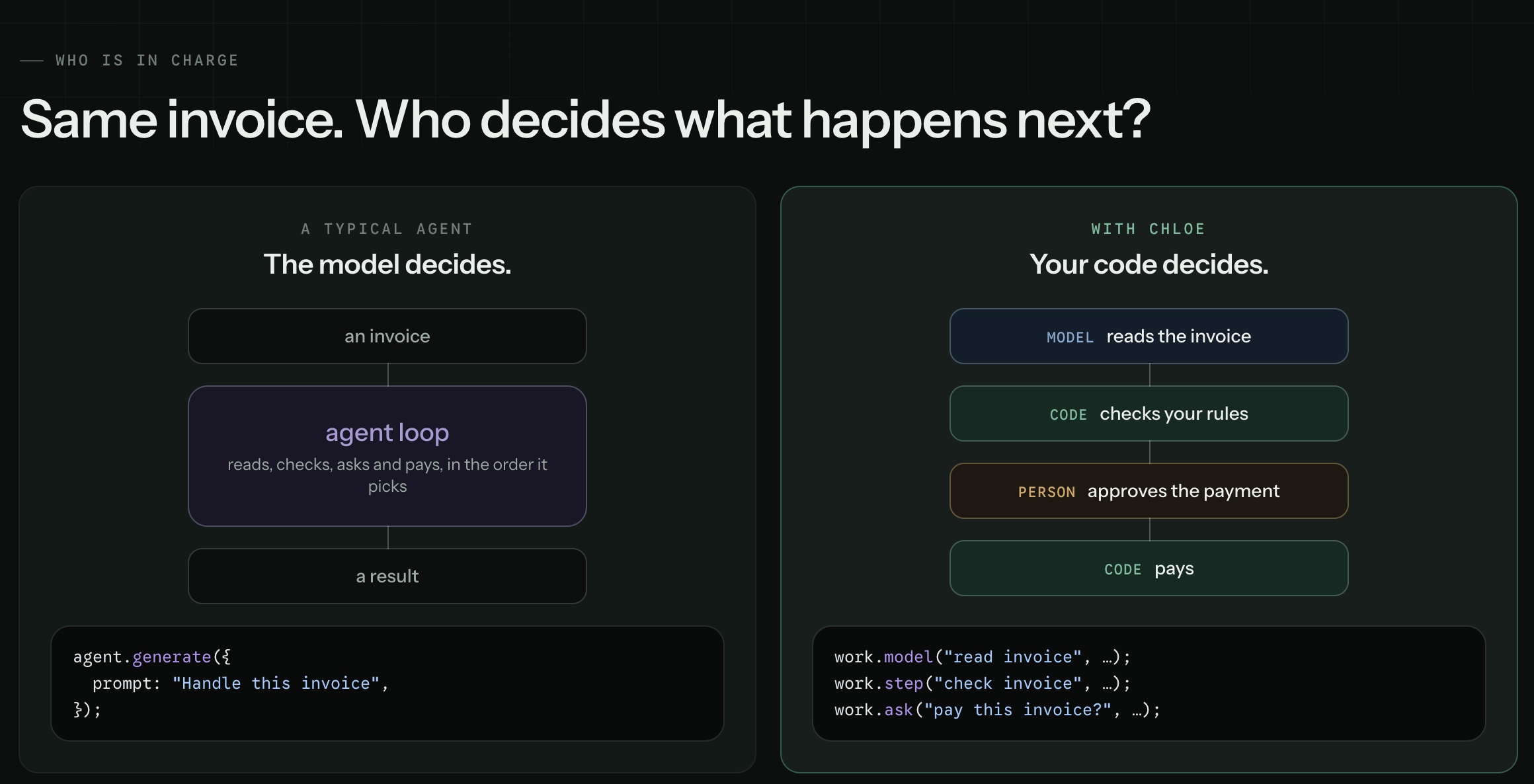
The Chloe side, in full:
export default defineJob({
  id: "pay-invoice",
  run: async (work) => {
    const invoice = await work.model("read invoice", {
      prompt: work.input.text,
      output: Invoice,
    });

    const problems = await work.step("check invoice", () => checkRules(invoice));
    if (problems.length) return { held: problems };

    const yes = await work.ask("pay this invoice?", {
      question: `Pay ${invoice.vendor} ${invoice.total}?`,
      answer: z.boolean(),
      within: "2d",
      otherwise: false,
    });
    if (yes) await work.step("pay", () => pay(invoice));
    return { paid: yes };
  },
});
The answer to an ask is checked against the shape it named. No model reads it. The run waits days if it must, and survives a restart while it waits.
Give the model only as much as the step needs
Four calls. Start at the top, and move down only when you have to.
work.step() | I know what to do. | Deterministic: the same input, the same result, every time. |
work.model() | I know what to ask. | One question, one typed answer. |
work.agent() | I know what I want. | The model picks the order, inside your limits. |
work.ask() | A person should decide. | The run waits, for days if it must. |
Your rules, loops and queries stay in TypeScript, and the if above a model
call decides whether to ask at all. A morning with nothing to report costs
nothing.
Hand over the goal, not the keys
When you only know the outcome, an agent step picks the order. You choose what
it can reach and how far it can go, in the AI SDK's own words: tools is all
it can reach, toolApproval is which of those calls may run, stopWhen and
chloe's budget are how far it can go and what it may spend.
export default defineJob({
  id: "order-issues",
  cron: every(15).minutes,
  identity: "Reads what customers wrote in and looks into the ones that need looking into.",
  run: async (work) => {
    const messages = await work.step("load messages", () => unread());

    const looked: string[] = [];
    for (const message of messages) {
      const issue = await work.model("classify issue", {
        prompt: message.text,
        output: Issue,
      });
      if (!issue.needsInvestigation) continue;

      const found = await work.agent("investigate issue", {
        prompt: `Find out what went wrong for customer ${message.customer}, and put it right if a refund will.`,
        tools: { getOrders, pastMessages, refund },
        stopWhen: isStepCount(6),
        budget: 0.05,
      });

      looked.push(`${message.id}: ${found}`);
    }

    return { looked };
  },
});
See which step asked a model
The run record has one line per step, with what it was, how long it took and what it cost. A job that quietly grew a second model call shows up as a second line and a bigger number.
- A finished step replays from the record.
- A run cut off by a restart is closed as failed, and starts again next time.
- A job waiting on a person survives the restart.
- Every tool call an agent made is recorded.
- Two runs of the same job never overlap.
One rule makes the replay safe: work happens inside a step, and code outside a step only decides. A finished step is replayed, not run again, when a run that was waiting carries on. A line outside one runs again on every resume, so it must not send, write or spend.
What comes with it
| Durable jobs | Finished steps replay on a resume. |
| Schedules | Cron in TypeScript, in your time zone. |
| Any model | Any provider, a model per job, on a subscription or a key. |
| Agents | Tools, approvals and a budget, set where the step is written. |
| Services | Email, Google, files, scripts, the web. |
| Tools | Built in, your own, or any MCP server. |
| Approvals | A run waits days for an answer. |
| Channels | Telegram, Slack, Discord, WhatsApp, email, a chat box on your site, and HTTP. |
| Memory | Notes and skills an agent keeps, in git. |
| Self-improvement | An agent changes its words, jobs and code when its owner asks. Every change is a commit you can undo. |
| Run history | Every step, its input and its answer. |
| Cost | Per step, per run, per job. |
| Tests and evals | Tests for code, scores for prompts. |
Code is tested. Words are scored.
Neither spends real money: a test runs jobs for real against a stand-in gateway, and an eval answers every tool from the case.
npm run test          # the jobs: does it do the thing
npm run evals <id>    # the prompts: did the model decide well
Is it for you
Most personal AI agents run a prompt on a timer. Chloe's run your code.
Pick Chloe if:
- You want an assistant of your own that you can read, change and grow into real jobs.
- You want to write your agents in code, and choose which steps an LLM handles.
- Your agents are jobs: on a schedule, from a chat, or started by hand.
- You want to see what every step did, and what it cost.
- You want to own it: on your own machine, with any LLM, in one process and one SQLite file.
Pick something else if:
- You want an LLM to choose every step, the way a chat assistant does.
- You need the work shared across many machines, or a hosted platform to run it.
- You are building an app around a model, where the chat is the product.
Run it wherever Node runs
One process serves the page, keeps every cron line and answers the channels. Its dependencies are zod and the AI SDK, and its state is one SQLite file, so moving machine is copying a folder.
Three files, and you have an agent:
package.json           with "type": "module", so node reads your .ts files
chloe.config.ts        the agents this copy runs, and every setting
your-agent/agent.ts    what the agent is: its jobs, tools and channels
A small agent can be one plain .ts file with no chloe.config.ts. To run a
job once and exit, it calls agent.run({ job, settings }). To stay running,
with its cron lines and channels, it calls startChloe({ agents, settings }).
Either way, node morning.ts starts it. See
the examples.
An agent written for the AI SDK's ToolLoopAgent moves across as it is: its
id, model, purpose, tools, stopWhen and toolApproval go into
defineAgent unchanged, and chloe's own loop runs them, so each call is
approved, budgeted and written down like any other.
import { anthropic } from "@ai-sdk/anthropic";
import { defineAgent } from "@chloejs/core";
import { tool } from "ai";
import { z } from "zod";

export default defineAgent({
  id: "weather",
  identity: "Says what the weather is.",
  purpose: "Answer about the weather.",
  model: anthropic("claude-opus-5-5"),
  tools: {
    weather: tool({
      description: "Get the weather in a location (in Fahrenheit)",
      inputSchema: z.object({ location: z.string() }),
      execute: async ({ location }) => ({ location, temperature: 72 }),
    }),
  },
});
That model goes to Anthropic on ANTHROPIC_API_KEY, as the package reads it,
whatever the routes in settings say. Its cost is its tokens at the price the
gateway's public list gives. A call to a tool with needsApproval stops the
job and asks its owner yes or no, then carries on from that call with the
answer.
Settings and secrets
A setting is a choice about how the runtime behaves, so it goes in the config with the agents, where it is typed and committed:
export default defineConfig({
  agents: [assistant],
  settings: {
    model: { defaultModel: "anthropic/claude-sonnet-5.5" },
    email: { provider: "resend" },
  },
})
What it leaves out is the default. Every setting is the Settings interface in
core/settings.ts, with its one line of explanation on it, so your editor tells
you what each one is as you write it. DEFAULTS beside it is what each one is
when nobody says, and the table on chloejs.org is read out of both.
A secret goes in .env beside the config, mode 600 and never committed: every
password, key and token, and nothing else.
CHLOE_MODEL_KEY=...
CHLOE_CONNECTIONS_RESEND_API_KEY=re_...
CHLOE_AGENTS_ASSISTANT_TELEGRAM=123456789:ABC...
The config names each one, so reading it shows every key there is. chloe reads no key it is not handed there:
settings: {
  model: { key: process.env.CHLOE_MODEL_KEY },
  connections: { resend: { api_key: process.env.CHLOE_CONNECTIONS_RESEND_API_KEY } },
  agents: { assistant: { telegram: process.env.CHLOE_AGENTS_ASSISTANT_TELEGRAM } },
}
The runtime reads no other setting from the environment: a setting is what the
config says, or its default. Any value can be kept in .env the same way, by
handing it over as process.env and a name. Where things are kept is the one
exception, CHLOE_STATE, CHLOE_MEMORY and CHLOE_DB, read before the config
is.
Commands
npx chloe                        # the one process, on 127.0.0.1:3067 unless serve in settings says
npx chloe link                   # a link that opens the page signed in
npx chloe account                # set the one password, or a new one
npx chloe agent <id>             # talk to one agent
npx chloe agent <id> <job>       # run one job now, without waiting for its cron line
npx chloe install                # run it as a service (systemd or launchd), so it survives a reboot
One process, one disk. The runs are a SQLite file in the state folder
(data/, or CHLOE_STATE), beside the account, the tokens and, unless an
agent says otherwise, its memory. Run one copy, on a machine or in a container
whose state folder is a disk that outlives it. Two copies on one state folder
would both fire every cron line, and a host that throws its disk away on every
start forgets every run. A stop waits up to 60 seconds for the runs that are going;
a run still going after that is closed as cut off at the next start.
It listens on 127.0.0.1:3067, an address only this machine can reach.
serve: { host, port } in settings moves it: a container needs
host: "0.0.0.0" so the machine around it can reach in, and then a proxy in
front with the port closed to everything else, because the login lockout
trusts the address that proxy writes.
Private by default
Chloe sends nothing to anyone you didn't name: no telemetry, no copy of your runs, and no remote dashboard. A request leaves the machine only for the model, the channels and the connections you set up. The runtime serves its own dashboard, on the box it runs on. To reach it from elsewhere, use an SSH tunnel, a private network, or your own web server in front of it: see From another machine.
What is in here
The package is this repo, compiled into dist/ on publish. Node refuses to
strip types for anything under node_modules, so what you install is
JavaScript; your own agent files are outside node_modules and node reads
those directly, which is why there is still no build step in your project.
index.ts     what "@chloejs/core" is when you import it
server.ts    the server, which `npx chloe` runs
model/       asking a model, and tools/, the only thing a model can be handed
load/        what an agent and a job are, and reading them off disk
timer/       cron lines and every(), published as "@chloejs/core/timer"
serve/       the one port: every route, the login, tokens, and serving the page
site/        the dashboard, React, built into site/page/ and shipped built
core/        the floor. steps.ts runs a job, turn.ts runs a prompt, clock.ts
             starts each job when its cron line is due
scorers/     how a run is marked
services/    the work itself, called straight from a job, published as
             "@chloejs/core/services"
channels/    the ways in, for an agent to bind
plugins/     each feature chloe ships that can be taken out, a folder each,
             listed in plugins/index.ts: the channels, Google, Resend, the web
             and memory tools, the subscription routes, self improvement.
             npm run plugins -- remove <name> takes one out
ops/         cli.ts, which is `npx chloe`, and what it runs: the tests, the
             evals, talking to an agent, links, the password, tokens, and
             install.sh. docs.ts writes the guides into the package
docs/        the guides, published filled in as dist/docs/
example/     the shop agent the guides quote, a project of its own. Not published
test-agent/  the agent the tests load. Not published
The entrances, and no others: @chloejs/core, @chloejs/core/services,
@chloejs/core/channels, @chloejs/core/connections, @chloejs/core/scorers,
@chloejs/core/timer, @chloejs/core/test, and one per set of tools:
@chloejs/core/tools/gmail, /calendar, /drive, /resend, /email, /web
and /fs.
AI is one part of it
Start with a job that asks nobody anything. Add the step that needs judgement when you find it, and read what it cost.
The guides are in docs/, and in the package as dist/docs/, for the version
installed. chloejs.org shows the latest, and its
reference pages are read out of this source on every push to main, so they
cannot describe a version of the code that does not exist.
MIT.