@computools/react-native-dynamic-app-icon 🚀
Dynamically change the app icon in React Native with cross-platform support for iOS and Android. Perfect for themes, events, and personalization.
| iOS | Android |
|---|---|
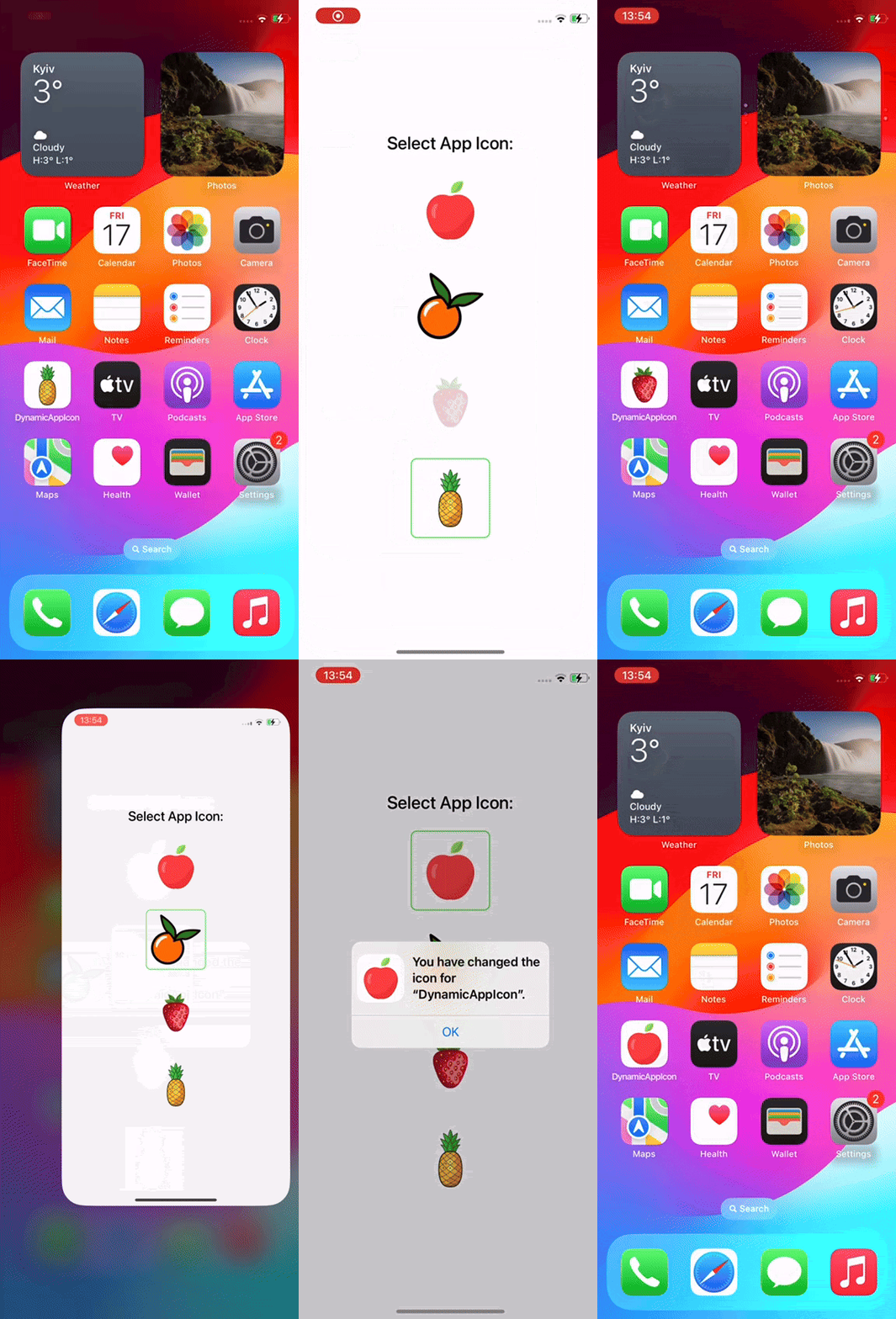
|
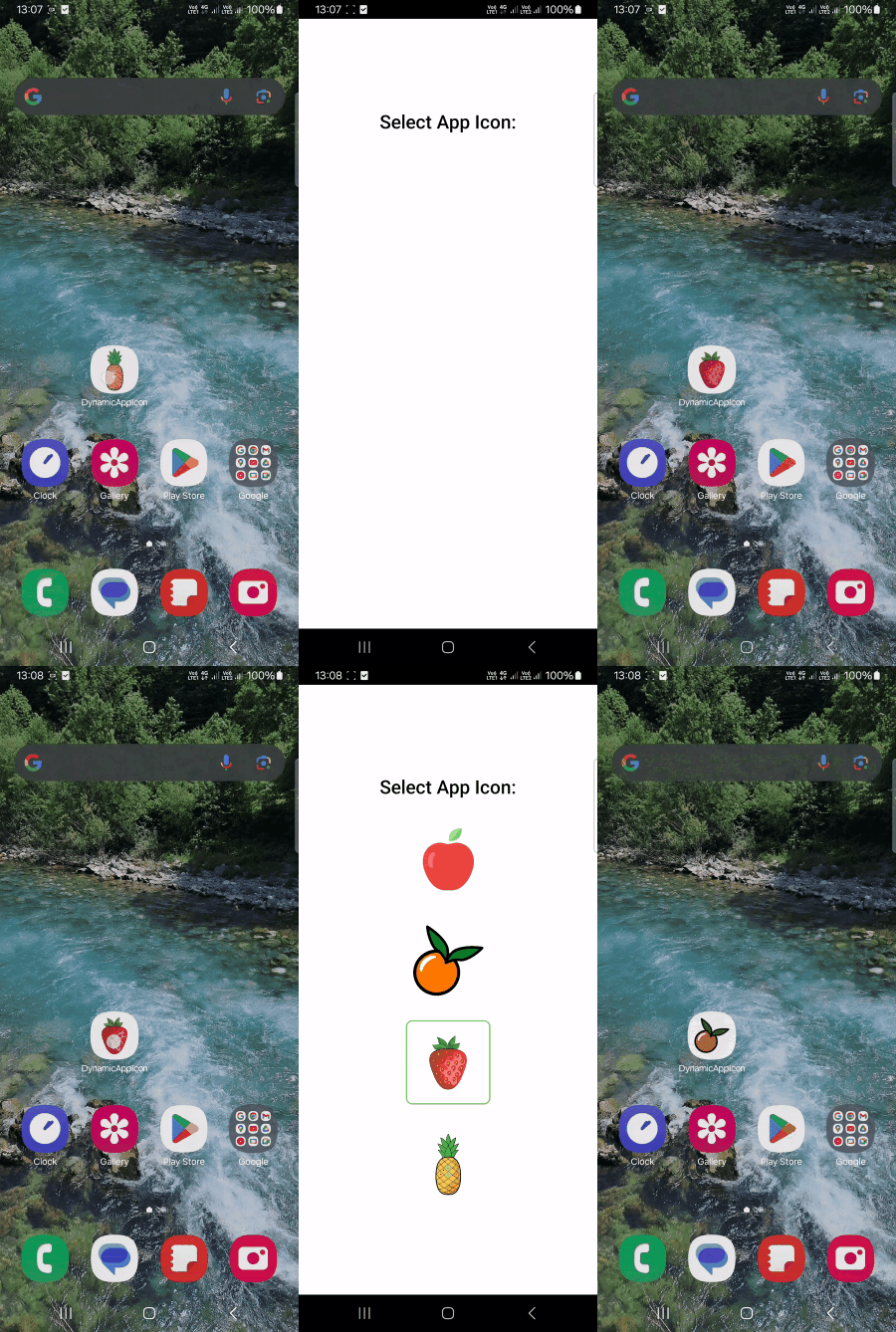
|
Installation
Using Yarn
yarn add @computools/react-native-dynamic-app-icon
Using npm
npm i @computools/react-native-dynamic-app-icon
iOS Set Up
After installing the package, run:
cd ios
pod install
Generate App Icons
Generate app icons using a tool like appicon.co to ensure all required sizes and formats are included.
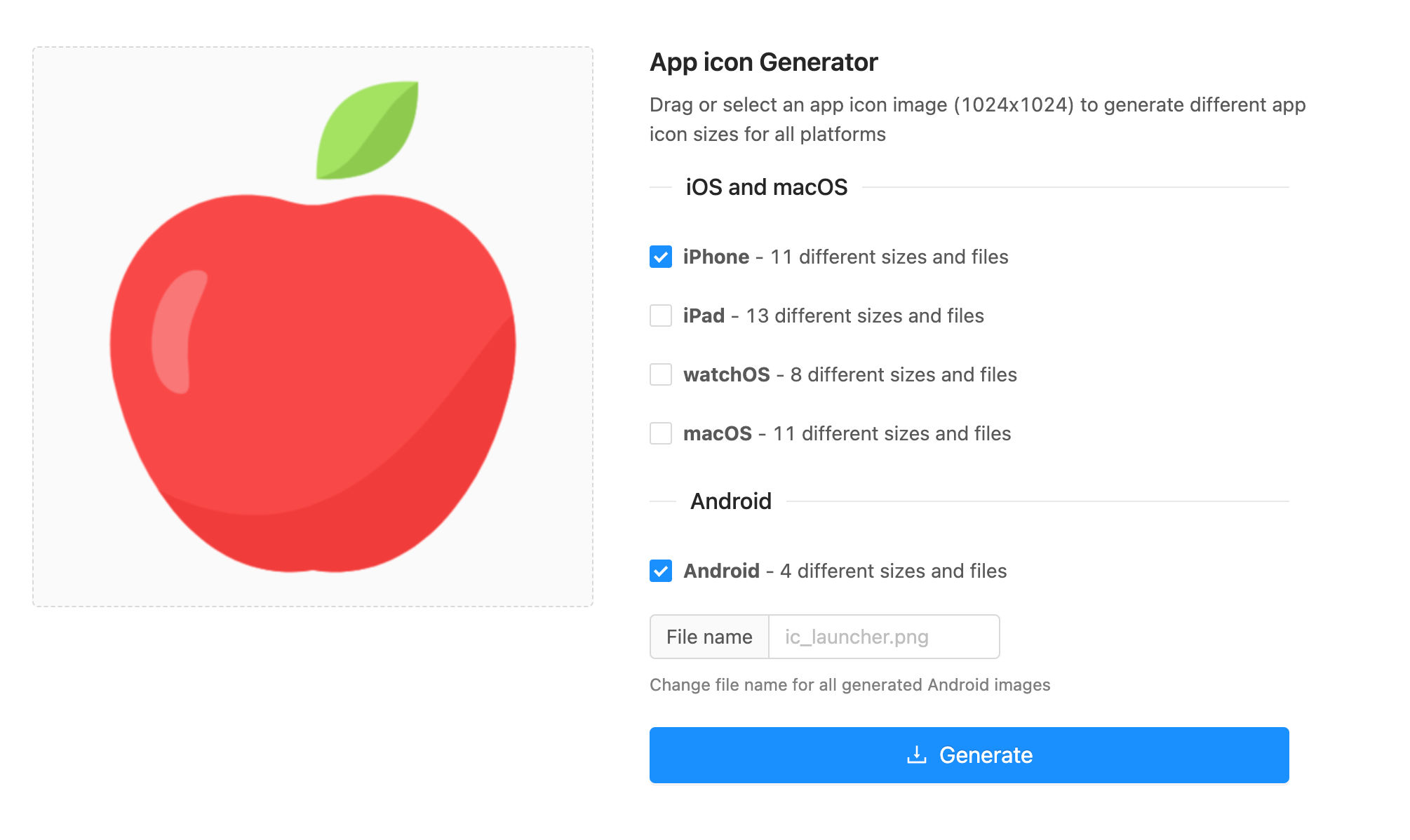
App Icons Set Up
Android
Step 1: Add App Icons Files
- Rename generated files to ic_launcher_<icon_type>.png e.g.
ic_launcher_orange.png. - Rename default icon files to to
ic_launcher_default.png - Move app icons files to
android/app/src/main/res/mipmap-*.
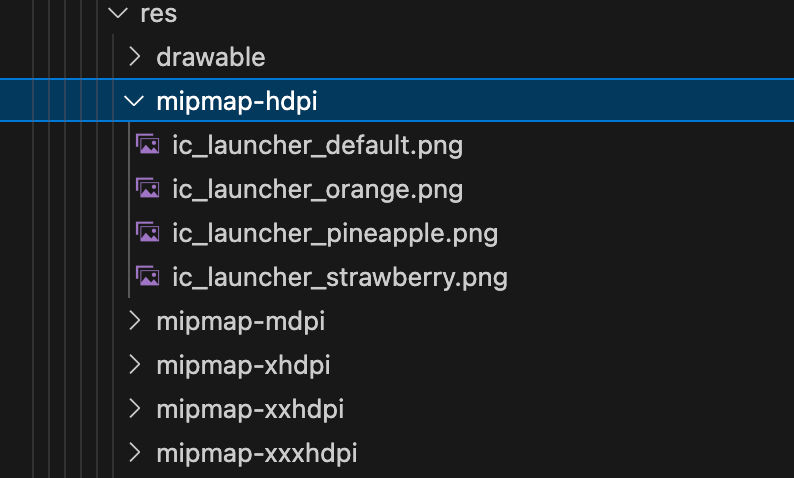
Step 2: Modify AndroidManifest.xml
- Add activity-alias for each icon.
<activity-alias
  android:name=".MainActivityPineapple" // .MainActivity + <icon-type>
  android:enabled="false"
  android:exported="true"
  android:icon="@mipmap/ic_launcher_pineapple"
  android:targetActivity=".MainActivity">
  <intent-filter>
    <action android:name="android.intent.action.MAIN" />
    <category android:name="android.intent.category.LAUNCHER" />
  </intent-filter>
</activity-alias>
Important: android:enabled="true" should be only for default activity-alias, other should have android:enabled="false".
- Remove
<category android:name="android.intent.category.LAUNCHER" />for activity-alias withandroid:enabled="true".
Notes:
- Don’t forget to use the correct file for
android:iconandandroid:name.android:nameis .MainActivity + e.g forandroid:icon=ic_launcher_orangeandroid:name=".MainActivityOrange". - Don't forget to change
android:iconto"@mipmap/ic_launcher_default"in<application>tag. - Make sure you have activity-alias with
android:icon=ic_launcher_default,android:name=".MainActivityDefault".
AndroidManifest.xml example:
<manifest xmlns:android="http://schemas.android.com/apk/res/android">

  <uses-permission android:name="android.permission.INTERNET" />

  <application
    android:name=".MainApplication"
    android:label="@string/app_name"
    android:icon="@mipmap/ic_launcher_default"
    android:allowBackup="false"
    android:theme="@style/AppTheme"
    android:supportsRtl="true">
    <activity
      android:name=".MainActivity"
      android:label="@string/app_name"
      android:configChanges="keyboard|keyboardHidden|orientation|screenLayout|screenSize|smallestScreenSize|uiMode"
      android:launchMode="singleTask"
      android:windowSoftInputMode="adjustResize"
      android:exported="true">
      <intent-filter>
        <action android:name="android.intent.action.MAIN" />
        <category android:name="android.intent.category.LAUNCHER" />
      </intent-filter>
    </activity>
    <activity-alias
      android:name=".MainActivityDefault"
      android:enabled="true"
      android:exported="true"
      android:icon="@mipmap/ic_launcher_default"
      android:targetActivity=".MainActivity">
      <intent-filter>
        <action android:name="android.intent.action.MAIN" />
      </intent-filter>
    </activity-alias>
    <activity-alias
      android:name=".MainActivityPineapple"
      android:enabled="false"
      android:exported="true"
      android:icon="@mipmap/ic_launcher_pineapple"
      android:targetActivity=".MainActivity">
      <intent-filter>
        <action android:name="android.intent.action.MAIN" />
        <category android:name="android.intent.category.LAUNCHER" />
      </intent-filter>
    </activity-alias>
    <activity-alias
      android:name=".MainActivityStrawberry"
      android:enabled="false"
      android:exported="true"
      android:icon="@mipmap/ic_launcher_strawberry"
      android:targetActivity=".MainActivity">
      <intent-filter>
        <action android:name="android.intent.action.MAIN" />
        <category android:name="android.intent.category.LAUNCHER" />
      </intent-filter>
    </activity-alias>
    <activity-alias
      android:name=".MainActivityOrange"
      android:enabled="false"
      android:exported="true"
      android:icon="@mipmap/ic_launcher_orange"
      android:targetActivity=".MainActivity">
      <intent-filter>
        <action android:name="android.intent.action.MAIN" />
        <category android:name="android.intent.category.LAUNCHER" />
      </intent-filter>
    </activity-alias>
  </application>
</manifest>
iOS
Step 1: Add App Icons Files
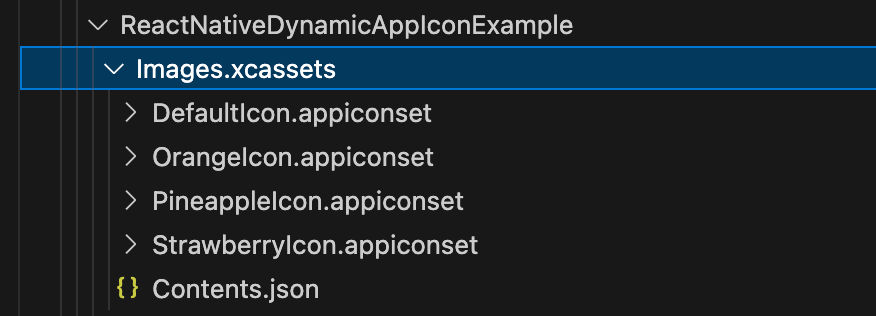
- Rename generated
AppIcon.appiconsetfolders to<icon-type>Icon.appiconset. - Rename default
AppIcon.appiconsettoDefaultIcon.appiconset. - Move all .appiconset folders into
ios/<app-name>/Images.xcassets. - Update
foldervalues in eachContents.jsonfile e.g"folder": "Images.xcassets/PineappleIcon.appiconset/".
Step 2: Set up App Icon in Xcode
- Open Xcode;
- Go to app's
Generalsettings; - Scroll to
App Icons and Launch Screen; - Set
App IcontoDefaultIconand check theInclude all app icon assetscheckbox below.

Step 3: Modify Info.plist
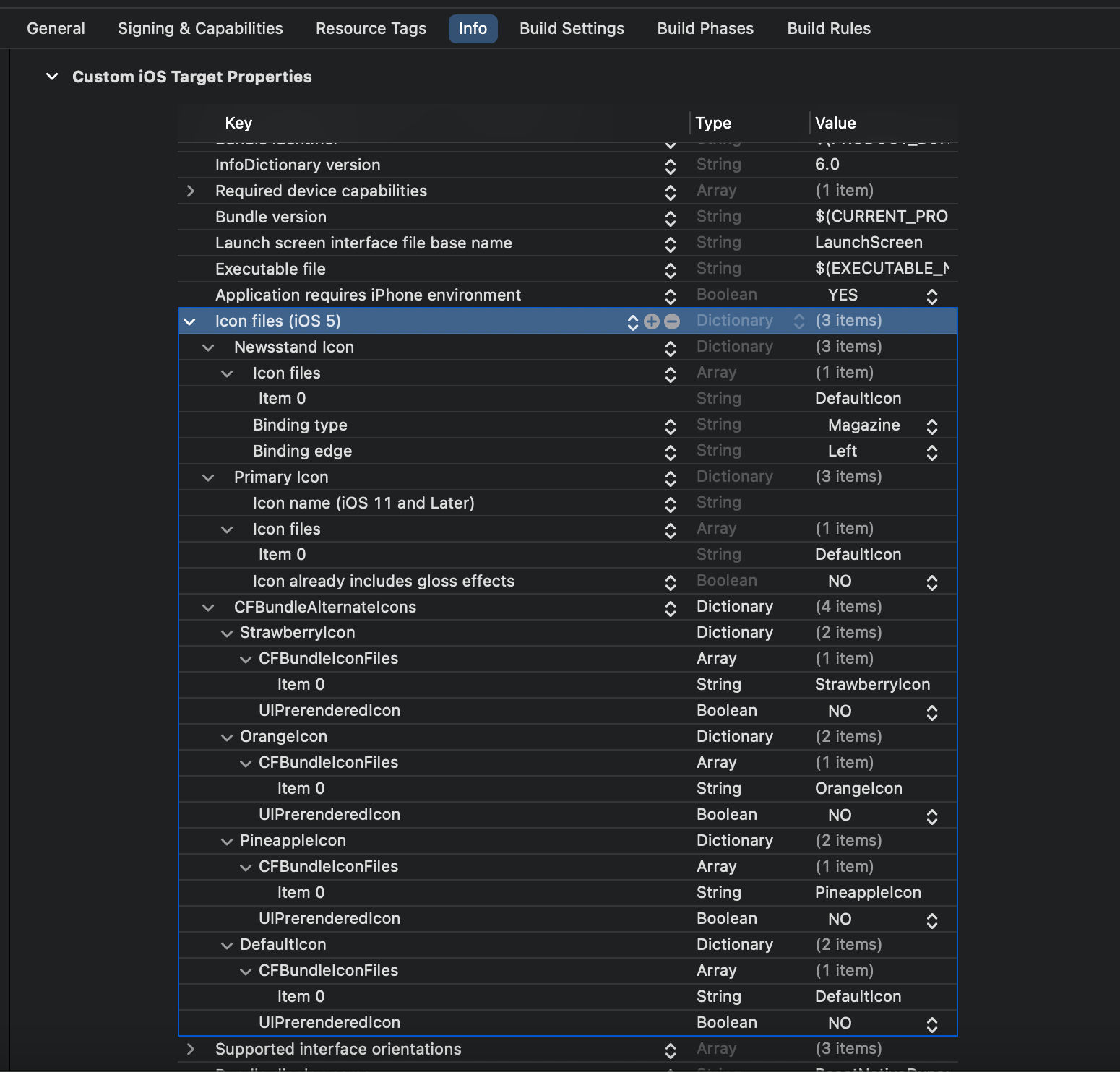
- Open Xcode, go to
Infoand insert a key forCFBundleIcons. - Within
CFBundleIconsdictionary add keyCFBundleAlternateIcons. - Within
CFBundleAlternateIconsadd keys for alternative icons:
- The
keyis the name you will reference from within code. - Set the first
arrayitem to the name of the target .appiconset.
- Within
CFBundleIconsset the default icon name inCFBundlePrimaryIconandUINewsstandIcon-> Icon files -> Item 0.
Info.plist example:
<key>CFBundleIcons</key>
<dict>
  <key>CFBundleAlternateIcons</key>
  <dict>
    <key>DefaultIcon</key>
    <dict>
      <key>CFBundleIconFiles</key>
      <array>
        <string>DefaultIcon</string>
      </array>
      <key>UIPrerenderedIcon</key>
      <false/>
    </dict>
    <key>OrangeIcon</key>
    <dict>
      <key>CFBundleIconFiles</key>
      <array>
        <string>OrangeIcon</string>
      </array>
      <key>UIPrerenderedIcon</key>
      <false/>
    </dict>
    <key>PineappleIcon</key>
    <dict>
      <key>CFBundleIconFiles</key>
      <array>
        <string>PineappleIcon</string>
      </array>
      <key>UIPrerenderedIcon</key>
      <false/>
    </dict>
    <key>StrawberryIcon</key>
    <dict>
      <key>CFBundleIconFiles</key>
      <array>
        <string>StrawberryIcon</string>
      </array>
      <key>UIPrerenderedIcon</key>
      <false/>
    </dict>
  </dict>
  <key>CFBundlePrimaryIcon</key>
  <dict>
    <key>CFBundleIconFiles</key>
    <array>
      <string>DefaultIcon</string>
    </array>
    <key>CFBundleIconName</key>
    <string></string>
    <key>UIPrerenderedIcon</key>
    <false/>
  </dict>
  <key>UINewsstandIcon</key>
  <dict>
    <key>CFBundleIconFiles</key>
    <array>
      <string>DefaultIcon</string>
    </array>
    <key>UINewsstandBindingEdge</key>
    <string>UINewsstandBindingEdgeLeft</string>
    <key>UINewsstandBindingType</key>
    <string>UINewsstandBindingTypeMagazine</string>
  </dict>
</dict>
Methods
| Method | Description | Parameters | Returns |
|---|---|---|---|
changeIcon<T extends string>(iconName: T) | Changes the app's icon to the specified icon. Note: The package automatically closes the app on Android after changing the app icon. This behavior is implemented to prevent duplicate icons and requires no additional action from the user. | iconName (T): The name of the icon to switch to. | Promise<void>: Resolves with void or rejects with an error. |
getIcon<T extends string>() | Retrieves the name of the currently active app icon. | None | Promise<T>: Resolves with the name of the current used icon or rejects with an error. |
Usage
Change Icon
import { changeIcon } from '@computools/react-native-dynamic-app-icon';

const setAppIcon = async () => {
  try {
    await changeIcon('Orange');
  } catch (error) {
    // error handling
  }
}

setAppIcon();
Get Icon
import { getIcon } from '@computools/react-native-dynamic-app-icon';

const getCurrentIcon = async () => {
  try {
    const currentIcon = await getIcon();
    // the logic of saving the currentIcon or other
  } catch (error) {
    // error handling
  }
}

getCurrentIcon();
Contributing
See the contributing guide to learn how to contribute to the repository and the development workflow.
License
MIT
Made with create-react-native-library