英语 · 法语
@ddd-ts-kit / s3
内核 FileStorage 任何S3协议提供商:AWS S3、MinIO、OVHcloud Object
仓库,Scaleway, Cloudflare R2,车库。文件的内容以部分形式流到bucket中,
永远不会在内存中完整,也永远不会在数据库中完整;骨料保持了 StoredFile 那 put
的回报。中没有 domain/ 或者 application/ 处理程序依赖于
FileStorage 端口,平台绑定此适配器。
npm i @ddd-ts-kit/s3 @aws-sdk/client-s3 @aws-sdk/lib-storage @aws-sdk/s3-request-presigner
官方AWS SDK v3的三个包是可选的对等体,根据3.1150编写。
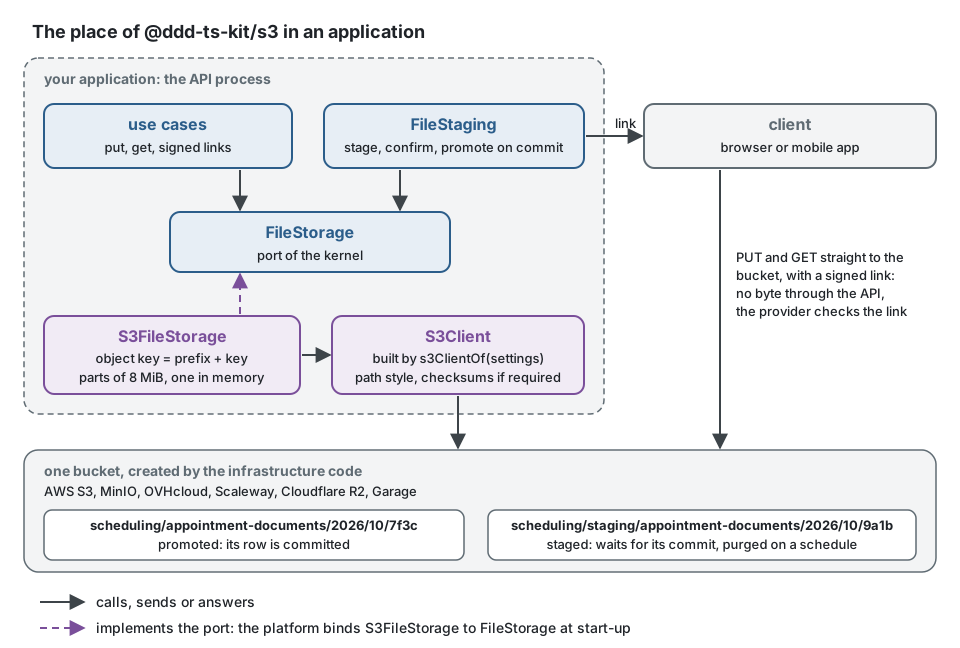
用例使用诸如的密钥与端口对话 appointment-documents/2026/10/7f3c,
生成的 TenantFileKeys, FileKeys 核心:地区,年,月,然后
一个来自 IdGenerator (和 tenants/<tenant>/ 在他们之前(当作品命名一个租户时)。
适配器将其前缀放在每个键(scheduling/appointment-documents/2026/10/7f3c 在
桶),和 FileStaging 把 staging/ 在等待提交的文件的键之前
(scheduling/staging/appointment-documents/2026/10/9a1b). 文件的字节从
客户端到桶的部分,或者从API到桶的部分,而数据库只保留
参考。
作文根
import type { FileStorage } from '@ddd-ts-kit/kernel';
import { S3FileStorage, s3ClientOf } from '@ddd-ts-kit/s3';

declare const config: {
  readonly storage: {
    readonly endpoint?: string;
    readonly region: string;
    readonly accessKeyId: string;
    readonly secretAccessKey: string;
    readonly bucket: string;
  };
};

const { endpoint, region, accessKeyId, secretAccessKey, bucket } = config.storage;

export const files: FileStorage = new S3FileStorage({
  client: s3ClientOf({
    ...(endpoint === undefined ? {} : { endpoint }), // left out for AWS; http://localhost:9000 for MinIO
    region, // 'auto' for R2
    accessKeyId,
    secretAccessKey,
  }),
  bucket, // created by the infrastructure code, never by the application
  prefix: 'scheduling/', // optional: several applications in one bucket
});
s3ClientOf 当给定端点(MinIO和大多数自托管)时设置路径样式寻址
服务器需要校验和),并且只在操作需要校验和时才计算校验和
SDK对每个请求发送一个校验和,一些非AWS的提供商会拒绝
这将绑定一个签名的上传链接到一个空的主体。手工构建的客户机也可以工作。
的选项 S3FileStorage:
| 选项 | 默认的 | |
|---|---|---|
client | 要求 | 一个 S3Client,从 s3ClientOf 或者手工制作 |
bucket | 要求 | 它必须存在:适配器不会创建它 |
prefix | 无 | 以结尾的有效密钥 /,把每把钥匙放在前面;构造者拒绝另一个 |
partSize | 8 MiB | 上传的每个部分的大小,至少5mib:每次上传所占用的最大内存 |
clock | 系统时钟 | 给出了 expiresAt 带符号的链接返回 |
处理程序依赖于端口,而不是SDK:
// Instead of: the handler speaks S3, holds the whole file in memory, and names the bucket
const body = Buffer.concat(await Array.fromAsync(rows));
await s3.send(new PutObjectCommand({ Bucket: 'acme-files', Key: `exports/${id}.csv`, Body: body }));
import { FileKeys, FileStorage, type StoredFile } from '@ddd-ts-kit/kernel';

// Write: the port of the kernel; the platform binds S3FileStorage to it, a test InMemoryFileStorage.
export class ExportAppointments {
  constructor(
    private readonly files: FileStorage,
    private readonly keys: FileKeys,
  ) {}

  async execute(csv: AsyncIterable<Uint8Array>): Promise<{ readonly file: StoredFile; readonly link: string }> {
    const key = this.keys.next('appointment-exports');

    // Streams to the bucket in parts; beyond 50 MiB, FILE_TOO_LARGE, and nothing is left under the key.
    const file = await this.files.put(key, csv, { mediaType: 'text/csv', maxBytes: 50 * 1_048_576 });

    // A presigned GetObject, computed locally: no request reaches the bucket.
    const { url } = await this.files.signedDownloadUrl(key, { expiresInSeconds: 300, fileName: 'appointments.csv' });

    return { file, link: url };
  }
}
它是做什么的
| 端口的方法 | 在桶上 |
|---|---|
put(key, stream, { mediaType, maxBytes }) | 的多部分上传 partSize 部分(默认为8 MiB,每次一个在内存中)或单个 PutObject 当内容适合于一个部分时;内容在它的路上被计数和散列,并被拒绝 FILE_TOO_LARGE 除了 maxBytes,它将终止上传并保留前一个对象 |
get, stat | GetObject 作为一条小溪, HeadObject; undefined 当对象不存在时,当无法到达服务时拒绝 |
delete | DeleteObject,幂等 |
copy, move | CopyObject 由服务(和)完成 DeleteObject 对于移动),每个对象最多5 GiB |
list(prefix) | ListObjectsV2一页接一页 |
signedDownloadUrl | 一个presigned GetObject 回答与 Content-Disposition: attachment,当给定一个时使用文件名 |
signedUploadUrl | 一个presigned PutObject 他的签名覆盖了 content-type:服务拒绝其他媒体类型 |
校验和(sha256:<hex>)由 put,内容流时计算;这个
巴克特没有保存它,所以 stat 不返回1。通过签名链接上传的文件
被测量、检查和散列了吗 FileStaging.confirm 内核,它把它读回来。
端口拒绝的密钥(../escape)被拒绝了 INVALID_FILE_KEY,并要求链接
一个多小时 INVALID_FILE_URL_EXPIRY,在任何请求之前。签名不需要请求
或者:从凭据中计算已签名的链接,并且只有提供者检查它
客户端使用它。
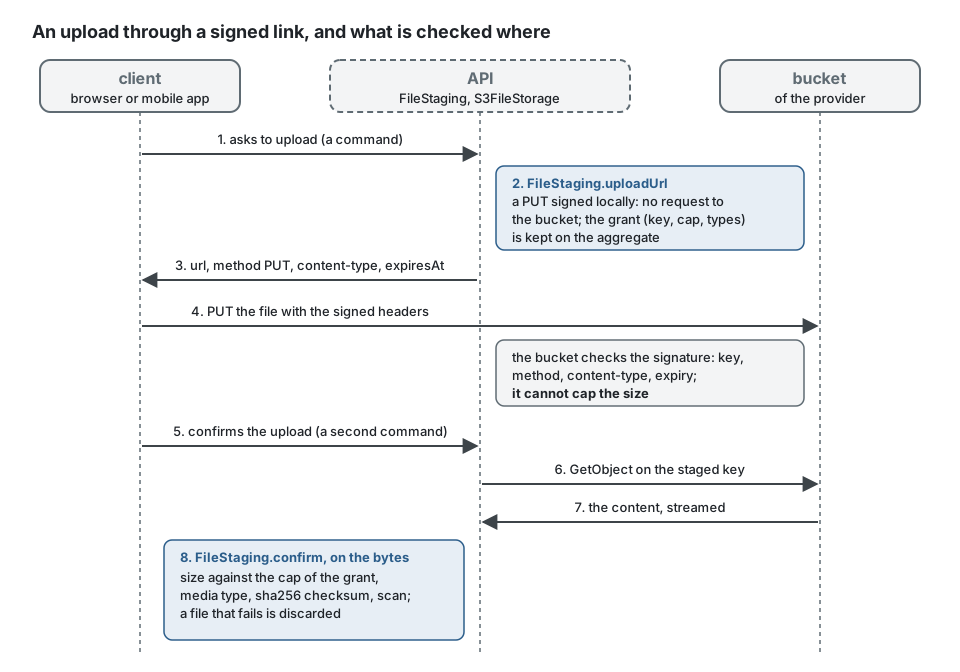
客户端发送的文件,完全按照链接说,它的头是给定的:
import type { SignedUpload } from '@ddd-ts-kit/kernel';

// In the client: the signature covers the content-type, so the headers are sent as they are.
export async function sendFile(link: SignedUpload, file: Blob): Promise<void> {
  const response = await fetch(link.url, { method: link.method, headers: link.headers, body: file });

  if (!response.ok) {
    throw new Error(`The storage refused the upload: ${response.status}`); // 403 once expired, or for another type
  }
}
限制
- 签名上传链接不能限制发送内容的大小(只有预先指定的POST策略可以):
它的
maxBytes不是由服务强制执行的,并且FileStaging.confirm测量文件 服务器保留了超出授权上限的权限,并将其丢弃。 - 复制并移动,通过
CopyObject,协议将每个对象限制为5 GiB。 - 一次上传最多有10000个部分:每个部分有8mib,一个文件大约有78gib。提高
partSize对于较大的文件。 - 的生命周期规则、版本控制、对象锁定和桶的加密都是 Bucket,由部署的基础结构代码生成,而不是由此适配器生成。
测试
每个规格在单元运行中运行:存储到达,通过真正的SDK,它的签名者和它的
HTTP传输,一个S3服务器,测试在它自己的进程中在一个空闲端口上启动
(test/support/server/). 它在标头和签名链接中检查签名版本4,并且
像MinIO一样回答存储请求:对象,副本,逐页前缀列表,
多部分上传,已签名下载保存的名称,链接的过期(其时钟)
不用等待就继续前进)。 fileStorageContract 的 @ddd-ts-kit/testing/contracts (再出口
由 @ddd-ts-kit/s3/testing)运行它。与 DDD_TS_KIT_TEST_S3_ENDPOINT,如
管道的集成作业,相同的规范在真实服务器上运行第二次,这
让记忆中的人保持诚实。上游MinIO项目停止在
2025年:管道运行 pgsty/minio,从相同的来源建立,由文摘固定
(pipeline/github/scripts/start-minio.sh)。
docker run -d --name minio -p 127.0.0.1:9000:9000 -e MINIO_ROOT_USER=ddd-ts-kit -e MINIO_ROOT_PASSWORD=ddd-ts-kit-secret pgsty/minio:RELEASE.2026-08-04T00-00-00Z server /data
DDD_TS_KIT_TEST_S3_ENDPOINT=http://localhost:9000 npx vitest run packages/s3
相同的规格在协议的另一个服务器上运行: DDD_TS_KIT_TEST_S3_REGION (us-east-1 由
默认的), DDD_TS_KIT_TEST_S3_ACCESS_KEY 和 DDD_TS_KIT_TEST_S3_SECRET_KEY 命名其区域和
钥匙,还有水桶 ddd-ts-kit-test 在键可以创建时创建。手动运行一次
在Garage v2.1.0(2026-10-18)上,区域 garage: 34项测试通过。其他的供应商
文档/工具/ file-storage.md 都没有经过验证。
一个项目在其组合堆栈的MinIO上对同一个套件持有自己的绑定:每个测试 在自己的前缀下写入,因此测试共享一个bucket,而不会看到彼此的bucket 文件。
import { randomBytes } from 'node:crypto';
import { beforeEach, describe, expect, it } from 'vitest';
import { S3FileStorage, s3ClientOf } from '@ddd-ts-kit/s3';
import { fileStorageContract } from '@ddd-ts-kit/s3/testing';

const endpoint = process.env['S3_TEST_ENDPOINT'] ?? '';

// Skipped without a server; the bucket is created beforehand, as in a deployment.
fileStorageContract(
  { describe: describe.runIf(endpoint !== ''), it, expect, beforeEach },
  {
    name: 'S3FileStorage on MinIO',
    createStorage: () =>
      new S3FileStorage({
        client: s3ClientOf({ endpoint, region: 'us-east-1', accessKeyId: 'minio', secretAccessKey: 'minio-secret' }),
        bucket: 'acme-files-test',
        prefix: `run-${randomBytes(6).toString('hex')}/`,
      }),
    // The links of a real server expire in real time.
    elapse: (ms) => new Promise((resolve) => setTimeout(resolve, ms)),
  },
);
另一个供应商
谷歌云存储和Azure Blob存储使用自己的协议。连接器:用于…之一的连接器
它们是一个类扩展 FileStorage 通过的内核 fileStorageContract 反对
真实服务或其模拟器(fake-gcs-server, Azurite):参见
文档/工具/ file-storage.md.