English · Français
@ddd-ts-kit/s3
The kernel FileStorage on any provider of the S3 protocol: AWS S3, MinIO, OVHcloud Object
Storage, Scaleway, Cloudflare R2, Garage. The content of a file streams to the bucket in parts,
never whole in memory and never in the database; the aggregate keeps the StoredFile that put
returns. Nothing in domain/ or application/ imports this package: handlers depend on the
FileStorage port, and the platform binds this adapter.
npm i @ddd-ts-kit/s3 @aws-sdk/client-s3 @aws-sdk/lib-storage @aws-sdk/s3-request-presigner
The three packages of the official AWS SDK v3 are optional peers, written against 3.1150.
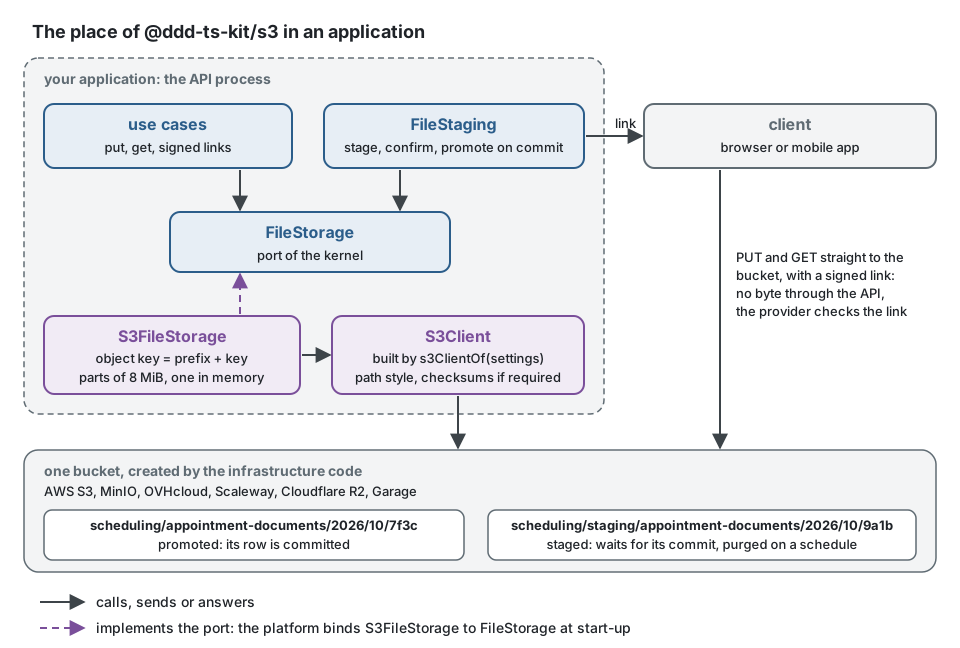
The use cases speak to the port with keys such as appointment-documents/2026/10/7f3c,
generated by TenantFileKeys, the FileKeys of the kernel: the area, the year, the month, then
an id from the IdGenerator (and tenants/<tenant>/ before them when the work names a tenant).
The adapter puts its prefix before every key (scheduling/appointment-documents/2026/10/7f3c in
the bucket), and FileStaging puts staging/ before the key of a file that waits for its commit
(scheduling/staging/appointment-documents/2026/10/9a1b). The bytes of a file go from the
client to the bucket, or from the API to the bucket in parts, and the database keeps only the
reference.
Composition root
import type { FileStorage } from '@ddd-ts-kit/kernel';
import { S3FileStorage, s3ClientOf } from '@ddd-ts-kit/s3';

declare const config: {
  readonly storage: {
    readonly endpoint?: string;
    readonly region: string;
    readonly accessKeyId: string;
    readonly secretAccessKey: string;
    readonly bucket: string;
  };
};

const { endpoint, region, accessKeyId, secretAccessKey, bucket } = config.storage;

export const files: FileStorage = new S3FileStorage({
  client: s3ClientOf({
    ...(endpoint === undefined ? {} : { endpoint }), // left out for AWS; http://localhost:9000 for MinIO
    region, // 'auto' for R2
    accessKeyId,
    secretAccessKey,
  }),
  bucket, // created by the infrastructure code, never by the application
  prefix: 'scheduling/', // optional: several applications in one bucket
});
s3ClientOf sets path-style addressing when an endpoint is given (MinIO and most self-hosted
servers need it) and computes checksums only when an operation requires one: the default of the
SDK sends a checksum with every request, which several providers that are not AWS refuse, and
which would bind a signed upload link to an empty body. A client built by hand works too.
The options of S3FileStorage:
| Option | Default | |
|---|---|---|
client | required | an S3Client, from s3ClientOf or built by hand |
bucket | required | it must exist: the adapter never creates one |
prefix | none | a valid key ending with /, put before every key; the constructor refuses another |
partSize | 8 MiB | the size of each part of an upload, at least 5 MiB: the most held in memory per upload |
clock | the system clock | gives the expiresAt the signed links return |
A handler depends on the port, never on the SDK:
// Instead of: the handler speaks S3, holds the whole file in memory, and names the bucket
const body = Buffer.concat(await Array.fromAsync(rows));
await s3.send(new PutObjectCommand({ Bucket: 'acme-files', Key: `exports/${id}.csv`, Body: body }));
import { FileKeys, FileStorage, type StoredFile } from '@ddd-ts-kit/kernel';

// Write: the port of the kernel; the platform binds S3FileStorage to it, a test InMemoryFileStorage.
export class ExportAppointments {
  constructor(
    private readonly files: FileStorage,
    private readonly keys: FileKeys,
  ) {}

  async execute(csv: AsyncIterable<Uint8Array>): Promise<{ readonly file: StoredFile; readonly link: string }> {
    const key = this.keys.next('appointment-exports');

    // Streams to the bucket in parts; beyond 50 MiB, FILE_TOO_LARGE, and nothing is left under the key.
    const file = await this.files.put(key, csv, { mediaType: 'text/csv', maxBytes: 50 * 1_048_576 });

    // A presigned GetObject, computed locally: no request reaches the bucket.
    const { url } = await this.files.signedDownloadUrl(key, { expiresInSeconds: 300, fileName: 'appointments.csv' });

    return { file, link: url };
  }
}
What it does
| Port method | On the bucket |
|---|---|
put(key, stream, { mediaType, maxBytes }) | a multipart upload of partSize parts (8 MiB by default, one in memory at a time), or a single PutObject when the content fits in one part; the content is counted and hashed on its way, and refused with FILE_TOO_LARGE beyond maxBytes, which aborts the upload and leaves the previous object |
get, stat | GetObject as a stream, HeadObject; undefined when the object does not exist, a rejection when the service cannot be reached |
delete | DeleteObject, idempotent |
copy, move | CopyObject done by the service (and DeleteObject for a move), up to 5 GiB per object |
list(prefix) | ListObjectsV2, page after page |
signedDownloadUrl | a presigned GetObject answered with Content-Disposition: attachment, with the file name when one is given |
signedUploadUrl | a presigned PutObject whose signature covers the content-type: another media type is refused by the service |
The checksum (sha256:<hex>) is returned by put, computed while the content streams; the
bucket does not keep it, so stat does not return one. A file uploaded through a signed link
is measured, checked and hashed by FileStaging.confirm of the kernel, which reads it back.
A key the port refuses (../escape) is refused with INVALID_FILE_KEY, and a link asked for
more than an hour with INVALID_FILE_URL_EXPIRY, before any request. Signing needs no request
either: a signed link is computed from the credentials, and only the provider checks it, when
the client uses it.
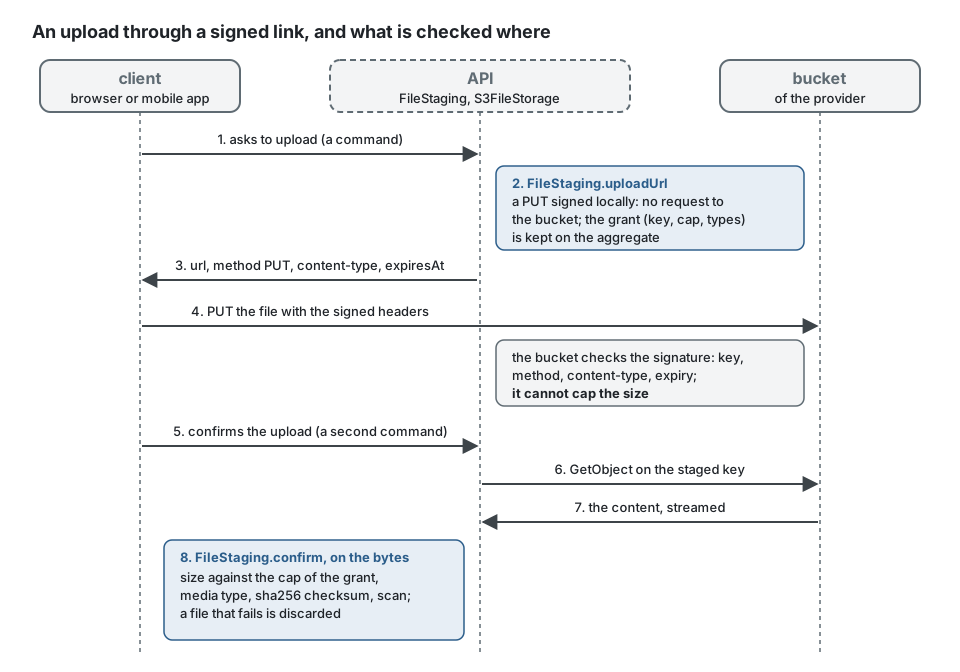
The client sends the file exactly as the link says, with the headers it was given:
import type { SignedUpload } from '@ddd-ts-kit/kernel';

// In the client: the signature covers the content-type, so the headers are sent as they are.
export async function sendFile(link: SignedUpload, file: Blob): Promise<void> {
  const response = await fetch(link.url, { method: link.method, headers: link.headers, body: file });

  if (!response.ok) {
    throw new Error(`The storage refused the upload: ${response.status}`); // 403 once expired, or for another type
  }
}
Limits
- A signed upload link cannot cap the size of what is sent (only a presigned POST policy can):
its
maxBytesis not enforced by the service, andFileStaging.confirmmeasures the file against the cap of the grant the server kept and discards it beyond. - Copy and move go through
CopyObject, limited to 5 GiB per object by the protocol. - An upload has at most 10 000 parts: with parts of 8 MiB, a file of about 78 GiB. Raise
partSizefor larger files. - Lifecycle rules, versioning, object lock and the encryption of the bucket are settings of the bucket, made by the infrastructure code of the deployment, not by this adapter.
Tests
Every spec runs in the unit run: the storage reaches, through the real SDK, its signer and its
HTTP transport, an S3 server the test starts in its own process on a free port
(test/support/server/). It checks Signature Version 4, in a header and in a signed link, and
answers what the storage asks as MinIO does: objects, copies, listings by prefix page after page,
multipart uploads, the name a signed download is saved under, the expiry of a link (its clock
moves on without waiting). fileStorageContract of @ddd-ts-kit/testing/contracts (re-exported
by @ddd-ts-kit/s3/testing) runs on it. With DDD_TS_KIT_TEST_S3_ENDPOINT, as in the
integration job of the pipeline, the same specs run a second time against a real server, which
is what keeps the in-memory one honest. The upstream MinIO project stopped publishing images in
2025: the pipeline runs pgsty/minio, built from the same sources, pinned by digest
(pipeline/github/scripts/start-minio.sh).
docker run -d --name minio -p 127.0.0.1:9000:9000 -e MINIO_ROOT_USER=ddd-ts-kit -e MINIO_ROOT_PASSWORD=ddd-ts-kit-secret pgsty/minio:RELEASE.2026-08-04T00-00-00Z server /data
DDD_TS_KIT_TEST_S3_ENDPOINT=http://localhost:9000 npx vitest run packages/s3
The same specs run on another server of the protocol: DDD_TS_KIT_TEST_S3_REGION (us-east-1 by
default), DDD_TS_KIT_TEST_S3_ACCESS_KEY and DDD_TS_KIT_TEST_S3_SECRET_KEY name its region and
key, and the bucket ddd-ts-kit-test is created when the key may create one. Run once by hand
on Garage v2.1.0 (2026-10-18), region garage: the 34 tests passed. The other providers of
docs/tools/file-storage.md are not verified.
A project holds its own binding to the same suite, on the MinIO of its compose stack: each test writes under a prefix of its own, so the tests share one bucket without seeing each other's files.
import { randomBytes } from 'node:crypto';
import { beforeEach, describe, expect, it } from 'vitest';
import { S3FileStorage, s3ClientOf } from '@ddd-ts-kit/s3';
import { fileStorageContract } from '@ddd-ts-kit/s3/testing';

const endpoint = process.env['S3_TEST_ENDPOINT'] ?? '';

// Skipped without a server; the bucket is created beforehand, as in a deployment.
fileStorageContract(
  { describe: describe.runIf(endpoint !== ''), it, expect, beforeEach },
  {
    name: 'S3FileStorage on MinIO',
    createStorage: () =>
      new S3FileStorage({
        client: s3ClientOf({ endpoint, region: 'us-east-1', accessKeyId: 'minio', secretAccessKey: 'minio-secret' }),
        bucket: 'acme-files-test',
        prefix: `run-${randomBytes(6).toString('hex')}/`,
      }),
    // The links of a real server expire in real time.
    elapse: (ms) => new Promise((resolve) => setTimeout(resolve, ms)),
  },
);
Another provider
Google Cloud Storage and Azure Blob Storage speak their own protocols. A connector for one of
them is a class extending FileStorage of the kernel that passes fileStorageContract against
the real service or its emulator (fake-gcs-server, Azurite): see
docs/tools/file-storage.md.