@edgetools/codemirror-lang-mermaid
This package implements Mermaid language support for the CodeMirror code editor. Get syntax highlighting for Mermaid diagrams!
Getting Started
Install the package:
npm install @edgetools/codemirror-lang-mermaid
Example usage:
import { basicSetup, EditorView } from 'codemirror';
import { mermaid, mindmapTags } from '@edgetools/codemirror-lang-mermaid';
import { HighlightStyle, syntaxHighlighting } from '@codemirror/language';

const myHighlightStyle = HighlightStyle.define([
  { tag: mindmapTags.diagramName, color: '#9650c8' },
  { tag: mindmapTags.lineText1, color: '#ce9178' },
  { tag: mindmapTags.lineText2, color: 'green' },
  { tag: mindmapTags.lineText3, color: 'red' },
  { tag: mindmapTags.lineText4, color: 'magenta' },
  { tag: mindmapTags.lineText5, color: '#569cd6' },
]);

new EditorView({
  doc: `mindmap
  root((mindmap))
    Origins
      Long history
      ::icon(fa fa-book)
      Popularisation
        British popular psychology author Tony Buzan
    Research
      On effectiveness<br/>and features
      On Automatic creation
        Uses
            Creative techniques
            Strategic planning
            Argument mapping
    Tools
      Pen and paper
      Mermaid
`,
  extensions: [basicSetup, mermaid(), syntaxHighlighting(myHighlightStyle)],
  parent: document.body,
});
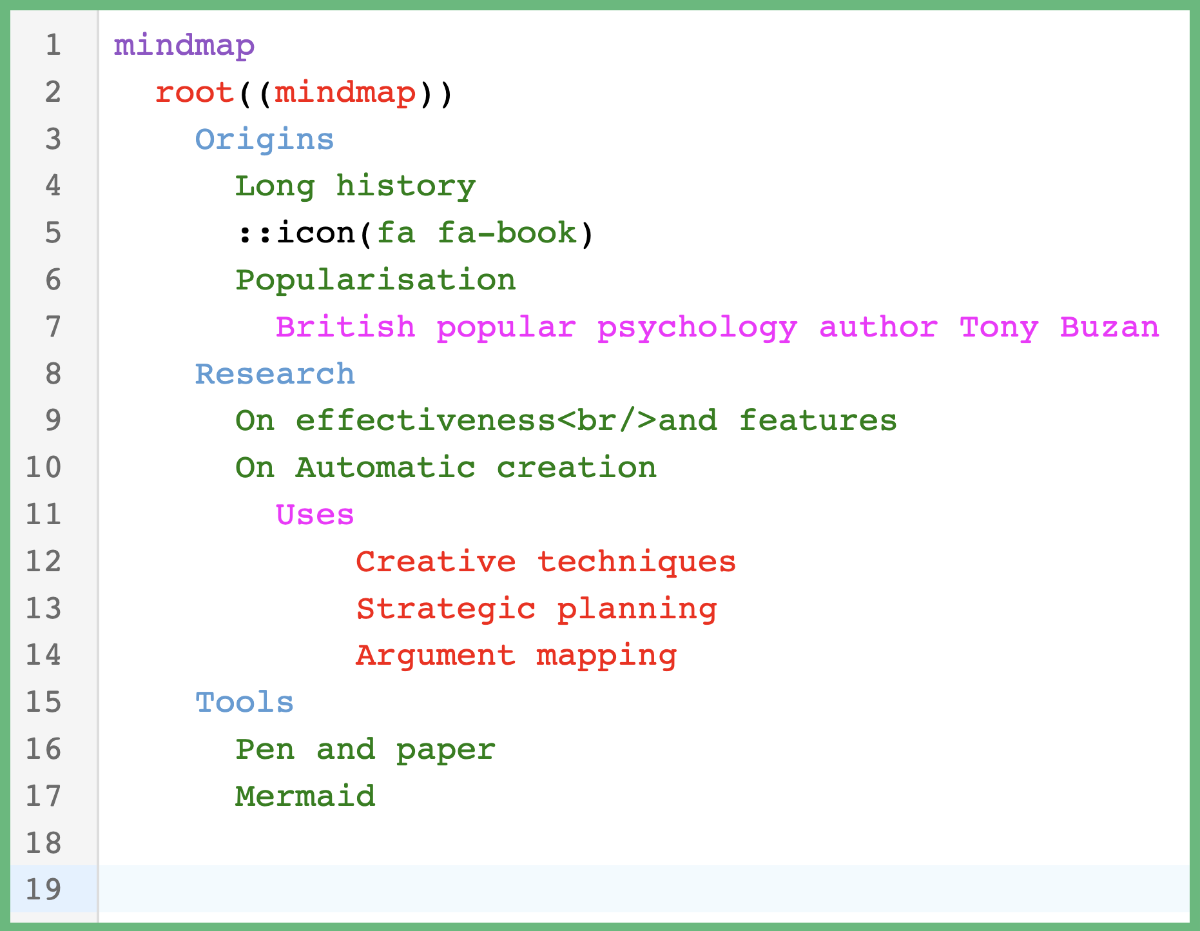
If you run this code in the browser, you should get syntax highlighting!
Supported Diagrams
Mermaid contains many different types of diagrams. Each diagram has its own Lezer grammar file. The following diagrams are supported:
- mindmaps
- pie charts
- flowcharts
- sequence diagrams
- user journeys
- requirement diagrams
- gantt charts
- timelines
- quadrant charts
- class diagrams
- state diagrams
- entity relationship diagrams
- git graphs
- C4 diagrams
- sankey diagrams
- XY charts
- block diagrams
- packet diagrams
- kanban boards
- architecture diagrams
Each diagram type is also exported individually — as a LanguageSupport extension (e.g. mindmap(), flowchart(), classDiagram()), a LRLanguage (e.g. mindmapLanguage), a LanguageDescription (e.g. mindmapLanguageDescription), and a set of custom highlighting tags (e.g. mindmapTags). The all-encompassing mermaid() extension automatically detects the diagram type from the first line and applies the matching grammar.
Supported Tags
CodeMirror supports a long list of tags that are suitable for handling syntax highlighting in a variety of languages. Some common tags include name, variableName, lineComment, string, and number.
CodeMirror also supports the ability to create custom tags. Custom tags are useful for styling tokens from a grammar that may not have a suitable tag available to us from CodeMirror.
You can choose to style the syntax highlighting based on either the custom tag I have defined or its corresponding parent tag (if it has one). Please see the tags file for a list of all custom tags I have defined and their corresponding parent tags.
Syntax Highlighting with Custom Tags
Below is an example of using custom tags to highlight tokens in a pie chart Mermaid diagram.
import { basicSetup, EditorView } from 'codemirror';
import { mermaid, pieTags } from '@edgetools/codemirror-lang-mermaid';
import { HighlightStyle, syntaxHighlighting } from '@codemirror/language';

const myHighlightStyle = HighlightStyle.define([
  { tag: pieTags.diagramName, color: '#9650c8' },
  { tag: pieTags.lineComment, color: '#ce9178' },
  { tag: pieTags.number, color: 'green' },
  { tag: pieTags.showData, color: 'blue' },
  { tag: pieTags.string, color: 'magenta' },
  { tag: pieTags.title, color: '#569cd6' },
  { tag: pieTags.titleText, color: 'red' },
]);

new EditorView({
  doc: `pie showData
    title Preferred Pizza Toppings
    "Cheese" : 300
    "Pepperoni" : 290
    "Mushroom" : 100
    "Pineapple" : 10`,
  extensions: [basicSetup, mermaid(), syntaxHighlighting(myHighlightStyle)],
  parent: document.body,
});
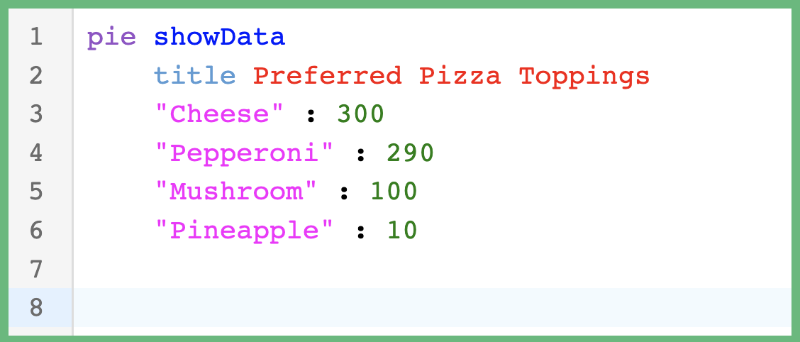
Running this code in the browser should result in the following syntax highlighting.
Syntax Highlighting with Parent Tags
Below is an example of using parent tags (defined by CodeMirror) to highlight tokens in a pie chart Mermaid diagram instead of using custom tags (defined by me).
import { basicSetup, EditorView } from 'codemirror';
import { mermaid } from '@edgetools/codemirror-lang-mermaid';
import { HighlightStyle, syntaxHighlighting } from '@codemirror/language';
import { tags as t } from '@lezer/highlight';

const myHighlightStyle = HighlightStyle.define([
  { tag: t.typeName, color: '#9650c8' }, // parent tag of pieTags.diagramName
  { tag: t.lineComment, color: '#ce9178' }, // parent tag of pieTags.lineComment
  { tag: t.number, color: 'green' }, // parent tag of pieTags.number
  { tag: t.keyword, color: '#569cd6' }, // parent tag of pieTags.showData and pieTags.title
  { tag: t.string, color: 'magenta' }, // parent tag of pieTags.string and pieTags.titleText
]);

new EditorView({
  doc: `pie showData
    title Preferred Pizza Toppings
    "Cheese" : 300
    "Pepperoni" : 290
    "Mushroom" : 100
    "Pineapple" : 10`,
  extensions: [basicSetup, mermaid(), syntaxHighlighting(myHighlightStyle)],
  parent: document.body,
});
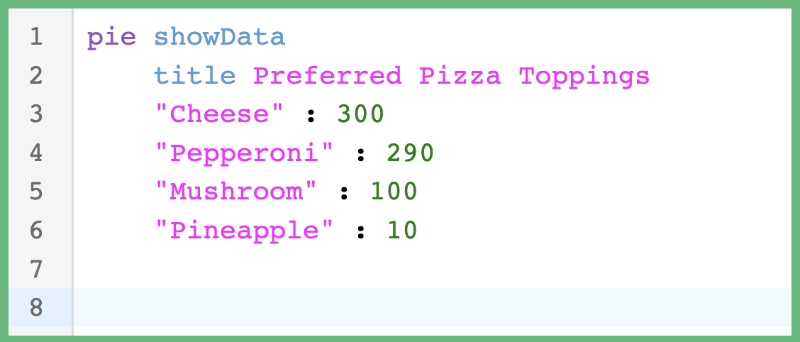
Running this code in the browser should result in the following syntax highlighting.
When to use Custom Tags vs Parent Tags
It's up to your preference! Though, I personally prefer custom tags 🙂. As stated previously, each Mermaid diagram requires its own Lezer grammar file, which essentially means each diagram uses its own "language." The language used in Mermaid diagrams is very different than typical programming languages and therefore will have tokens that don't have a corresponding match in CodeMirror's list of tags.
The custom tags in the @edgetools/codemirror-lang-mermaid package provide a bit more control of what tokens get syntax highlighting. Notice that in the pie chart example above, t.string is both the parent of pieTags.string and pieTags.titleText. I created two custom tags to style the TitleText token differently than the String tokens. However, if your app already has a color theme and you don't want the overhead of custom tags, then continue using the parent tags.
Do note that not all custom tags have parent tags (i.e. most of the mindmap tags) which means you'll still need to use custom tags for those tokens. The mindmap diagram has special syntax highlighting that changes depending on how many indentions there are on each line.
Extensions
The @edgetools/codemirror-lang-mermaid package provides support for the following extension:
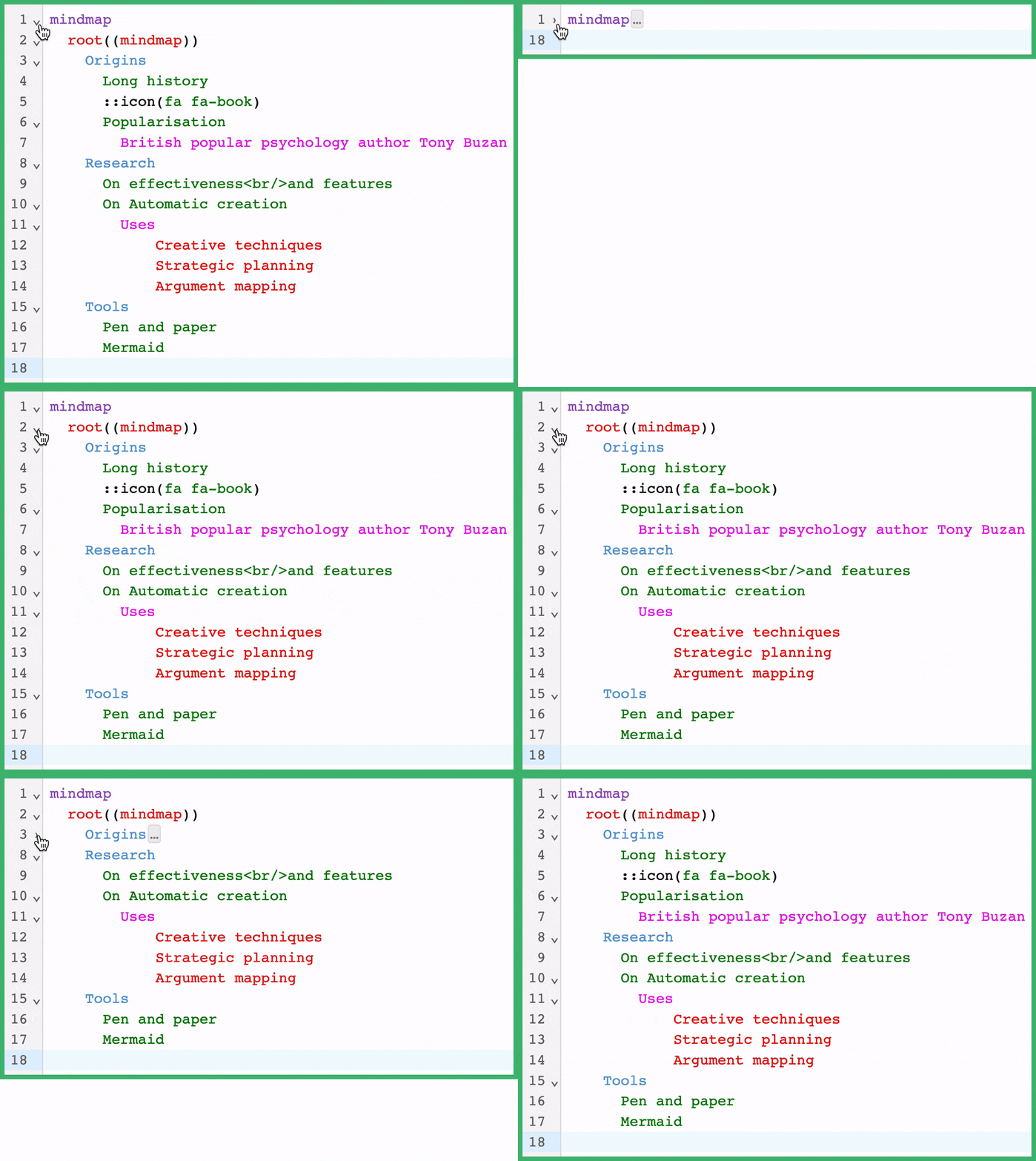
By enabling the foldByIndent extension, the CodeMirror editor will add code folding support across all Mermaid diagrams. Code folding is a common feature in text editors and IDEs that let you hide ("fold") parts of a document. This can help make the document easier to read or manage.
Example usage:
import { basicSetup, EditorView } from 'codemirror';
import { mermaid, mindmapTags } from '@edgetools/codemirror-lang-mermaid';
import { HighlightStyle, syntaxHighlighting } from '@codemirror/language';

const myHighlightStyle = HighlightStyle.define([
  { tag: mindmapTags.diagramName, color: '#9650c8' },
  { tag: mindmapTags.lineText1, color: '#ce9178' },
  { tag: mindmapTags.lineText2, color: 'green' },
  { tag: mindmapTags.lineText3, color: 'red' },
  { tag: mindmapTags.lineText4, color: 'magenta' },
  { tag: mindmapTags.lineText5, color: '#569cd6' },
]);

new EditorView({
  doc: `mindmap
  root((mindmap))
    Origins
      Long history
      ::icon(fa fa-book)
      Popularisation
        British popular psychology author Tony Buzan
    Research
      On effectiveness<br/>and features
      On Automatic creation
        Uses
            Creative techniques
            Strategic planning
            Argument mapping
    Tools
      Pen and paper
      Mermaid
`,
  extensions: [basicSetup, mermaid(), syntaxHighlighting(myHighlightStyle), foldByIndent()],
  parent: document.body,
});
By adding foldByIndent to your list of extensions, code folding by indents will be enabled. Keep in mind that this example is using the basicSetup extension, provided by CodeMirror, which adds arrows on all lines that provide code folding support. The foldByIndent extension will fold code based on the number of indents on the current line and the number of indents on the following lines.