
云为 Bunyan 日志: Node.js 客户端


这个模块提供了一种易于使用,更高级的层层,用于与 云记录, (中文(简体) ), 兼容 邦扬将它作为您现有的 Bunyan 伐木机的运输工具.
各版本的更改一览表载于 变化。 。 。 .
更多信息,请访问Cloud APIs的客户端库,包括老年人 Google APIs 客户端图书馆, in 客户端图书馆解释。 。 。 .
目录 :
快速启动
在你开始之前
- 选择或创建云平台项目。 。 。 .
- 启用 Bunyan API 的云记录。 。 。 .
- 设置认证 这样你就可以访问 当地工作站的API.
安装客户端库
npm install @google-cloud/logging-bunyan
使用客户端库
const bunyan = require('bunyan');

// Imports the Google Cloud client library for Bunyan
const {LoggingBunyan} = require('@google-cloud/logging-bunyan');

// Creates a Bunyan Cloud Logging client
const loggingBunyan = new LoggingBunyan();

// Create a Bunyan logger that streams to Cloud Logging
// Logs will be written to: "projects/YOUR_PROJECT_ID/logs/bunyan_log"
const logger = bunyan.createLogger({
  // The JSON payload of the log as it appears in Cloud Logging
  // will contain "name": "my-service"
  name: 'my-service',
  streams: [
    // Log to the console at 'info' and above
    {stream: process.stdout, level: 'info'},
    // And log to Cloud Logging, logging at 'info' and above
    loggingBunyan.stream('info'),
  ],
});

// Writes some log entries
logger.error('warp nacelles offline');
logger.info('shields at 99%');
用作快取的中间软件
注:这一特征是实验性的。 API 可能向后变化 直到这被认为是稳定的。 请给我们反馈 我们可以更好地完善这种明确整合.
我们提供的中间器件可以用于一个快件应用. 除此以外 这可以让云更强大的特性 伐木:请求捆绑。 代表特定程序发布的任何应用程序日志 请求将被显示在请求日志内 截图 :
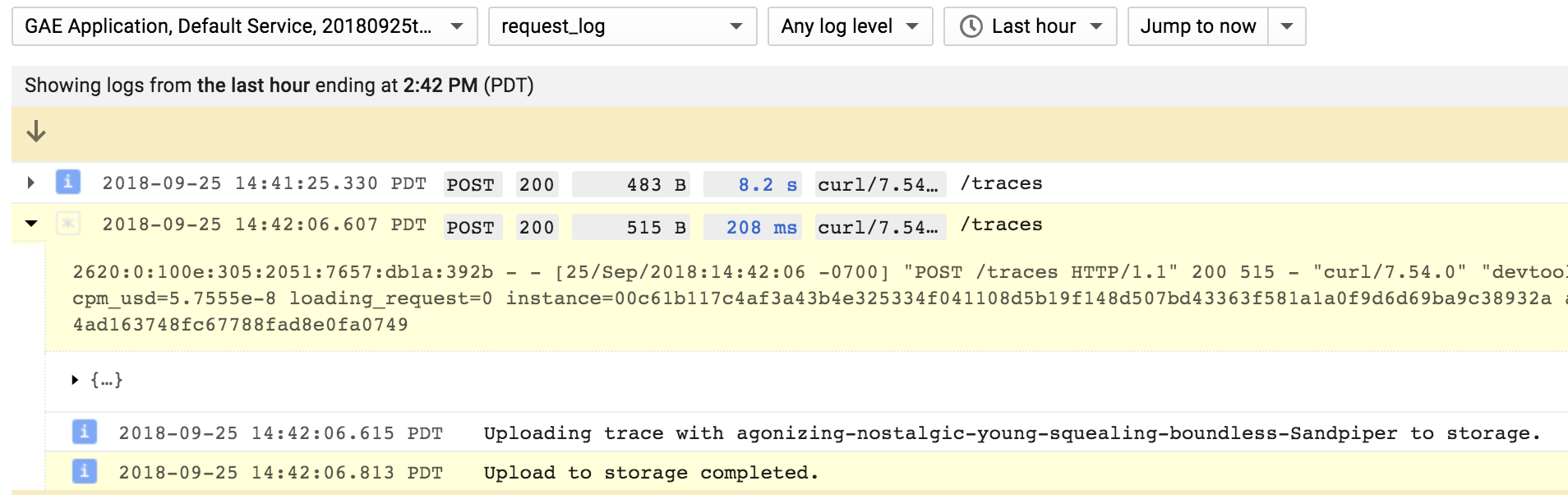
中间的软件增加了一个 bunyan- 类型日志函数到 request 对象。 你个
无论你在哪里可以使用这个 request 对象(req 输入
(见下文样本)。 代表具体请求所做的所有日志条目均为:
在 Cloud 日志界面中显示捆绑在一起 .
const lb = require('@google-cloud/logging-bunyan');

// Import express module and create an http server.
const express = require('express');

async function startServer() {
  const {logger, mw} = await lb.express.middleware();
  const app = express();

  // Install the logging middleware. This ensures that a Bunyan-style `log`
  // function is available on the `request` object. Attach this as one of the
  // earliest middleware to make sure that log function is available in all the
  // subsequent middleware and routes.
  app.use(mw);

  // Setup an http route and a route handler.
  app.get('/', (req, res) => {
    // `req.log` can be used as a bunyan style log method. All logs generated
    // using `req.log` use the current request context. That is, all logs
    // corresponding to a specific request will be bundled in the Cloud UI.
    req.log.info('this is an info log message');
    res.send('hello world');
  });

  // `logger` can be used as a global logger, one not correlated to any specific
  // request.
  logger.info({port: 8080}, 'bonjour');

  // Start listening on the http server.
  app.listen(8080, () => {
    console.log('http server listening on port 8080');
  });
}

startServer();
报告错误
任意 Error 重度记录对象 error 或更高层可自动被 云出错报告 如果您指定了 serviceContext.service 当即时 LoggingBunyan 实例:
const loggingBunyan = new LoggingBunyan({
  serviceContext: {
    service: 'my-service', // required to report logged errors
                           // to the Google Cloud Error Reporting
                           // console
    version: 'my-version'
  }
});
指定一个 serviceContext 但未具体说明 serviceContext.service。 。 。 .
请将日志添加到您的日志中 未找到的例外 财务报告和审定财务报表 未处理的拒绝 如果你也想看那些错误的话 处理者们.
您还可能想要查看[@google-cloud/error-report][@google-cloud/error-report]模块,该模块可直接访问错误报告 API .
日志输入中的特殊有效载荷字段
有些字段被Google云日志认为是特殊的,并将被取入LogEntry结构. 譬如说, severity, (中文(简体) ), message 财务报告和审定财务报表 labels 如果包含在 Bunyan 日志有效载荷中,则可以提取到 LogEntry 。 这些 特殊 JSON 字段 用于设置 LogEntry。请注意这些特殊领域,以避免出乎意料的伐木行为.
日志条目标签
如果bunyan日志记录包含一个标签属性,所有值都是字符串,我们自动促进
属性为 LogEntry.labels 相对价值
而不是成为其中之一 payload 字段。 这使得使用标签过滤UI中的日志变得更容易.
logger.info({labels: {someKey: 'some value'}}, 'test log message');
所有标签值都必须是这个自动晋级工作的字符串. 否则,标签留在有效载荷中.
格式化请求日志
要格式化您的请求日志, 您可以提供 httpRequest 属性,您提供的 Bunyan 元数据与日志消息。 我们会把这当成 HttpRequest 消息和 Cloud 日志将显示为请求日志 。 示例

logger.info({
  httpRequest: {
    status: res.statusCode,
    requestUrl: req.url,
    requestMethod: req.method,
    remoteIp: req.connection.remoteAddress,
    // etc.
  }
}, req.path);
这个 httpRequest 属性必须是适当的格式化 HttpRequest 留言。 (注:链接的原生文件显示 snake_case 属性名称,但在 JavaScript 中需要提供属性名称 camelCase. ) (中文(简体) )
与跟踪连接的日志
如果您使用 [@google- cloud/ trace- agent][ trace- agent] 模块,则此模块将设置 Cloud 日志 [LogEntry][LogEntry] trace 属性,以当前微量上下文为基础。 这种关联允许您在 Cloud Trace 查看器中以微量长度输入 [查看- 查看- 登录] 。 示例
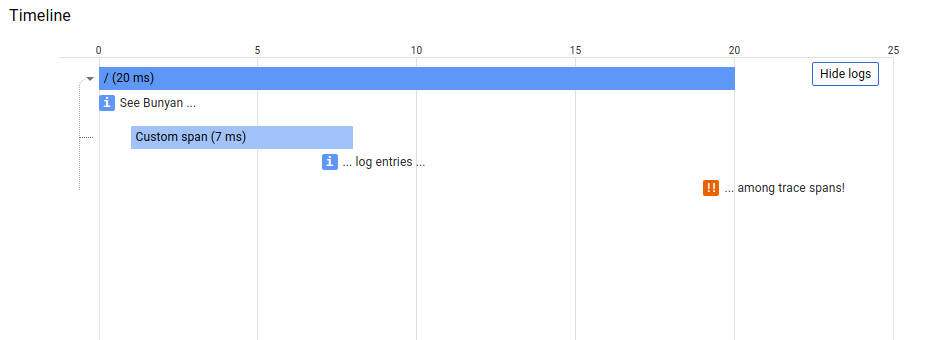
如果您想要设置云日志 trace 属性,然后为 'logging.googleapis.com/trace',此模块导出为 LOGGING_TRACE_KEY。例如:
const bunyan = require('bunyan');
// Node 6+
const {LoggingBunyan, LOGGING_TRACE_KEY} = require('@google-cloud/logging-bunyan');
const loggingBunyan = LoggingBunyan();

...

logger.info({
  [LOGGING_TRACE_KEY]: 'custom-trace-value'
}, 'Bunyan log entry with custom trace field');
默认召回处理出错
这个 LoggingBunyan 类创建实例 Logging 创建 Log 课程从 @google-cloud/logging 用于写入日志条目的软件包.
这个 Log 类日志是同步的,有时日志条目失败时无法写入,或者日志后端返回出错.
如果错误没有处理, 它可能会崩溃应用程序 。 处理错误的一个可能的方法是提供默认的回调
页:1 LoggingBunyan 用于初始化 Log 对象,如下文中的例子:
// Imports the Google Cloud client library for Bunyan
const {LoggingBunyan} = require('@google-cloud/logging-bunyan');
// Creates a client
const loggingBunyan = new LoggingBunyan({
  projectId: 'your-project-id',
  keyFilename: '/path/to/key.json',
  defaultCallback: err => {
      if (err) {
      console.log('Error occured: ' + err);
      }
  },
});
在Google Cloud 管理环境中摄入日志的替代方式
如果您使用此库中的 Cloud 日志代理, 您可以配置处理器输出日志到 process.stdout 使用
页:1 结构化记录 Json 格式。 。 。 .
要做到这一点,请添加 redirectToStdout: true 参数 LoggingBunyan 如下样本所示的构造器.
您可以在 Google Cloud 管理环境中运行应用程序时使用此参数, 如 AppEngine, Cloud Run,
云函数或GKE. 安装在这些环境中的日志代理可以捕捉 process.stdout 把它摄入云中.
代理可以解析结构化日志打印到 process.stdout 并获取日志有效载荷旁的额外日志元数据.
建议设置 redirectToStdout: true 在像云函数这样的无服务器环境中,因为它可以
执行终止时减少记录损失,因为所有记录都写到 process.stdout 这些
将由运行在谷歌云管理环境中的云测代理接取.
注意还有 useMessageField 选项,用于控制“消息”字段是否用于存储
内部结构化的非文本数据 jsonPayload 字段时 redirectToStdout 已经设定。 默认 useMessageField 总是 true。 。 。 .
设定 skipParentEntryForCloudRun 选项以跳过创建请求本身的条目,因为 Cloud Run 已经自动创建
此类日志条目。 这可能成为下一个主要版本的默认行为.
// Imports the Google Cloud client library for Bunyan
const {LoggingBunyan} = require('@google-cloud/logging-bunyan');

// Creates a client
const loggingBunyan = new LoggingBunyan({
  projectId: 'your-project-id',
  keyFilename: '/path/to/key.json',
  redirectToStdout: true,
});
样本
样本在 samples/ 目录。 每个样本 README.md 有运行样本的指示.
| 样本 | 源代码 | 试试看 |
|---|---|---|
| 快递 | 源代码 |  |
| 快速启动 | 源代码 | |
| 过期 Auth 设置 | 源代码 | |
这个 Bunyan Node.js 客户端 API 的云日志 文档 还包含样品.
支持的节点.js版本
我们的客户端图书馆跟着 节点.js发布时间表。 。 。 . 图书馆兼容所有当前 活动 财务报告和审定财务报表 维修 版本 节点.js. 如果你在使用"节点"(Node.js)的报废版本,我们建议你更新 尽快到积极支持的LTS版本.
Google 的客户端库支持在 a 上的 Node.js runtimes 的遗留版本 以下列警告为依据:
- 后遗症版本不进行连续整合测试.
- 一些安全补丁和特性不能被后移植.
- 依赖关系不能不断更新.
设有针对Node.js的一些报废版本的客户端图书馆,以及
可以通过 npm 安装 秒数。 。 。 .
立面遵循命名惯例 legacy-(version)。 。 。 .
譬如说, npm install @google-cloud/logging-bunyan@legacy-8 安装客户端库
用于兼容Node.js 8的版本.
版本
这个图书馆跟随 语义版本。 。 。 .
这个图书馆被认为是 稳定。代码表面不会改变向后兼容的方式 除非绝对必要(例如,由于关键的安全问题)或 大量贬值期。 问题和要求 稳定 图书馆 以最高优先处理.
更多信息 : 谷歌云平台启动阶段
捐款
欢迎捐款! 见 贡献指南。 。 。 .
请注意: README.md,则 samples/README.md, (中文(简体) ),
和该寄存器中的各种配置文件(包括 .nycrc 财务报告和审定财务报表 tsconfig.json(中文(简体) )
从中央模板生成。 要编辑这些文件之一, 请编辑
输入模板
目录。 。 。 .
许可证
Apache 版本 2.0
见 自由主义