
Cloud Logging for Bunyan: Node.js Client


This module provides an easy to use, higher-level layer for working with Cloud Logging, compatible with Bunyan. Simply attach this as a transport to your existing Bunyan loggers.
A comprehensive list of changes in each version may be found in the CHANGELOG.
- Cloud Logging for Bunyan Node.js Client API Reference
- Cloud Logging for Bunyan Documentation
- github.com/googleapis/nodejs-logging-bunyan
Read more about the client libraries for Cloud APIs, including the older Google APIs Client Libraries, in Client Libraries Explained.
Table of contents:
Quickstart
Before you begin
- Select or create a Cloud Platform project.
- Enable the Cloud Logging for Bunyan API.
- Set up authentication so you can access the API from your local workstation.
Installing the client library
npm install @google-cloud/logging-bunyan
Using the client library
const bunyan = require('bunyan');

// Imports the Google Cloud client library for Bunyan
const {LoggingBunyan} = require('@google-cloud/logging-bunyan');

// Creates a Bunyan Cloud Logging client
const loggingBunyan = new LoggingBunyan();

// Create a Bunyan logger that streams to Cloud Logging
// Logs will be written to: "projects/YOUR_PROJECT_ID/logs/bunyan_log"
const logger = bunyan.createLogger({
  // The JSON payload of the log as it appears in Cloud Logging
  // will contain "name": "my-service"
  name: 'my-service',
  streams: [
    // Log to the console at 'info' and above
    {stream: process.stdout, level: 'info'},
    // And log to Cloud Logging, logging at 'info' and above
    loggingBunyan.stream('info'),
  ],
});

// Writes some log entries
logger.error('warp nacelles offline');
logger.info('shields at 99%');
Using as an express middleware
NOTE: this feature is experimental. The API may change in a backwards incompatible way until this is deemed stable. Please provide us feedback so that we can better refine this express integration.
We provide a middleware that can be used in an express application. Apart from being easy to use, this enables some more powerful features of Cloud Logging: request bundling. Any application logs emitted on behalf of a specific request will be shown nested inside the request log as you see in this screenshot:
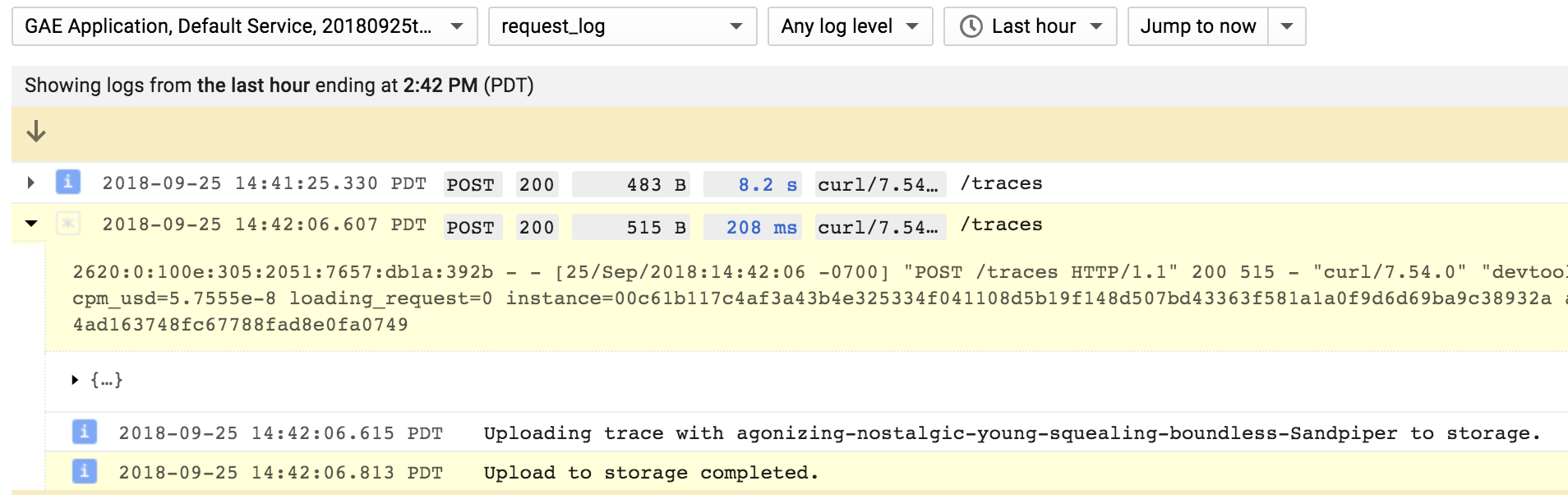
The middleware adds a bunyan-style log function to the request object. You
can use this wherever you have access to the request object (req in the
sample below). All log entries that are made on behalf of a specific request are
shown bundled together in the Cloud Logging UI.
const lb = require('@google-cloud/logging-bunyan');

// Import express module and create an http server.
const express = require('express');

async function startServer() {
  const {logger, mw} = await lb.express.middleware();
  const app = express();

  // Install the logging middleware. This ensures that a Bunyan-style `log`
  // function is available on the `request` object. Attach this as one of the
  // earliest middleware to make sure that log function is available in all the
  // subsequent middleware and routes.
  app.use(mw);

  // Setup an http route and a route handler.
  app.get('/', (req, res) => {
    // `req.log` can be used as a bunyan style log method. All logs generated
    // using `req.log` use the current request context. That is, all logs
    // corresponding to a specific request will be bundled in the Cloud UI.
    req.log.info('this is an info log message');
    res.send('hello world');
  });

  // `logger` can be used as a global logger, one not correlated to any specific
  // request.
  logger.info({port: 8080}, 'bonjour');

  // Start listening on the http server.
  app.listen(8080, () => {
    console.log('http server listening on port 8080');
  });
}

startServer();
Error Reporting
Any Error objects you log at severity error or higher can automatically be picked up by Cloud Error Reporting if you have specified a serviceContext.service when instantiating a LoggingBunyan instance:
const loggingBunyan = new LoggingBunyan({
  serviceContext: {
    service: 'my-service', // required to report logged errors
                           // to the Google Cloud Error Reporting
                           // console
    version: 'my-version'
  }
});
It is an error to specify a serviceContext but not specify serviceContext.service.
Make sure to add logs to your uncaught exception and unhandled rejection handlers if you want to see those errors too.
You may also want to see the [@google-cloud/error-reporting][@google-cloud/error-reporting] module which provides direct access to the Error Reporting API.
Special Payload Fields in LogEntry
There are some fields that are considered special by Google cloud logging and will be extracted into the LogEntry structure. For example, severity, message and labels can be extracted to LogEntry if included in the bunyan log payload. These special JSON fields will be used to set the corresponding fields in the LogEntry. Please be aware of these special fields to avoid unexpected logging behavior.
LogEntry Labels
If the bunyan log record contains a label property where all the values are strings, we automatically promote that
property to be the LogEntry.labels value rather
than being one of the properties in the payload fields. This makes it easier to filter the logs in the UI using the labels.
logger.info({labels: {someKey: 'some value'}}, 'test log message');
All the label values must be strings for this automatic promotion to work. Otherwise the labels are left in the payload.
Formatting Request Logs
To format your request logs you can provide a httpRequest property on the bunyan metadata you provide along with the log message. We will treat this as the HttpRequest message and Cloud logging will show this as a request log. Example:

logger.info({
  httpRequest: {
    status: res.statusCode,
    requestUrl: req.url,
    requestMethod: req.method,
    remoteIp: req.connection.remoteAddress,
    // etc.
  }
}, req.path);
The httpRequest property must be a properly formatted HttpRequest message. (Note: the linked protobuf documentation shows snake_case property names, but in JavaScript one needs to provide property names in camelCase.)
Correlating Logs with Traces
If you use [@google-cloud/trace-agent][trace-agent] module, then this module will set the Cloud Logging [LogEntry][LogEntry] trace property based on the current trace context when available. That correlation allows you to [view log entries][trace-viewing-log-entries] inline with trace spans in the Cloud Trace Viewer. Example:
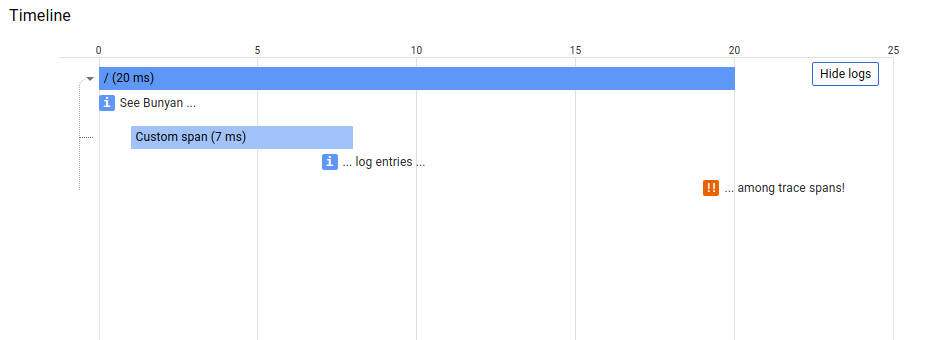
If you wish to set the Cloud LogEntry trace property with a custom value, then write a Bunyan log entry property for 'logging.googleapis.com/trace', which is exported by this module as LOGGING_TRACE_KEY. For example:
const bunyan = require('bunyan');
// Node 6+
const {LoggingBunyan, LOGGING_TRACE_KEY} = require('@google-cloud/logging-bunyan');
const loggingBunyan = LoggingBunyan();

...

logger.info({
  [LOGGING_TRACE_KEY]: 'custom-trace-value'
}, 'Bunyan log entry with custom trace field');
Error handling with a default callback
The LoggingBunyan class creates an instance of Logging which creates the Log class from @google-cloud/logging package to write log entries.
The Log class writes logs asynchronously and there are cases when log entries cannot be written when it fails or an error is returned from Logging backend.
If the error is not handled, it could crash the application. One possible way to handle the error is to provide a default callback
to the LoggingBunyan constructor which will be used to initialize the Log object with that callback like in the example below:
// Imports the Google Cloud client library for Bunyan
const {LoggingBunyan} = require('@google-cloud/logging-bunyan');
// Creates a client
const loggingBunyan = new LoggingBunyan({
  projectId: 'your-project-id',
  keyFilename: '/path/to/key.json',
  defaultCallback: err => {
      if (err) {
      console.log('Error occured: ' + err);
      }
  },
});
Alternative way to ingest logs in Google Cloud managed environments
If you use this library with the Cloud Logging Agent, you can configure the handler to output logs to process.stdout using
the structured logging Json format.
To do this, add redirectToStdout: true parameter to the LoggingBunyan constructor as in sample below.
You can use this parameter when running applications in Google Cloud managed environments such as AppEngine, Cloud Run,
Cloud Function or GKE. The logger agent installed on these environments can capture process.stdout and ingest it into Cloud Logging.
The agent can parse structured logs printed to process.stdout and capture additional log metadata beside the log payload.
It is recommended to set redirectToStdout: true in serverless environments like Cloud Functions since it could
decrease logging record loss upon execution termination - since all logs are written to process.stdout those
would be picked up by the Cloud Logging Agent running in Google Cloud managed environment.
Note that there is also a useMessageField option which controls if "message" field is used to store
structured, non-text data inside jsonPayload field when redirectToStdout is set. By default useMessageField is always true.
Set the skipParentEntryForCloudRun option to skip creating an entry for the request itself as Cloud Run already automatically creates
such log entries. This might become the default behaviour in a next major version.
// Imports the Google Cloud client library for Bunyan
const {LoggingBunyan} = require('@google-cloud/logging-bunyan');

// Creates a client
const loggingBunyan = new LoggingBunyan({
  projectId: 'your-project-id',
  keyFilename: '/path/to/key.json',
  redirectToStdout: true,
});
Samples
Samples are in the samples/ directory. Each sample's README.md has instructions for running its sample.
| Sample | Source Code | Try it |
|---|---|---|
| Express | source code |  |
| Quickstart | source code | |
| Explict Auth Setup | source code | |
The Cloud Logging for Bunyan Node.js Client API Reference documentation also contains samples.
Supported Node.js Versions
Our client libraries follow the Node.js release schedule. Libraries are compatible with all current active and maintenance versions of Node.js. If you are using an end-of-life version of Node.js, we recommend that you update as soon as possible to an actively supported LTS version.
Google's client libraries support legacy versions of Node.js runtimes on a best-efforts basis with the following warnings:
- Legacy versions are not tested in continuous integration.
- Some security patches and features cannot be backported.
- Dependencies cannot be kept up-to-date.
Client libraries targeting some end-of-life versions of Node.js are available, and
can be installed through npm dist-tags.
The dist-tags follow the naming convention legacy-(version).
For example, npm install @google-cloud/logging-bunyan@legacy-8 installs client libraries
for versions compatible with Node.js 8.
Versioning
This library follows Semantic Versioning.
This library is considered to be stable. The code surface will not change in backwards-incompatible ways unless absolutely necessary (e.g. because of critical security issues) or with an extensive deprecation period. Issues and requests against stable libraries are addressed with the highest priority.
More Information: Google Cloud Platform Launch Stages
Contributing
Contributions welcome! See the Contributing Guide.
Please note that this README.md, the samples/README.md,
and a variety of configuration files in this repository (including .nycrc and tsconfig.json)
are generated from a central template. To edit one of these files, make an edit
to its templates in
directory.
License
Apache Version 2.0
See LICENSE