cypress-locator-analyses


柏树选择器脆弱性分析。它的工作原理是 插件 (运行后 cypress run)及作为 短绒/ CLI (运行时不执行测试,这使得它非常适合CI)。
每个定位器都有一个等级 (健壮) 来 F(脆弱). 然后每个测试都得到一个 风险评分从0到100,结果是最有可能失败的测试和最值得修复的定位器的排名。
这个工具的剧作家版本是 playwright-locator-analyses。
控制台输出
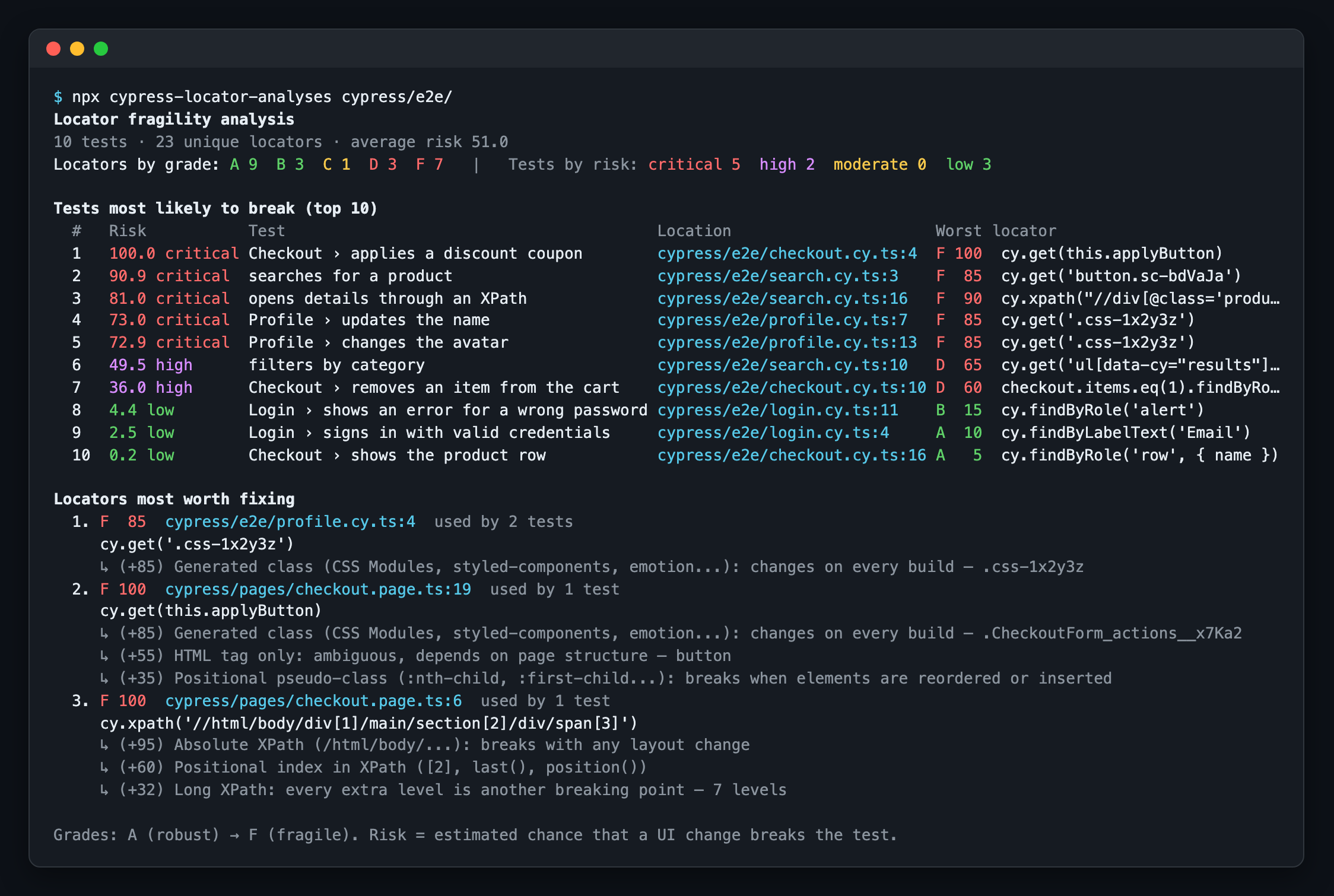
由CLI和插件打印的排名,运行在 示例项目:
HTML报告
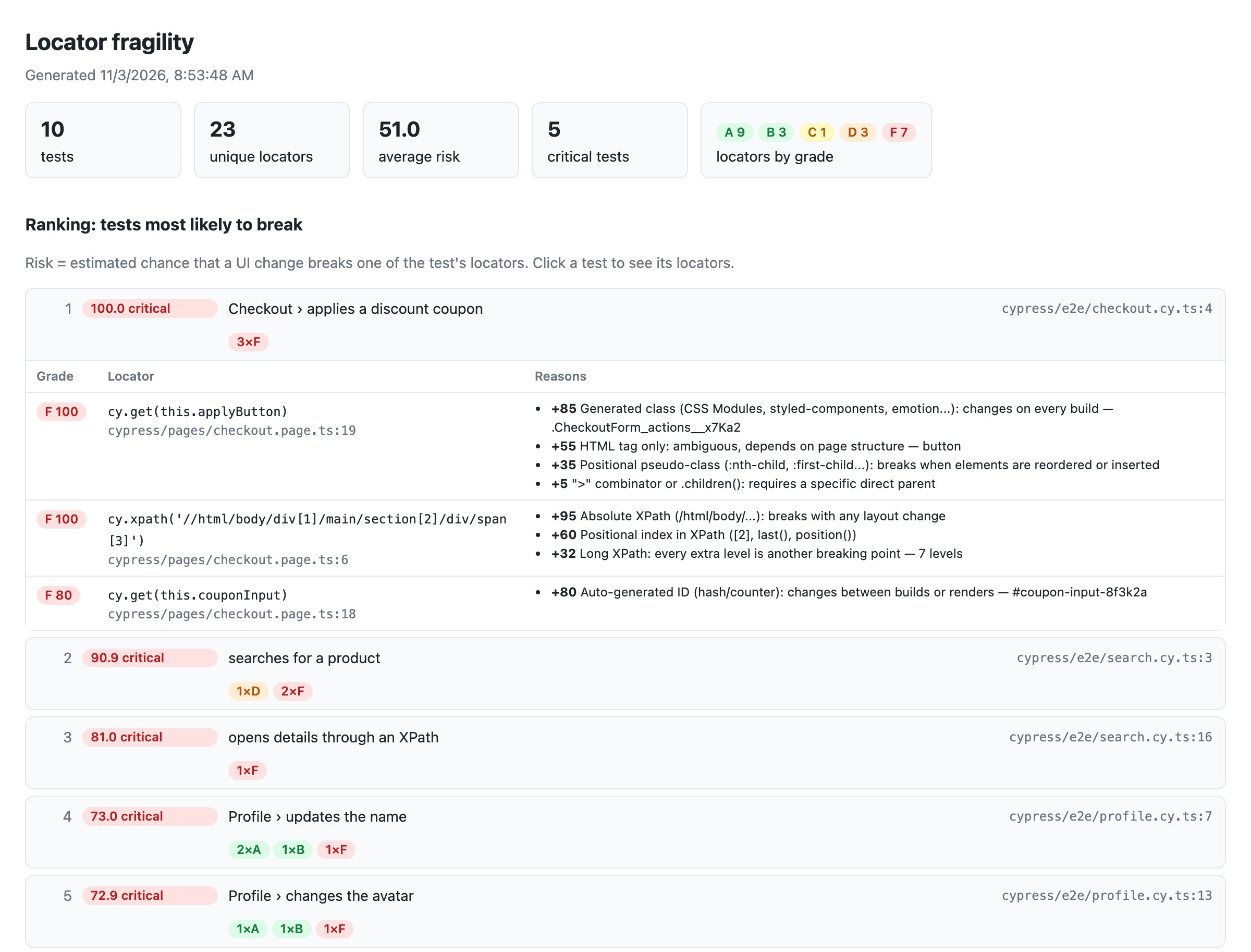
与 htmlFile (插件)或 --html (CLI),您将得到一个可以浏览的报告。点击一个测试查看每个定位器,它的等级和背后的原因:
它是如何工作的
分析如下 静态. 它使用TypeScript编译器读取你的规范(JavaScript或TypeScript),所以它不需要浏览器和运行的应用程序。它按照开发人员的方式遵循代码:
- 查询链:
cy.get('[data-cy=list]').find('li').eq(2)是一个定位器。这个链条通过使主体(cy.get(a).click().find(b)),cy.get()开始新的生活。 - 页面对象和帮助程序:
loginPage.login()对内部使用的选择器计数login(),即使它存在于另一个文件中。getter (get submit() { return cy.get(...) }),返回链的方法,元素映射(elements = { email: () => cy.get(...) })和字段或构造函数中的选择器字符串也会被解析。 - 自定义命令:
Cypress.Commands.add()在cypress/support是紧随其后。cy.getBySel('save')用它的论点得分([data-cy=save]→A),和一个命令像cy.login()计算它使用的每个选择器。子命令({ prevSubject })从它们被链接的元素继续。 - 别名:
cy.get('@rows').eq(1)是用定位器保存的吗.as('rows'). 网络别名(cy.intercept().as(...))被忽略。 .within():回调函数中的查询限定在其主题的范围内。- 钩子: selectors in
beforeEach/before计数封闭中的每个测试describe/context。 - 常量:
cy.get(SELECTORS.promo)在可能的情况下解析模板字符串。 - 测试库 (
cy.findByRole,findByLabelText,…)和 XPath (cy.xpath())也得分了。
当它作为插件运行时,它还显示每个测试是否 失败的 或者是 古里古怪的 (重试后通过)在该运行中,紧挨着它的风险。
安装
pnpm add -D cypress-locator-analyses
# or
npm i -D cypress-locator-analyses
# or
yarn add -D cypress-locator-analyses
作为插件使用
// cypress.config.ts
import { defineConfig } from 'cypress';
import locatorAnalyses from 'cypress-locator-analyses';

export default defineConfig({
  e2e: {
    setupNodeEvents(on, config) {
      locatorAnalyses(on, config, {
        htmlFile: 'fragility-report.html',   // optional
        outputFile: 'fragility-report.json', // optional
        top: 10,
        // failOnRisk: 80,                   // fail `cypress run` if any test has risk >= 80
      });
      return config;
    },
  },
});
CommonJS: const { locatorAnalyses } = require('cypress-locator-analyses');。
分析运行在 after:run 事件,所以它运行 cypress run (和 cypress open 只有在 experimentalInteractiveRunEvents 是对的)。
柏树只保留 一个 每个事件的处理程序。如果另一个插件也使用 after:run,从自己的处理程序调用这两个:
import { analyzeRun } from 'cypress-locator-analyses';

on('after:run', (results) => {
  otherPlugin(results);
  analyzeRun(results, config, { htmlFile: 'fragility-report.html' });
});
作为过滤器使用(CLI)
npx cypress-locator-analyses cypress/e2e                     # ranking in the console
npx cypress-locator-analyses cypress/e2e --html report.html  # plus an HTML report
npx cypress-locator-analyses cypress/e2e --fail-on-risk 80   # exit code 1 if any test has risk >= 80
npx 如果项目中没有安装该工具,则下载该工具,这样您就可以尝试它,而不必先添加它。
| 选项 | 描述 |
|---|---|
--json <file> | 将完整的报告写成JSON |
--html <file> | 编写一个可浏览的HTML报告 |
--top <n> | 排名中的测试数(默认为10) |
--top-locators <n> | 要显示的“值得修复的定位器”数量(默认为5) |
--fail-on-risk <0-100> | 如果有测试存在风险>= n,则失败 |
--support <path> | 带有自定义命令的文件或文件夹(默认: cypress/support 包含规范的项目)。可重复的 |
--tsconfig <file> | 用于解析导入/别名的Tsconfig(自动检测) |
--test-id-attribute <attr> | 自定义测试id属性(例如: data-automation) |
--pattern <regex> | 测试文件regex(默认 \.(cy|spec|test)\.[cm]?[jt]sx?$) |
插件选项
| 选项 | 默认的 | 描述 |
|---|---|---|
outputFile | - - - - - - | JSON报告路径(相对于项目根目录) |
htmlFile | - - - - - - | HTML报告路径(相对于项目根目录) |
top / topLocators | 10 / 5 | 控制台列表的大小 |
failOnRisk | - - - - - - | 失败 cypress run (退出代码1)如果任何测试有风险>= value |
quiet | false | 不要打印到控制台(只写文件) |
weights | - - - - - - | 覆盖任何规则的点,例如: { 'nth-child': 50, text: 15 } |
testIdAttributes | - - - - - - | 作为测试id处理的额外属性(data-cy, data-test, data-testid, data-test-id 和 data-qa 总是) |
supportFiles | config.supportFile | 带有自定义命令的文件(接下来是它们的导入) |
testFunctionNames | ['it', 'specify'] | 如果使用不同的测试函数,则显示测试函数的名称 |
hotspotMinScore | 30. | 出现在“最值得修复的定位器”下面的最低分数 |
得分
每个定位器都从 最脆弱的锚 它取决于(CSS选择器只有在每个部分都匹配时才匹配),以及 处罚 都加在上面。得分范围从0到100。
| 锚 | 点 | 点球 | 点 | |
|---|---|---|---|---|
[data-cy] / [data-testid] / findByTestId | 5 | :nth-child, :first-child… | + 35 | |
findByRole 与 name | 5 | jQuery :eq(), :first, :gt()… | + 25 | |
findByLabelText | 10 | .eq(n) | + 25 | |
findByRole 没有 name | 15 | .first() / .last() | + 15 | |
cy.contains / :contains() / findByText | 25 | .parent(), .siblings(), .next(), .closest()… | + 15每 | |
固定 #id | 20. | XPath指数 [2], last() | + 20每 | |
在已知元素中的HTML标签(.find('li')) | 30. | XPath深度大于3级 | 每级+8 | |
语义CSS类 .btn | 35 | 轴 .., following-sibling | + 15每 | |
| 相对XPath | 40 | CSS深度大于2级 | 每级+7 | |
实用程序类 .mt-4 | 50 | > / .children() / + ~ | +5 / +5 / +10 | |
标签只 button | 55 | 长度超过40个字符的文本 | + 10 | |
生成的 #id (:r1:, ember123) | 80 | |||
生成类(.css-1x2y3z, .Btn_x__a1B2c, .sc-bdVaJa) | 85 | |||
绝对XPath (/html/body/...) | 95 |
成绩: 一个 < 15≤ B < 30≤ C < 50≤ D < 70≤ F。
测试风险
带分数的定位器 s 假定在UI更改时有概率中断 p = (s/100)². 如果其中任何一个定位器中断,则测试中断:
risk = 1 − Π (1 − pᵢ)
平方使测试中充满好的定位器接近于零,而一个F定位器已经使测试变得至关重要。级别: 低 < 10≤ 温和的 < 25≤ 高 < 50≤ 至关重要的。
“最值得修复的定位器”排序 (s/100)² × number of tests using the locatora中的一个坏选择器 beforeEach,页面对象或自定义命令上升到顶部。
忽略定位器
// cypress-locator-analyses-ignore
cy.get('#legacy-widget-12345').click();
cy.get('.btn-legacy').click(); // cypress-locator-analyses-ignore
编程API
import { analyzeFiles, buildReport, formatConsole, scoreSelector, ScoreContext } from 'cypress-locator-analyses';

const report = buildReport(analyzeFiles(['cypress/e2e/login.cy.ts']));
console.log(formatConsole(report));

scoreSelector('div > li:nth-child(2)', new ScoreContext()).score; // 95 (F)
限制
- 分析是静态的:在运行时构建的选择器(来自API响应,复杂循环)被标记为“动态”(得分30)。
- 通过扫描找到自定义命令
Cypress.Commands.add()在规范中,支持文件和它们导入的内容。添加的命令addQuery()或overwrite()不被跟随。 - 别名按名称匹配:最接近前面的
.as('name')在同一文件中获胜。 - 生成的类和ID检测是启发式的。一个不寻常的名字可能被错误分类;调整
weights或者使用ignore注释。 - 参数化测试(
[...].forEach((x) => it(...)))在静态排名中出现一次。 - 测试结果由规范文件和标题匹配,因此带有动态标题的测试不会显示结果。
发展
开发使用 规划 (版本是固定的 package.json;运行 corepack enable 以自动使用它)和Node 22或24。发布的包支持Node 20+。
pnpm install
pnpm run build       # compile to dist/
pnpm run typecheck   # typecheck src, tests, the example and the e2e project
pnpm test            # build, then unit, plugin and CLI tests (vitest)
pnpm run example     # run the CLI on the example project (example/)
pnpm run e2e         # run real Cypress tests with the plugin (e2e/)
pnpm run e2e:verify  # check the JSON report written by the e2e run
pnpm run docs:images # regenerate the README screenshots in docs/images/ (uses playwright-core)
CI (.github/workflows/ci.yml)在节点22和节点24上运行上述所有内容 main 每个拉出请求都会检查这个 failOnRisk 使 cypress run 失败,并将生成的报告作为工件上传。Dependabot (.github/dependabot.yml)每周检查npm包和GitHub Actions,最多有5个打开的pull请求。