cypress-locator-analyses


Selector fragility analysis for Cypress. It works as a plugin (runs after cypress run) and as a linter/CLI (runs without executing tests, which makes it a good fit for CI).
Every locator gets a grade from A (robust) to F (fragile). Every test then gets a risk score from 0 to 100, and the result is a ranking of the tests most likely to break and of the locators most worth fixing.
The Playwright version of this tool is playwright-locator-analyses.
Console output
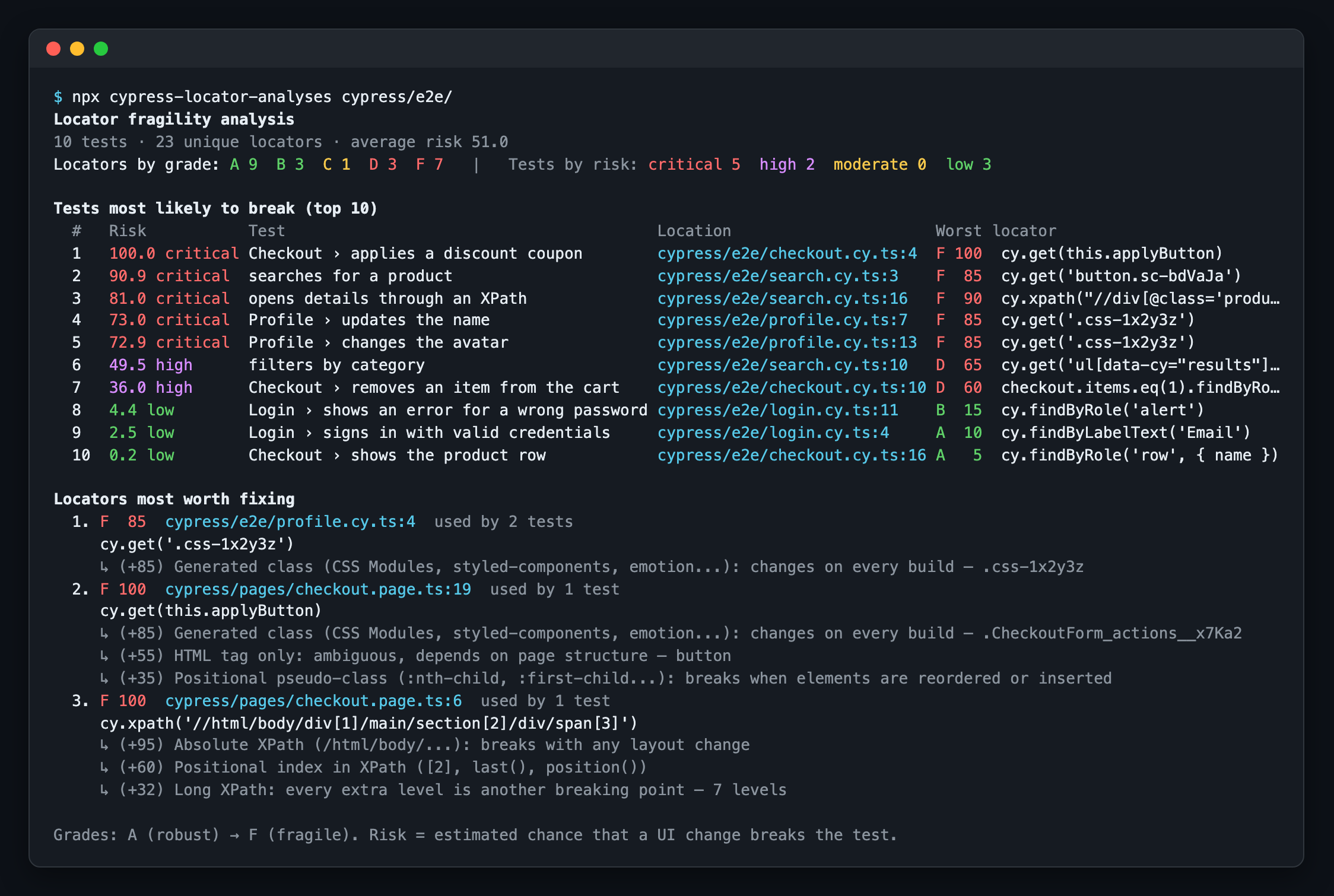
The ranking printed by the CLI and the plugin, run on the example project:
HTML report
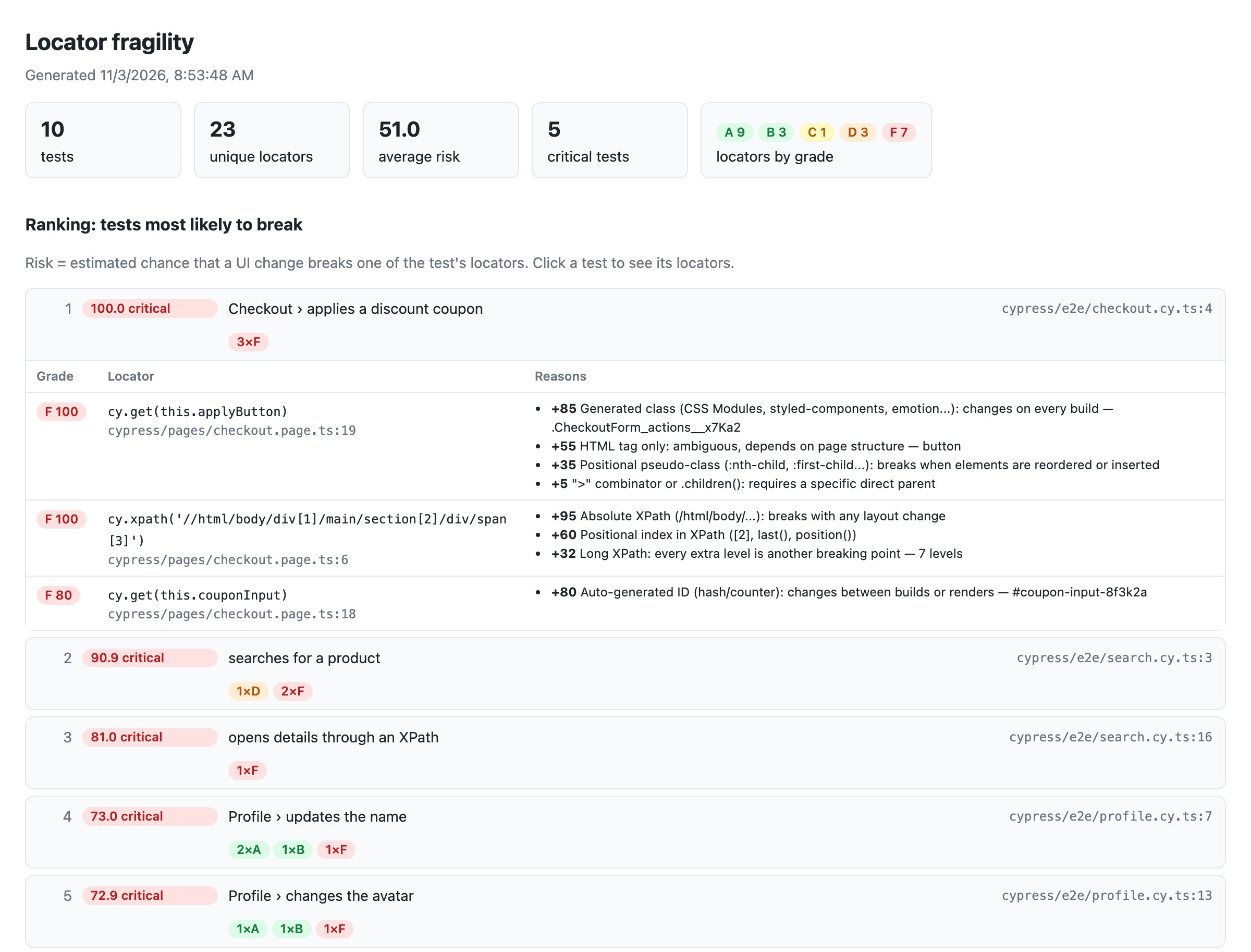
With htmlFile (plugin) or --html (CLI), you get a report you can browse. Click a test to see each locator, its grade and the reasons behind it:
How it works
The analysis is static. It uses the TypeScript compiler to read your specs (JavaScript or TypeScript), so it needs no browser and no running app. It follows the code the way a developer would:
- Query chains:
cy.get('[data-cy=list]').find('li').eq(2)is one locator. The chain continues through actions that keep the subject (cy.get(a).click().find(b)), andcy.get()starts a new one. - Page objects and helpers:
loginPage.login()counts the selectors used insidelogin(), even when it lives in another file. Getters (get submit() { return cy.get(...) }), methods that return a chain, element maps (elements = { email: () => cy.get(...) }) and selector strings in fields or constructors are resolved too. - Custom commands:
Cypress.Commands.add()incypress/supportis followed.cy.getBySel('save')is scored with its argument ([data-cy=save]→ A), and a command likecy.login()counts every selector it uses. Child commands ({ prevSubject }) continue from the element they are chained on. - Aliases:
cy.get('@rows').eq(1)is scored from the locator saved with.as('rows'). Network aliases (cy.intercept().as(...)) are ignored. .within(): queries inside the callback are scoped to its subject.- Hooks: selectors in
beforeEach/beforecount for every test in the enclosingdescribe/context. - Constants:
cy.get(SELECTORS.promo)and template strings are resolved when possible. - Testing Library (
cy.findByRole,findByLabelText, ...) and XPath (cy.xpath()) are scored too.
When it runs as a plugin, it also shows whether each test failed or was flaky (passed after a retry) in that run, next to its risk.
Installation
pnpm add -D cypress-locator-analyses
# or
npm i -D cypress-locator-analyses
# or
yarn add -D cypress-locator-analyses
Usage as a plugin
// cypress.config.ts
import { defineConfig } from 'cypress';
import locatorAnalyses from 'cypress-locator-analyses';

export default defineConfig({
  e2e: {
    setupNodeEvents(on, config) {
      locatorAnalyses(on, config, {
        htmlFile: 'fragility-report.html',   // optional
        outputFile: 'fragility-report.json', // optional
        top: 10,
        // failOnRisk: 80,                   // fail `cypress run` if any test has risk >= 80
      });
      return config;
    },
  },
});
With CommonJS: const { locatorAnalyses } = require('cypress-locator-analyses');.
The analysis runs on the after:run event, so it runs with cypress run (and with cypress open only if experimentalInteractiveRunEvents is on).
Cypress keeps only one handler per event. If another plugin also uses after:run, call both from your own handler:
import { analyzeRun } from 'cypress-locator-analyses';

on('after:run', (results) => {
  otherPlugin(results);
  analyzeRun(results, config, { htmlFile: 'fragility-report.html' });
});
Usage as a linter (CLI)
npx cypress-locator-analyses cypress/e2e                     # ranking in the console
npx cypress-locator-analyses cypress/e2e --html report.html  # plus an HTML report
npx cypress-locator-analyses cypress/e2e --fail-on-risk 80   # exit code 1 if any test has risk >= 80
npx downloads the tool if it isn't installed in your project, so you can try it without adding it first.
| Option | Description |
|---|---|
--json <file> | Write the full report as JSON |
--html <file> | Write a browsable HTML report |
--top <n> | Number of tests in the ranking (default 10) |
--top-locators <n> | Number of "locators worth fixing" to show (default 5) |
--fail-on-risk <0-100> | Fail if any test has risk >= n |
--support <path> | File or folder with custom commands (default: cypress/support of the project that holds the specs). Repeatable |
--tsconfig <file> | tsconfig used to resolve imports/aliases (auto-detected) |
--test-id-attribute <attr> | Custom test id attribute (e.g. data-automation) |
--pattern <regex> | Test file regex (default \.(cy|spec|test)\.[cm]?[jt]sx?$) |
Plugin options
| Option | Default | Description |
|---|---|---|
outputFile | — | JSON report path (relative to the project root) |
htmlFile | — | HTML report path (relative to the project root) |
top / topLocators | 10 / 5 | Size of the console lists |
failOnRisk | — | Fail cypress run (exit code 1) if any test has risk >= value |
quiet | false | Do not print to the console (only write files) |
weights | — | Override the points of any rule, e.g. { 'nth-child': 50, text: 15 } |
testIdAttributes | — | Extra attributes treated as test ids (data-cy, data-test, data-testid, data-test-id and data-qa always are) |
supportFiles | config.supportFile | Files with custom commands (their imports are followed) |
testFunctionNames | ['it', 'specify'] | Names of your test function, if you use a different one |
hotspotMinScore | 30 | Minimum score to appear under "locators most worth fixing" |
Scoring
Each locator starts from the most fragile anchor it depends on (a CSS selector only matches if every part matches), and penalties are added on top. Scores range from 0 to 100.
| Anchor | Points | Penalty | Points | |
|---|---|---|---|---|
[data-cy] / [data-testid] / findByTestId | 5 | :nth-child, :first-child... | +35 | |
findByRole with name | 5 | jQuery :eq(), :first, :gt()... | +25 | |
findByLabelText | 10 | .eq(n) | +25 | |
findByRole without name | 15 | .first() / .last() | +15 | |
cy.contains / :contains() / findByText | 25 | .parent(), .siblings(), .next(), .closest()... | +15 each | |
fixed #id | 20 | XPath index [2], last() | +20 each | |
HTML tag inside a known element (.find('li')) | 30 | XPath deeper than 3 levels | +8 per level | |
semantic CSS class .btn | 35 | axes .., following-sibling | +15 each | |
| relative XPath | 40 | CSS deeper than 2 levels | +7 per level | |
utility class .mt-4 | 50 | > / .children() / + ~ | +5 / +5 / +10 | |
tag only button | 55 | text longer than 40 characters | +10 | |
generated #id (:r1:, ember123) | 80 | |||
generated class (.css-1x2y3z, .Btn_x__a1B2c, .sc-bdVaJa) | 85 | |||
absolute XPath (/html/body/...) | 95 |
Grades: A < 15 ≤ B < 30 ≤ C < 50 ≤ D < 70 ≤ F.
Test risk
A locator with score s is assumed to break on a UI change with probability p = (s/100)². The test breaks if any of its locators breaks:
risk = 1 − Π (1 − pᵢ)
Squaring keeps tests full of good locators close to zero, while a single F locator already makes a test critical. Levels: low < 10 ≤ moderate < 25 ≤ high < 50 ≤ critical.
"Locators most worth fixing" are sorted by (s/100)² × number of tests using the locator, so a bad selector in a beforeEach, a page object or a custom command rises to the top.
Ignoring a locator
// cypress-locator-analyses-ignore
cy.get('#legacy-widget-12345').click();
cy.get('.btn-legacy').click(); // cypress-locator-analyses-ignore
Programmatic API
import { analyzeFiles, buildReport, formatConsole, scoreSelector, ScoreContext } from 'cypress-locator-analyses';

const report = buildReport(analyzeFiles(['cypress/e2e/login.cy.ts']));
console.log(formatConsole(report));

scoreSelector('div > li:nth-child(2)', new ScoreContext()).score; // 95 (F)
Limitations
- The analysis is static: selectors built at runtime (from API responses, complex loops) are marked as "dynamic" (score 30).
- Custom commands are found by scanning for
Cypress.Commands.add()in the specs, the support files and what they import. Commands added withaddQuery()oroverwrite()are not followed. - Aliases are matched by name: the closest preceding
.as('name')in the same file wins. - Generated class and ID detection is heuristic. An unusual name may be misclassified; adjust
weightsor use the ignore comment. - Parameterized tests (
[...].forEach((x) => it(...))) appear once in the static ranking. - Test outcomes are matched by spec file and title, so tests with dynamic titles show no outcome.
Development
Development uses pnpm (the version is pinned in package.json; run corepack enable to use it automatically) and Node 22 or 24. The published package supports Node 20+.
pnpm install
pnpm run build       # compile to dist/
pnpm run typecheck   # typecheck src, tests, the example and the e2e project
pnpm test            # build, then unit, plugin and CLI tests (vitest)
pnpm run example     # run the CLI on the example project (example/)
pnpm run e2e         # run real Cypress tests with the plugin (e2e/)
pnpm run e2e:verify  # check the JSON report written by the e2e run
pnpm run docs:images # regenerate the README screenshots in docs/images/ (uses playwright-core)
CI (.github/workflows/ci.yml) runs all of the above on Node 22 and 24 for every push to main and every pull request, checks that failOnRisk makes cypress run fail, and uploads the generated reports as artifacts. Dependabot (.github/dependabot.yml) checks npm packages and GitHub Actions weekly, with at most 5 open pull requests.